

Cal.com vs Calendly: Which Scheduling Tool is Best for You in 2026?


Tired of the endless back-and-forth to book a meeting? You’re not alone. Whether you’re a freelancer, coach, or small business owner, managing appointments can eat up hours of your week. That’s exactly why scheduling tools have become essential; they save time, reduce no-shows, and make booking effortless.
Two of the most popular options today are Cal.com and Calendly. Both help you take control of your calendar, but they do it in slightly different ways. Choosing the wrong one could leave you paying for features you don’t need or missing out on tools that would actually make your life easier.
In this guide, we’ll break down Cal.com vs Calendly, from features and pricing to pros, cons, and best use cases, so you can confidently choose the tool that fits your workflow. And make sure to read till the end, we’ve got a bonus for WordPress users.
Let’s dive in!
Cal.com vs Calendly: Quick Overview
Features |  |  |
Best For | Teams, developers, and businesses need flexibility | Freelancers, professionals, and small teams |
Ease of Use | Flexible setup, slightly technical | Very easy and beginner-friendly |
Customization | High (open-source, self-hosting option) | Full customization of the booking page, forms, and communications |
Calendar Sync | Google, Outlook, Apple Calendar | Google, Outlook, iCloud, Office 365 |
Client Management | Basic (no detailed records) | Full client profiles, notes, and appointment history |
Free Plan | Yes (core scheduling features) | Yes (basic, limited features) |
Mobile Application | No | Yes |
Paid Plans Starts from | $15/user/month | $10/user/month (billed yearly) |
Team Scheduling | Round-robin, collective | Round-robin, team events |
Payments | Stripe | Stripe, PayPal (paid plans) |
Data Privacy | Self-hostable: You own your data. GDPR/HIPAA options. | SaaS-only: Hosted on Calendly’s servers. |
Integrations | 60+ | 100+ |
HIPAA Compliance | Yes | Available (Premium Plan) |
What Is Cal.com?
Cal.com is a modern scheduling platform that helps individuals, teams, and businesses automate appointments and manage bookings without the back-and-forth of manual scheduling.
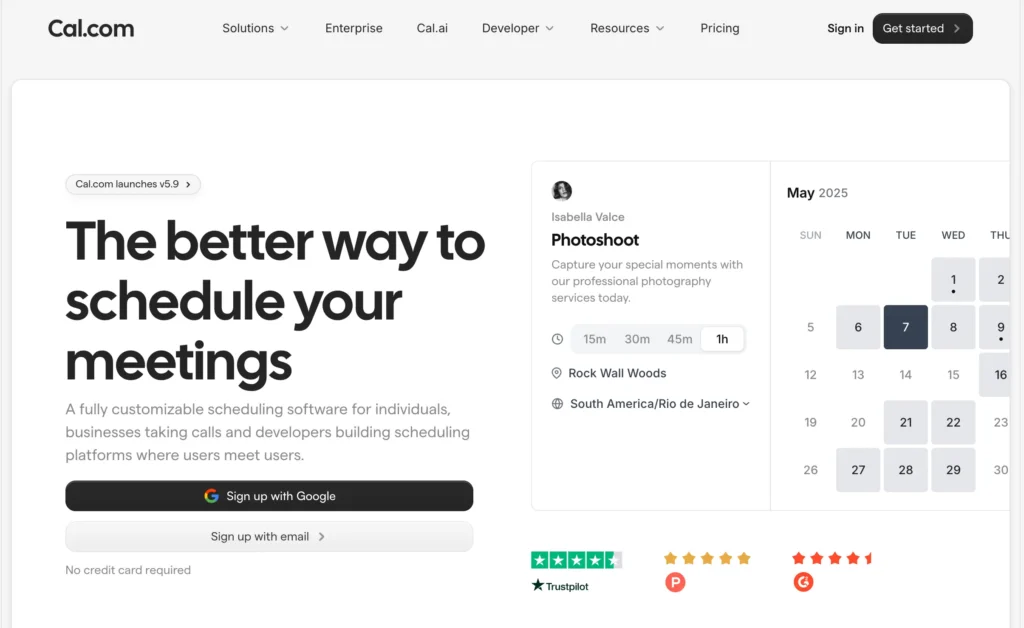
At its core, Cal.com lets you connect your calendar, set your availability, and share a booking link so clients or colleagues can choose a time that works best for them. Also, it handles double-bookings, time zone differences, buffers, and reminders, making scheduling simple and reliable.
One of Cal.com’s defining features is its open-source and customizable nature. You can use it as hosted SaaS, or, if you want full control, self-host it and tweak the code or workflows to match your exact needs.
Key Features of Cal.com
- Connect multiple calendars (Google, Outlook, Apple) to avoid double bookings.
- Create personalized scheduling links that reflect your brand and workflow.
- Built-in support for round-robin, collective, and dynamic group events for team coordination.
- Automate notifications, confirmations, reminders, and follow-ups with configurable workflows.
- Accept payments for bookings through Stripe.
- Role-based permissions help larger teams manage visibility and actions securely.
- Support for multiple booking entry points, such as phone-based booking alongside email.
- Keep attendees informed and reduce no-shows.
- Quick meeting setup without delays.
Pros & Cons of Cal.com
| Pros | Cons |
| Easy to use and simplifies scheduling | Some settings feel complex for first-time users |
| Seamless calendar integrations | Limited customization in certain areas |
| Strong automation and scheduling workflows | Occasional booking and payment issues |
| Flexible customization for professional use | Missing features for advanced use cases |
| Helpful and friendly customer support | Interface clarity and invite customization could improve |
| API access for custom workflows | The free plan is limited |
Best Use Cases
- Development teams that need custom booking logic
- Enterprises with specific workflow requirements
- Businesses wanting full control over branding and data
- Teams using multiple calendars and tools
What Is Calendly?
Calendly is a cloud-based scheduling tool that helps you book meetings without the usual back-and-forth emails. You can simply set your availability, share a booking link, and let others choose a time that works for them.
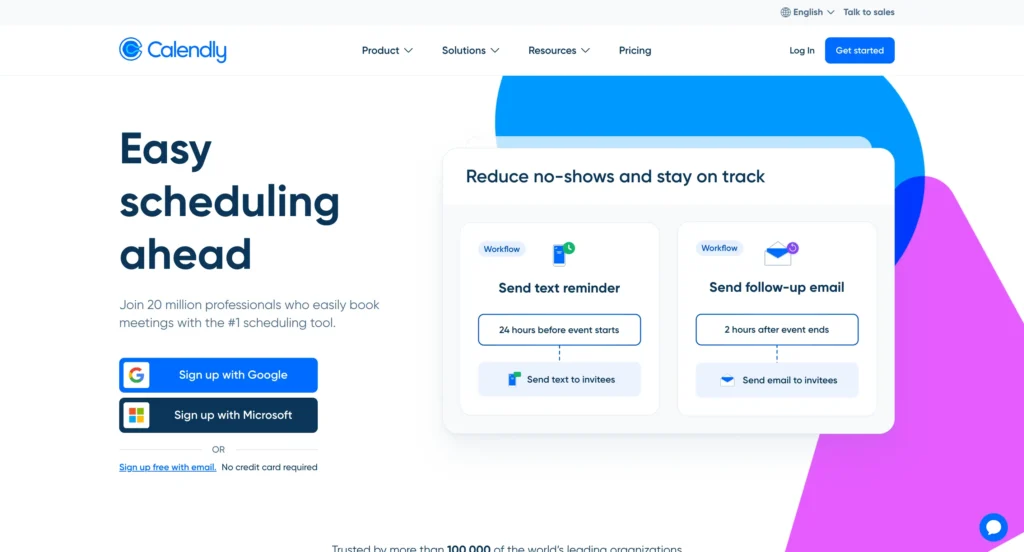
Calendly creates a personalized booking page based on your availability. Once you connect your calendar and define your working hours, it shows only your open time slots, without exposing any private calendar details.
When someone opens your booking link, they see available times in their own time zone. After they select a slot, the meeting is instantly added to both calendars, eliminating manual scheduling and follow-up emails.
Key Features of Calendly
- Automated scheduling with flexible availability rules
- Integrations with Google Calendar, Outlook, Zoom, Microsoft Teams, and more
- Free plan with unlimited one-on-one meetings
- Payment collection via Stripe or PayPal (paid plans)
- Automated reminders and follow-ups via workflows
- Wide range of third-party integrations (Zoom, HubSpot, Salesforce, Zapier)
- Team scheduling for group, round-robin, and collective meetings
Pros and Cons of Calendly
| Pros | Cons |
| Free plan for basic scheduling | Limited customization compared to advanced tools |
| Very beginner-friendly interface | Payments are available only on paid plans |
| Strong team scheduling features | Not ideal for complex or class-based bookings |
| Mobile app available | |
| Wide range of integrations |
Best Use Cases
- Freelancers and solo professionals
- Small teams needing straightforward scheduling
- Quick one-on-one meetings or group sessions
- Users who want minimal setup and maintenance
Pricing Comparison: Cal.com vs Calendly
| Plan Type | Cal.com | Calendly |
| Free | Unlimited event types & calendars | 1 event type, 1 calendar |
| Entry | Teams: $15/user/month | Standard: $10/user/month |
| Mid | Teams: $15/user/month | Teams: $16/user/month |
| Advanced | Organizations: $37/user/month | Enterprise: from $15K/year |
| Enterprise | Custom | Custom |
| Free Trial | 14 days (contact required) | 14 days |
Insight: Cal.com can be more cost-effective if you self-host or have multiple users, while Calendly is ideal for small teams or freelancers who value simplicity and fast setup.
Cal.com vs Calendly: Feature Comparison
Let’s compare Cal.com and Calendly across the most important features that actually matter when choosing a scheduling tool, based on real use cases, not just feature lists.
Scheduling & Booking Process
The scheduling and booking process is the core of any appointment tool, and both Cal.com and Calendly make it easy, but in slightly different ways.
- Cal.com: Cal.com offers a flexible scheduling experience with options for one-on-one meetings, group events, round-robin distribution, and collective availability. You can set buffer times, minimum scheduling notice, and automatically handle time zone conversions. Custom fields allow you to collect extra information from invitees, making it ideal for businesses that need detailed client data. The setup is straightforward, but some advanced features may require a certain level of technical expertise.
- Calendly: Calendly keeps scheduling super simple. You create a booking link, share it, and let clients or team members pick a suitable time. It syncs with Google Calendar, Outlook, and other calendars to prevent double bookings. You can also set buffer times, define different meeting types, use round-robin for teams, and automate notifications and reminders. The interface is beginner-friendly, making it perfect for freelancers and small teams.
If you want a flexible platform with detailed customization and are comfortable with minor technical setups, Cal.com is the better choice. For quick, simple, and intuitive scheduling that works out of the box, Calendly is ideal.
Ease of Use
Both Cal.com and Calendly focus on making scheduling simple, but their approaches to UI and UX differ:
- Cal.com: Cal.com offers a modern, clean interface with options for light or dark mode, giving users flexibility and a visually appealing experience. Its menus are intuitive, creating booking links, managing appointments, and navigating the dashboard feel effortless. One standout feature is the Calendar Overlay, which lets you view your calendar alongside the calendars of those you’re scheduling with, reducing double bookings and improving overall efficiency.
- Calendly: Calendly has a familiar, polished UI aligned with its established brand identity. The recent UI refresh has improved navigation and simplified scheduling, making it easy for beginners and seasoned users alike. While functional and user-friendly, its UX is slightly less flexible than Cal.com’s, especially for users who value advanced visual scheduling tools.
While Calendly’s interface is clean and efficient, Cal.com takes the edge with a more modern UI, smoother navigation, and innovative features like Calendar Overlay that enhance the user experience.
Customization
When it comes to customization, Cal.com and Calendly offer very different levels of flexibility:
- Cal.com: Being open-source, Cal.com gives developers full access to its codebase, allowing deep customization of core functionalities, appearance, and integrations. Users can also choose to self-host, which provides control over infrastructure, security, and internal system integrations. Its robust API access further enables creating custom workflows and features tailored to specific business needs.
- Calendly: Calendly provides customization within a predefined framework. You can adjust colors, booking flows, notifications, and use integrations with other tools to tweak workflows. While its API allows custom integrations, the core platform functionality remains proprietary and less flexible than Cal.com.
Cal.com takes the lead in customization. Its open-source nature and self-hosting options make it ideal for those needing deep control over both the appearance and functionality of their scheduling platform. In contrast, Calendly is better suited for users who want simpler, framework-based customization.
Integrations
Both Cal.com and Calendly offer a wide range of integrations, but their approaches differ significantly.
- Cal.com: Cal.com uses an App Store model where you can install apps to connect services rather than simple one-off connections. It supports essential calendar services (Google, Outlook, Office 365, CalDAV), video conferencing, and payment processors. Its open-source nature allows technically unlimited custom integrations for any service. Cal.com also supports less common calendars like Zoho, Lark, and Vimcal, and messaging platforms such as WhatsApp, Telegram, and Signal, along with video tools like Discord and Element Call. This makes it attractive for teams using niche or specialized tools.
- Calendly: Calendly offers over 100 native integrations, making it ideal for connecting to existing business tools without custom development. It integrates with major CRM platforms (Salesforce, HubSpot, Pipedrive, ActiveCampaign), marketing tools (Mailchimp, ConvertKit), and recruitment platforms (LinkedIn Messaging, Greenhouse, Lever). Popular productivity tools like Slack, Trello, and Notion also work seamlessly with Calendly, providing a smooth experience for most teams.
Cal.com is more flexible for custom or niche integrations, while Calendly wins for breadth of ready-to-use integrations that fit most mainstream business needs.
Team Collaboration
Both Cal.com and Calendly offer team scheduling, but their approaches cater to different needs.
- Calendly: Calendly provides robust out-of-the-box collaboration tools. Teams can share scheduling links, use round-robin or collective scheduling, and benefit from centralized billing. Admin features let managers control team access, maintain branding consistency, and monitor performance through detailed analytics. These ready-made features make it easy for teams to start collaborating immediately without technical setup.
- Cal.com: Cal.com’s collaboration features are more flexible but require technical setup. Self-hosting allows full control over data, appealing to enterprises with strict privacy requirements. Its open-source nature enables teams to build custom workflows and collaboration features tailored to their needs. However, this flexibility comes at the cost of additional technical investment compared to Calendly’s plug-and-play approach.
Calendly is ideal for teams seeking ready-made collaboration tools, while Cal.com suits technically capable teams that need highly customizable collaboration and full control over data.
Mobile Experience
Both Cal.com and Calendly are primarily web-based, but their approach to mobile and desktop access differs.
- Calendly: Offers a fully functional web app and mobile apps available on both the Apple App Store and Google Play Store, making it easy to manage bookings on the go.
- Cal.com: Currently provides a web app only. While it’s fully functional in a browser, there are no dedicated mobile or desktop apps yet.
Calendly takes the lead here, thanks to its mobile apps that allow users to schedule, manage, and track meetings from anywhere, whereas Cal.com is limited to web access.
Security & Compliance
Both Cal.com and Calendly take security seriously and comply with industry standards to keep your data safe.
- Calendly: Calendly protects customer data through infrastructure and application security measures. It complies with SOC 2 Type II, SOC 3, ISO/IEC 27001, GDPR, CCPA, and other standards, and follows guidelines such as FINRA and GLBA. These certifications ensure that both individual and organizational data remain secure.
- Cal.com: Cal.com also meets high-security standards, including ISO 27001, SOC 2 Type II, GDPR, CCPA, EU-US Data Privacy Framework, and HIPAA compliance. Its self-hosting option provides additional control for organizations needing complete data oversight.
Both platforms follow top-tier security practices and certifications. Whether you choose Cal.com or Calendly, your data is well-protected. It’s a tie in terms of security.
Which One Should You Choose, Calendly or Cal.com?
Deciding between Calendly and Cal.com depends on your specific needs, as both tools excel in different areas. Here’s our hands-on perspective to help you choose the right scheduling tool.
Choose Calendly if:
- You want a polished, ready-to-use scheduling solution without technical setup.
- You need a mobile app for scheduling on the go (iOS & Android).
- You prefer broad, ready-made integrations (e.g., Salesforce, HubSpot, Zoom, Zapier).
- For Example: A freelancer or small team can quickly set up booking links, sync calendars, and start scheduling client meetings within minutes.
Choose Cal.com if:
- You value flexibility, customization, and open-source control over the platform.
- You or your team have the technical resources to implement custom integrations or self-host.
- You want cutting-edge community-driven features like Cal.ai and Calendar Overlay.
- For Example: A development-focused startup or tech-savvy team can self-host Cal.com, customize workflows, and integrate less-common tools like Discord, Signal, or Vimcal.
Calendly is ideal for those who want simplicity, speed, and broad integrations without technical setup. Cal.com is better for users who want deep customization, open-source freedom, and the ability to extend the platform with unique integrations or self-hosting options.
Looking for the Best of Both Worlds on Your WordPress Site?
If you’re comparing Cal.com vs Calendly and want the perfect mix of simplicity and flexibility inside WordPress, try FluentBooking. It combines the easy scheduling of Calendly with the customization power of Cal.com, all tailored for WordPress users.
With FluentBooking, you can:
- Embed booking forms directly on your WordPress site.
- Set buffer times, availability rules, and meeting durations.
- Offer multiple meeting types: 1:1, group, round-robin, and collective.
- Automate reminders, confirmations, and follow-ups to reduce no-shows.
- Match your branding with fully customizable booking pages.
- Integrate seamlessly with multiple calendars and services.
- Accept payments via Stripe, PayPal, G-Pay, and Apple Pay.
Plus, sharing your booking link is effortless; you can add it to WordPress pages, email signatures, or social channels, letting clients book appointments in seconds without endless back-and-forth.
For WordPress users who want the ease of Calendly and the flexibility of Cal.com, FluentBooking is your ultimate all-in-one scheduling solution.
Simplify Your Scheduling with FluentBooking
Get the simplicity of Calendly and the flexibility of Cal.com, fully integrated into your WordPress site with FluentBooking.
Final Verdict: Cal.com vs Calendly
Both Cal.com and Calendly offer powerful features to make scheduling easier and more efficient. Calendly shines with its simplicity, intuitive interface, and wide range of ready-made integrations, making it ideal for straightforward scheduling.
On the other hand, Cal.com stands out with its open-source flexibility, deep customization options, and self-hosting capabilities, perfect for users who want full control over their scheduling setup.
And, if you’re a WordPress user looking for a solution that combines the best of both, FluentBooking might be the perfect fit. It integrates seamlessly with WordPress and offers all the essential scheduling features, buffer times, multiple meeting types, automated reminders, and payment processing, without the extra hassle.
Ultimately, both platforms help you save time, reduce no-shows, and keep your calendar organized. Explore your options and find the one that fits your workflow best.
Ratul Hasan Ripon
I enjoy making complex ideas simple and engaging through my writing and designs. With a strong knowledge on content writing and SEO, I create technical content that’s both easy to understand and interesting.
Table of Content
Subscribe To Get
WordPress Guides, Tips, and Tutorials





Add your first comment to this post