

How to Schedule an Interview: A Step-by-Step Guide for Recruiters (2026)


Scheduling interviews might seem simple, but coordinating calendars, avoiding conflicts, and keeping candidates informed can quickly turn it into a headache. It’s a major reason founders spend nearly 25% of their workweek on hiring-related tasks, many of which could be automated.
A smooth scheduling process does more than save time. It signals professionalism, keeps hiring on track, and improves candidate experience. Delays or confusion can easily push top candidates to look elsewhere.
In this guide, you’ll learn a clear, step-by-step process to schedule interviews efficiently, explore best practices, and discover how a smart automated scheduling system can handle bookings, confirmations, and reminders, so you never miss out on great candidates again.
How to Schedule an Interview: Step-by-Step Guide
Before sending interview invites, take a moment to plan your process. HR professionals spend up to 57% of their time on administrative tasks, much of which could be avoided with a clear structure. Mapping out rounds, participants, and durations upfront will save hours later and make the process smoother for both your team and candidates.
Step 1: Prepare Your Interview Process
Before scheduling interviews, take time to define your interview process. This keeps your team aligned and helps candidates understand what to expect.
Start by deciding how many interview rounds you’ll run and who will be involved in each stage. Every round should have a clear purpose, whether it’s a screening call, a skills-based interview, or a final culture-fit discussion.
Next, set realistic timelines. Define how long each interview should last and how quickly candidates should move from one stage to the next. Keeping early-stage interviews within a fixed window helps maintain momentum.
Finally, define the interview structure. Set a clear duration, choose the interview format (phone, video, or in-person), and note any preparation candidates should complete in advance. Align with the hiring manager on roles, timelines, and evaluation criteria to make scheduling easier later.
Step 2: Check Internal Availability
Once your interview process is clear, the next challenge is aligning everyone’s availability. This step becomes especially important when more than one interviewer is involved.
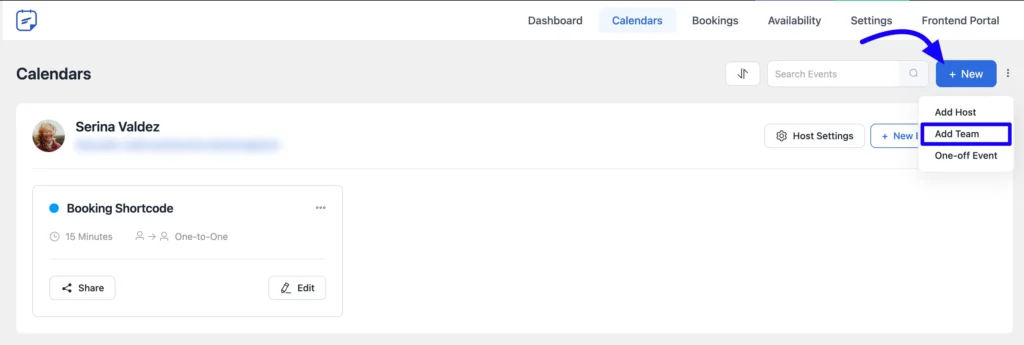
If multiple interviewers are involved, coordinating schedules can quickly become a headache. Instead of checking each calendar manually, you can use a plugin like FluentBooking’s collective booking event on your WordPress website. To set it up, go to your FluentBooking dashboard, open the Calendar, and click New → Add Team.
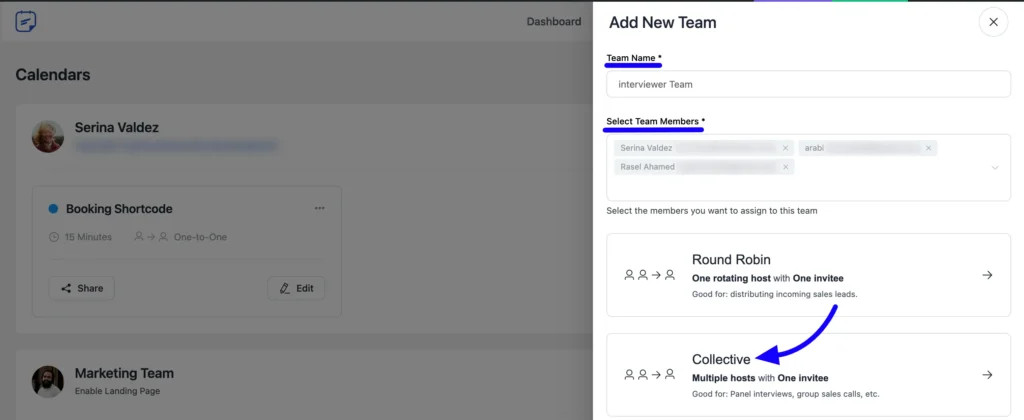
Name your team, select the interviewers, and enable the Collective option. Then, add the meeting name, description, duration, location, and timezone, and click Continue.
In the availability settings, you can either use a Common Schedule for all hosts or let each host follow their individual availability.
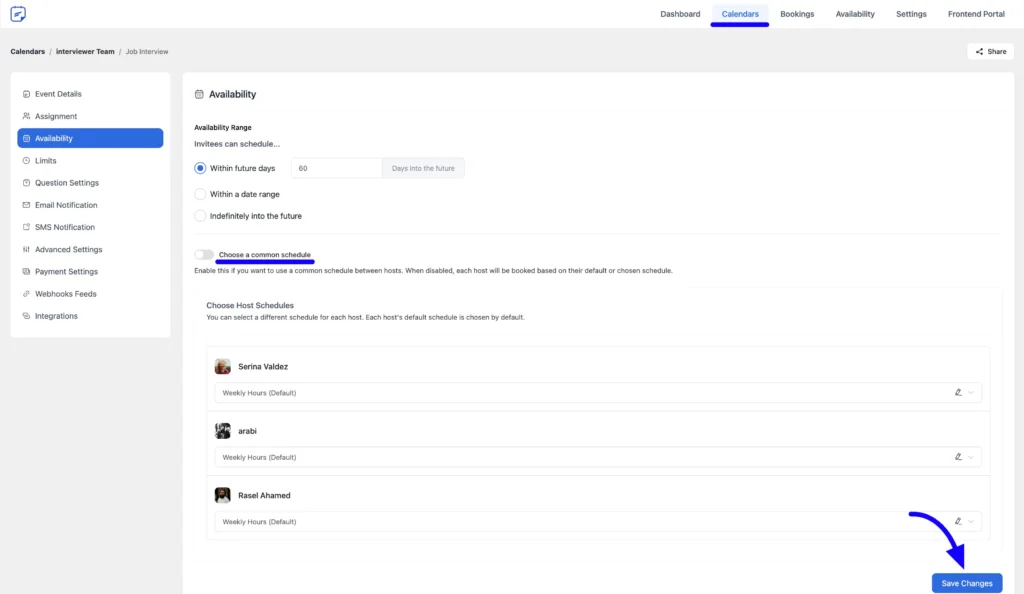
Once you save the settings, candidates will only see time slots when everyone is available, eliminating scheduling conflicts and back-and-forth emails.
Step 3: Offer Flexible Interview Time Slots to Candidates
Once internal availability is sorted, the next step is to let candidates choose a time that works for them. Instead of asking for availability over email, offer clear time slots to avoid unnecessary back-and-forth.
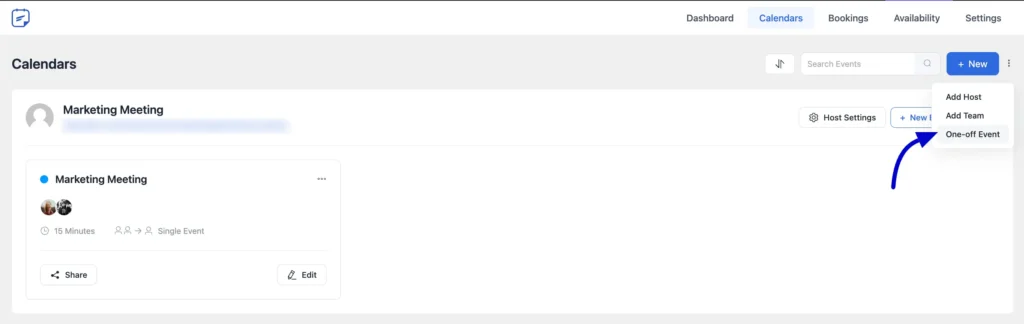
For one-on-one interviews, you can create a Single One-off Event in FluentBooking. Start by going to Calendars → New → One-off Event and select Single One-off Event.
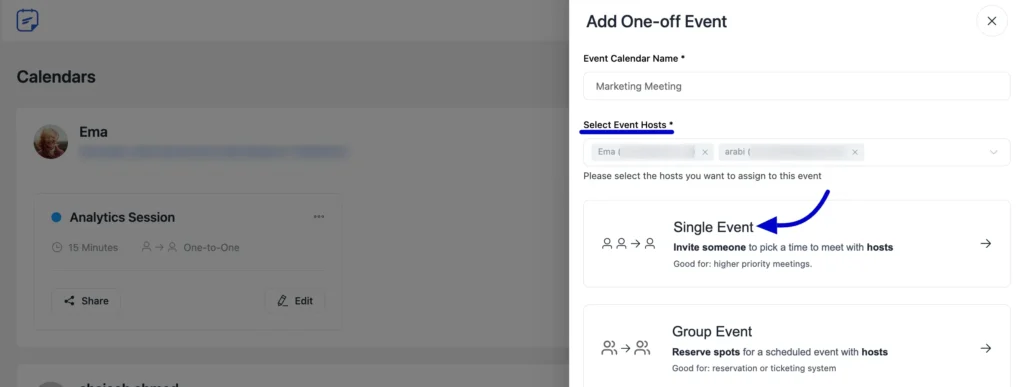
Now, add the interview name, choose the host, select Single Event, and continue to the event setup with event duration, location, format, etc.
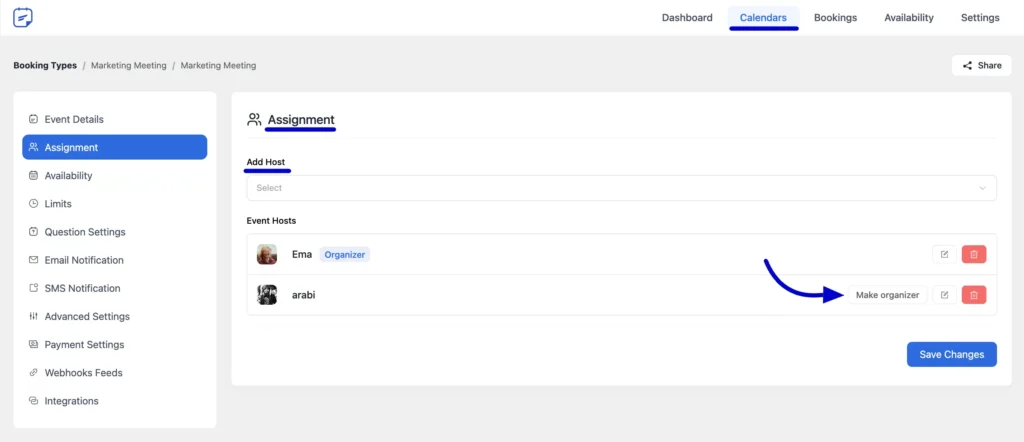
In the Assignment section, you can manage who will host the interview. Add more hosts if needed using the Add Hosts option. You can also designate one host as the Organizer, who will manage the event. Just click Make Organizer and save the changes.
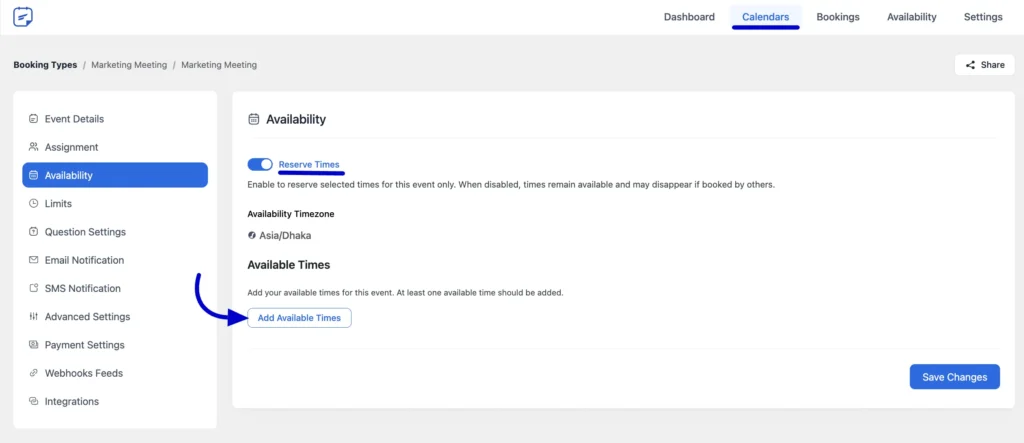
Next, define your availability by clicking Add Available Times and selecting the time slots you want to offer. Enable Reserve Time to prevent double bookings once a slot is selected. If needed, you can also allow additional guests to join the interview.
On the other hand, if you’re scheduling interviews for multiple candidates for the same role, you can use FluentBooking’s Group One-off Event. This allows each candidate to book their own interview slot from a single event setup, keeping your calendar organised without repeating the same setup for every person.
To set it up, go to Calendars → New → One-off Event and select Group One-off Event. Add the event name, select the hosts, and assign an Organizer if needed.
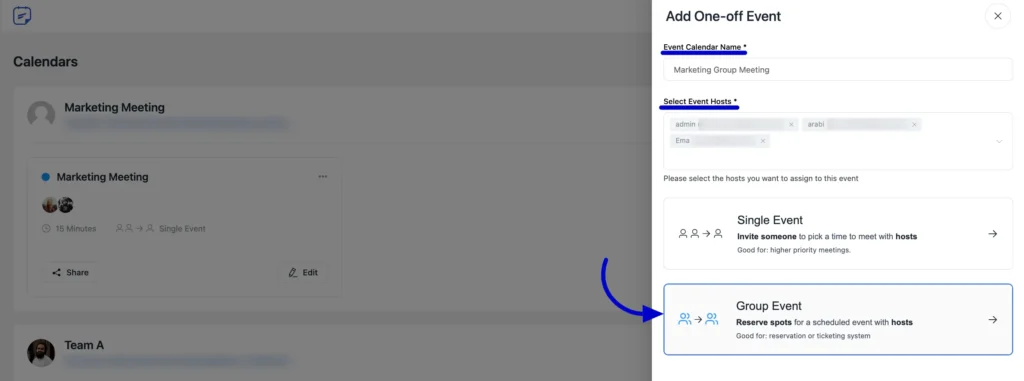
Then define the available time slot(s) and enable Reserve Time so the slots are blocked once booked. Also, you don’t have to send individual invitations.
Once the event is saved, share the booking link with the candidate. They can pick a suitable time, and the interview will automatically be added to both calendars, making scheduling quick and stress-free.
Step 4: Confirm and Send Interview Invitations
Once candidates have booked their slots, it’s important to confirm the interview details clearly. A well-crafted confirmation reduces confusion and ensures both candidates and interviewers are prepared.
Include the following in your confirmation:
- Date and time of the interview (with time zone)
- Interview format – phone, video, or in-person
- Meeting link or location
- Names of interviewers
- Any preparation instructions or documents that candidates should review
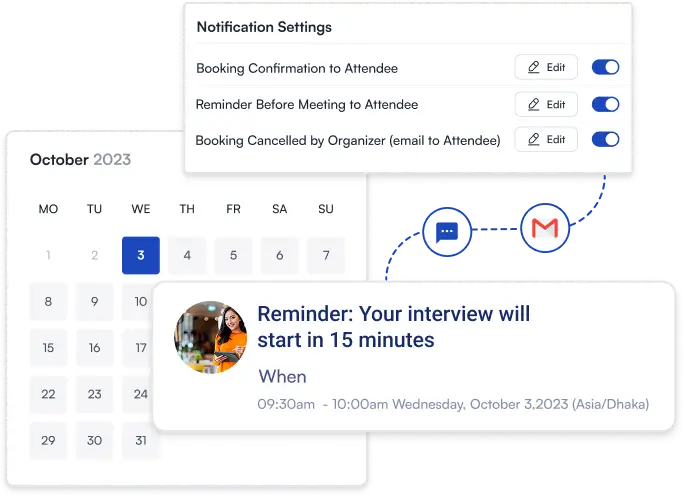
With FluentBooking, you can automatically send these confirmations once a candidate books a slot. This way, the candidate receives all the details immediately, and the interview is added to your calendar and the interviewers’ calendars.
Sending clear, automated invitations ensures candidates show up prepared, interviewers know what to expect, and you avoid unnecessary back-and-forth emails.
Bonus: Want to make your interview invitations even more effective? Check out our interview invitation email templates blog for ready-to-use examples that save time and help you communicate professionally with candidates.
Step 5: Send Automated Interview Reminder and Follow-up
Even with confirmed schedules, candidates can forget their interviews. Sending timely reminders reduces no-shows and keeps the process running smoothly.
With FluentBooking, you can automate multiple reminders for both candidates and interviewers. Set reminders to go out 24 hours, 1 hour, 30 minutes, or more before the interview and again shortly before it starts. Each reminder should include the same information as the confirmation email.
After the interview, you can also send an automated follow-up with FluentCRM, thanking candidates for their time and sharing next steps. This keeps communication professional and ensures candidates feel valued throughout the hiring process.
By combining confirmations, reminders, and follow-ups, your interview process becomes efficient, organised, and candidate-friendly, reducing last-minute surprises and improving the overall experience.
Interview Scheduling Best Practices
Following a few key best practices can make your interview scheduling faster, smoother, and more professional, while also improving the candidate experience:
- Develop a diverse interviewer pool: Train multiple team members to conduct interviews across different departments, roles, and experience levels. This gives you more flexibility when scheduling and reduces delays. It also shows candidates that your company values different perspectives.
- Act promptly and minimize delays: Move quickly once a candidate advances to the next stage. Delays can frustrate candidates and increase drop-offs. Use scheduling tools to offer immediate booking options and keep the hiring momentum going.
- Offer clear and flexible options: Provide candidates with multiple time slots to choose from, accommodating different schedules and time zones. Flexibility—like early mornings, lunch hours, or mid-afternoon slots—makes the process easier for candidates and increases the likelihood of confirmations.
- Choose optimal time slots: Schedule interviews when both candidates and interviewers are likely to be focused and alert. Mid-morning (10–11:30 AM) and mid-week (Tuesday or Wednesday) are generally ideal. Avoid very early mornings, late afternoons, and Fridays.
- Communicate details and expectations clearly: Every interview confirmation should include the date, time, format, location or meeting link, names of interviewers, duration, and any preparation instructions. Clear communication helps candidates feel prepared and professional.
- Send confirmations and reminders: Confirmations should go out as soon as a candidate books their slot. Sending reminders 24 hours and a few hours before the interview reduces no-shows and ensures everyone is prepared. Automation tools like FluentBooking make this effortless.
- Plan for accessibility and inclusiveness: Proactively ask if candidates need any accommodations, like extra time for assessments, alternative formats for materials, or a different interview format. Making your process accessible shows respect and encourages all candidates to perform at their best.
- Coordinate around interviewers’ absences: Check calendars for vacations, holidays, or blackout dates before scheduling. Pre-block time for panel interviews and set up a plan for substitutions if someone becomes unavailable. This avoids last-minute reschedules and keeps the process smooth.
- Use automation to streamline scheduling: Automate repetitive tasks like confirmations, reminders, and availability updates. Tools like FluentBooking save time, reduce human errors, and let you focus on evaluating candidates instead of managing calendars.
5 Common Interview Scheduling Mistakes
Even seasoned recruiters can run into scheduling issues that slow down hiring or frustrate candidates. Here are five mistakes to watch out for:
- Not checking interviewer availability thoroughly: Overlooking time off, conflicting meetings, or team blackout dates can cause last-minute reschedules. Always double-check calendars and confirm availability before sending invites.
- Skipping a structured interview plan: Without a clear process for rounds, durations, and interviewer roles, interviews can become inconsistent or confusing for candidates. A defined framework keeps the process organized and fair.
- Overloading interviewers: Scheduling too many interviews in a row can cause fatigue, leading to rushed evaluations or less thoughtful feedback. Build in short breaks and balance workloads across your team.
- Sharing unclear or incomplete details: Invitations that lack the interview format, meeting link, or preparation instructions leave candidates guessing. Clear, complete instructions help candidates feel prepared and reduce no-shows.
- Relying entirely on manual scheduling: Managing bookings manually increases back-and-forth emails, errors, and confusion. Automating scheduling, confirmations, and reminders saves time and ensures a smoother experience for everyone.
By following this process, you can schedule interviews efficiently, professionally, and without the usual calendar chaos. Automation and the right tools allow you to focus on selecting the best candidate rather than managing schedules.
Hire Faster Without the Scheduling Chaos
Interview scheduling shouldn’t slow down your hiring or cost you great candidates. With a clear process, thoughtful communication, and the right level of automation, you can turn a time-consuming task into a smooth, predictable workflow.
By planning your interview structure, coordinating availability, sending clear invitations, and using automated reminders, you create a better experience for both candidates and your team, and keep your hiring momentum strong.
Get the scheduling right, and you’ll spend less time managing calendars and more time hiring the people who move your business forward.
Looking to level up your hiring process? Check out 10 Proven Ways to Automate Your Recruitment Process in 2026 to discover practical ways to automate repetitive tasks, improve candidate experience, and keep your team focused on strategic hiring decisions.
Ratul Hasan Ripon
I enjoy making complex ideas simple and engaging through my writing and designs. With a strong knowledge on content writing and SEO, I create technical content that’s both easy to understand and interesting.
Table of Content
Subscribe To Get
WordPress Guides, Tips, and Tutorials


Leave a Reply