

How to Run a Group Coaching Session Successfully: A Complete Step-by-Step Guide


Running a group coaching session sounds straightforward until you are actually doing it. Suddenly, you are chasing confirmations over email, manually tracking who signed up, sending reminders one by one, and hoping everyone shows up at the right time.
It does not have to be that messy.
This guide walks you through exactly how to plan, organize, and run a smooth group coaching session from start to finish. Whether you are a business coach, life coach, fitness trainer, or mentor, you will find a clear process here that you can reuse every time.
We will also show you how to set things up inside WordPress using FluentBooking, so your booking, attendee management, and reminders run on autopilot.
Key Takeaways
- Group coaching lets you help multiple clients at once while creating a supportive environment where participants can learn from each other’s experiences.
- A clear session structure improves results. Define your topic, schedule, group size, and coaching format before launching the program.
- Use a group meeting setup so multiple participants can book the same session instead of scheduling individual appointments.
- Recurring events simplify multi-week programs. Instead of creating each session manually, you can schedule the entire coaching series at once.
- Custom booking questions help you understand participants better by collecting goals, fitness level, or expectations before the program begins.
- Payment integration helps you secure committed participants. Collect payments during booking so seats are confirmed instantly and you do not have to chase invoices later.
- Automated confirmations and reminders reduce no-shows and keep participants informed about upcoming sessions.
- Sharing one booking page makes enrollment easy so participants can reserve their spot without back-and-forth communication.
- Consistent scheduling and group limits improve coaching quality, helping you deliver a more organized and engaging experience.
What Is a Group Coaching Session?
A group coaching session is a structured, time-limited gathering where one coach works with multiple participants at the same time. Unlike a workshop or webinar where the coach mostly presents, group coaching involves active interaction, guided discussion, and real-time problem-solving with the group.
Sessions can run anywhere from 60 minutes to a few hours and are typically organized around a shared goal or theme. Examples include:
- Weekly accountability calls for a coaching program
- Monthly strategy sessions for a mastermind group
- Goal-setting workshops for a fitness cohort
- Career coaching group sessions for job seekers
- Online group mentoring for course creators
- Online group mentoring for course creators
- Weekly fat loss coaching check-ins for a fitness program
- Strength training coaching sessions for a small gym community
- Nutrition and habit coaching sessions for weight-loss clients
- Startup mentoring sessions for early-stage founders
- Personal development coaching circles focused on mindset and productivity
- Language practice coaching sessions for students preparing for exams
- Sales coaching workshops for small business teams
The format varies, but the core idea is the same: one coach, multiple clients, one shared session.
Why Group Coaching Works for Coaches?
If you have been doing one-on-one coaching and wondering whether group coaching is worth it, here is the honest case for it.
- You can serve more people without working more hours. Instead of running ten 1:1 sessions a week, you can run two group sessions and reach the same number of clients in a fraction of the time.
- It creates a peer dynamic that 1:1 cannot replicate. Clients often learn from each other. Hearing how someone else tackled a challenge can be more powerful than hearing advice from the coach alone.
- It is more affordable for clients. Group pricing makes coaching accessible to people who cannot afford private sessions, which opens up your audience significantly.
- It scales your revenue without scaling your time. You set the price per seat and fill the group. Once your process is set up, repeating the session becomes simple.
The main challenge coaches run into is the logistics: how do you collect bookings, manage attendees, send reminders, and keep everything organized without drowning in admin work? That is exactly what the rest of this guide covers.
What You Need Before Setting Up a Group Coaching Session
Before you open up bookings, you need a few things figured out. Skipping this part is usually where the chaos starts.
- A defined topic or goal for the session. People book a session because it promises a specific outcome. “Group coaching call” is too vague. “90-minute goal-setting session for freelancers” is something people will sign up for.
- A clear capacity limit. Decide how many participants you can effectively coach at once. For most coaches, somewhere between 6 and 20 works well, depending on the format.
- A set date and time, or a recurring schedule. Are you running this once, weekly, or monthly? Having this locked in before you share the booking link avoids the back-and-forth rescheduling.
- A meeting link or location. Whether you use Zoom, Google Meet, or an in-person venue, attendees need to know where to show up.
- A confirmation and reminder strategy. People forget. Automated reminders cut no-shows significantly.
- A booking system. This is where most coaches lose time. Taking bookings through DMs or email forms and then manually tracking everything is not sustainable. A proper booking system handles this for you.
Once you have these sorted, you are ready to set things up.
How to Schedule and Run a Group Coaching Session inside WordPress: Step by Step
Running a group coaching session becomes much easier when you have a repeatable system in place. Instead of creating each session manually, you can use FluentBooking’s group meeting and recurring event features together to let multiple participants book the same session and join it on a recurring schedule.
This setup works well for weekly coaching programs, accountability groups, mastermind sessions, and multi-week training series. Here’s how to set it up step by step.
Create a Group Meeting
First, go to your FluentBooking dashboard and open the Calendar tab. Under your host, create a new event by choosing New Event Type and then selecting Group.

This is the foundation of your group meeting setup. A group meeting allows multiple attendees to book the same time slot, which is exactly what you need for a group coaching session.
Add Session Details
Next, enter the basic information for your coaching session. Add a clear session name and a short description so people understand what the session is about before they book.
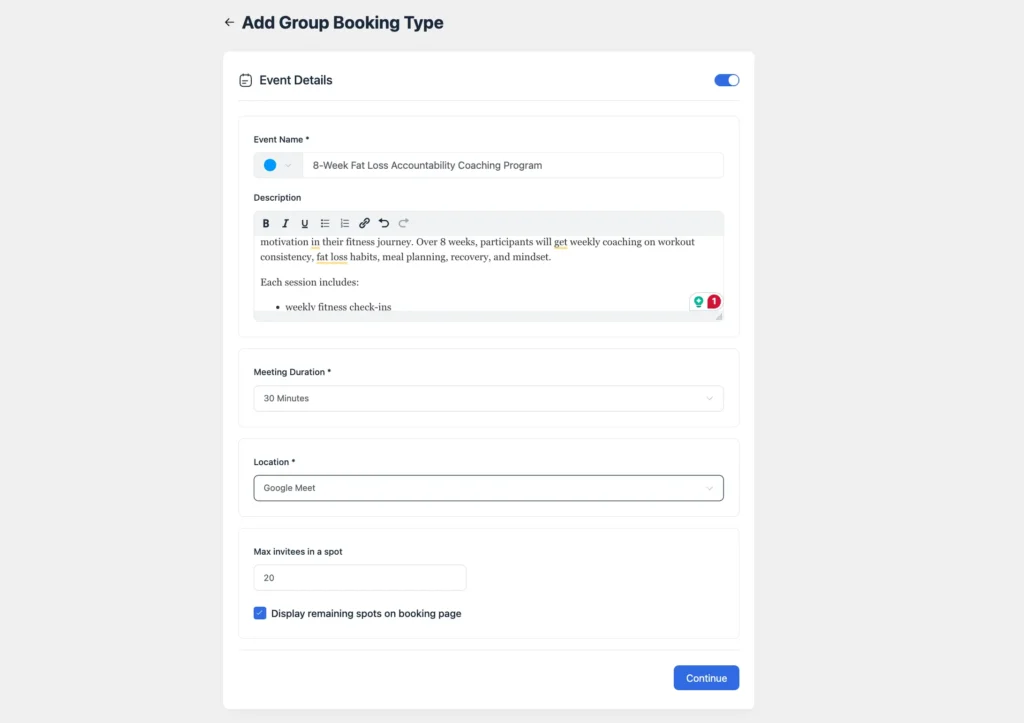
You can also choose whether the session will be virtual or in-person. At this stage, it helps to be specific.
After that, define how many people can join each session by setting the maximum number of invitees in one spot.
This step is important because it controls the size of your coaching group. If you want a smaller, more interactive session, you might keep the group size limited. If your format is more training-focused, you may allow more participants.
Define Availability
Now open the Availability settings and choose the days and time slots when this coaching session should be open for booking.
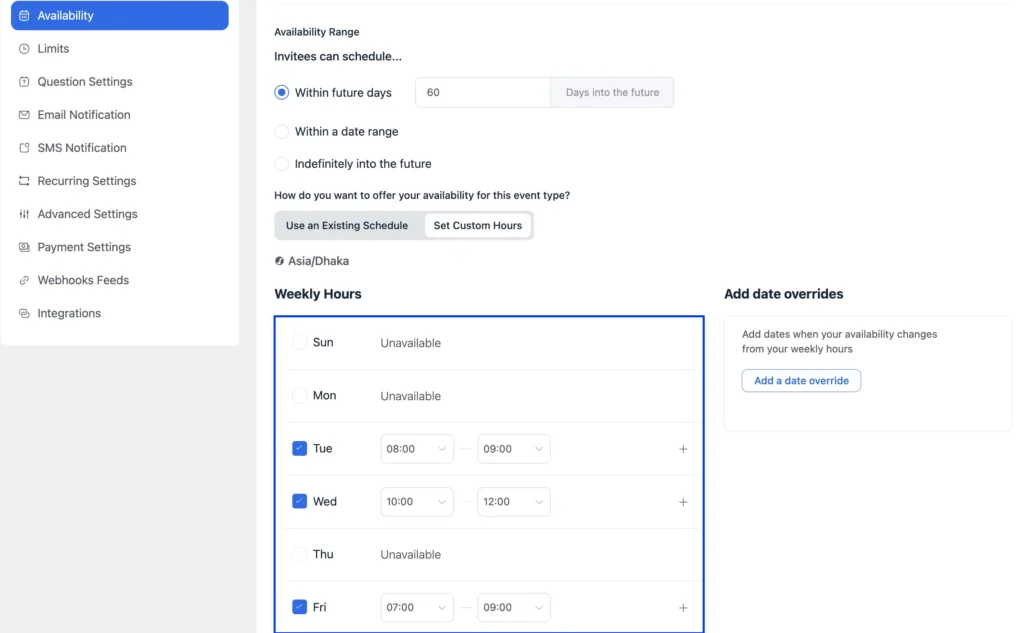
This is where you shape the actual schedule of your program. For example, if your group coaching session runs every Tuesday at 7 PM, this is where you define that time window. Keeping your availability clear helps avoid confusion and makes the booking process smoother for attendees.
Add Limits and Buffer Time
Next, go to the Limits tab and add any extra rules you need. You can set buffer time between meetings so you are not jumping from one session to the next without a break.
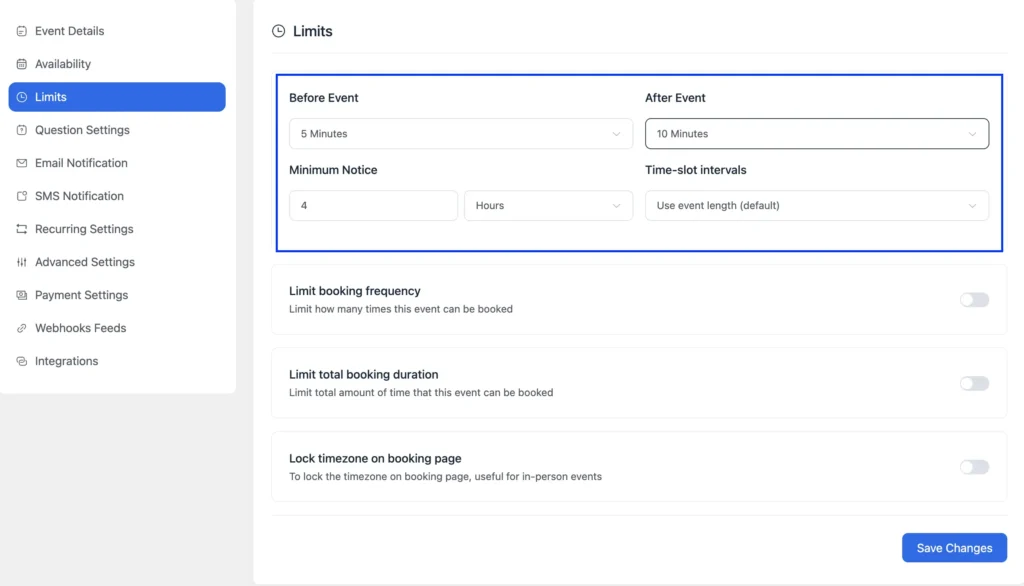
You can also use booking limits to keep your calendar manageable. This is especially useful if you run group coaching alongside 1:1 sessions or other client work.
Add Custom Booking Questions
Add a few custom booking questions to collect the details you need from participants upfront. This helps you understand their goals, fitness level, and constraints, so you can coach the group better from the very first session.
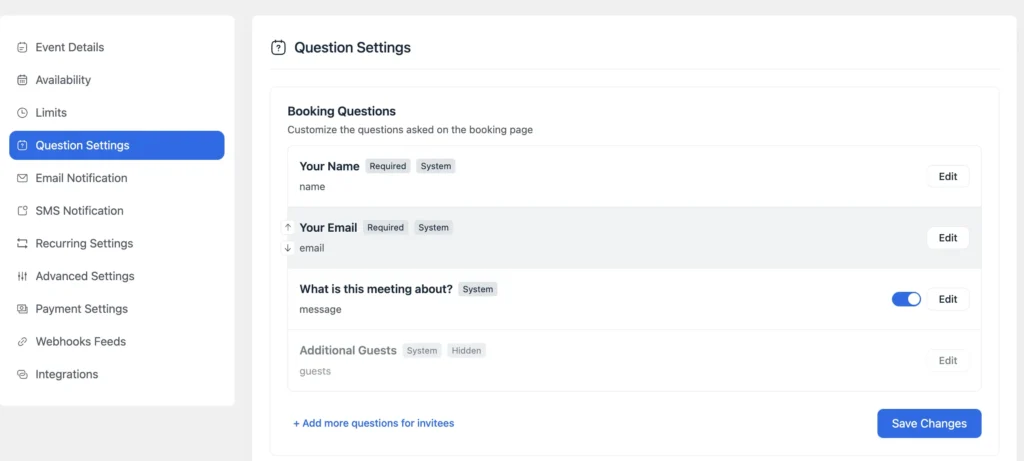
Good custom questions for a fitness group coaching program:
- What is your primary goal for the next 8 weeks? (Fat loss/strength/consistency / general health)
- What’s your current workout routine like? (0–2 days / 3–4 days / 5+ days)
- Any injuries or limitations we should know about?
- What time zone are you in? (if you have remote participants)
- What’s your biggest struggle right now? (Motivation/food cravings/consistency/time)
Enable Recurring Event
For most group coaching programs, weekly on a fixed day works best. Set the day and time, then define when the series ends. You can set a specific end date or limit it to a certain number of occurrences.
So, once your group meeting is ready, open Recurring Settings from the event menu and turn on the Recurring Event option.
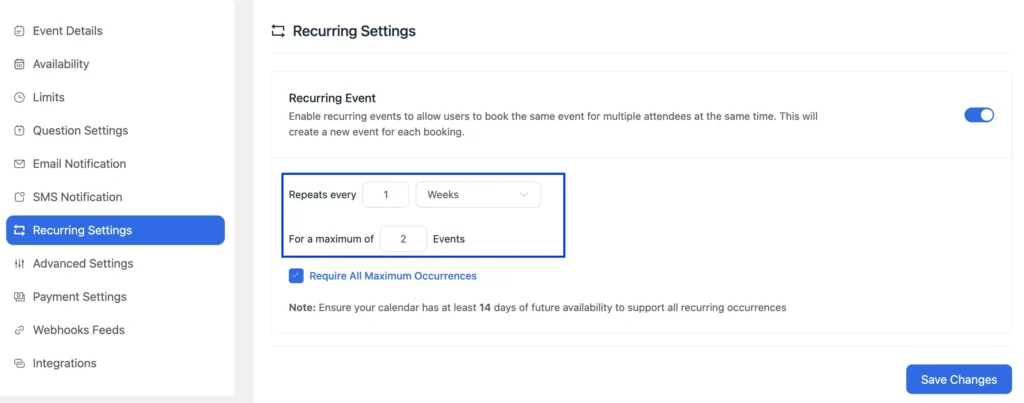
Choose the frequency of the event, such as every week, and then set the total number of sessions in the series. If you are running a 6-week coaching program, this is where you would set it up.
You will also see an option called Require All Maximum Occurrences. This setting helps you decide whether attendees must book the full series or whether they can book fewer sessions. That gives you more flexibility depending on how your coaching offer is structured.
Once everything looks right, click Save Changes. At this point, your recurring group coaching session is fully configured inside FluentBooking. You now have a booking setup that can handle multiple attendees and repeat automatically based on your schedule.
Check Future Availability Range
Before moving on, make sure your future availability range is long enough to support the full recurring series.
This part is easy to miss. If you set up a 6-week recurring session but your availability only opens a few weeks ahead, later sessions may not appear properly. So if your program runs for several weeks, make sure your booking window covers the full duration.
Set Up Payment Integration (Collect Payments at Booking)
If your group coaching program is paid, this step helps you lock in committed participants and avoid chasing payments later. Once payments are enabled, people can pay during booking and secure their seat instantly, especially helpful when you have limited spots in a cohort.
Enable payments from the global settings
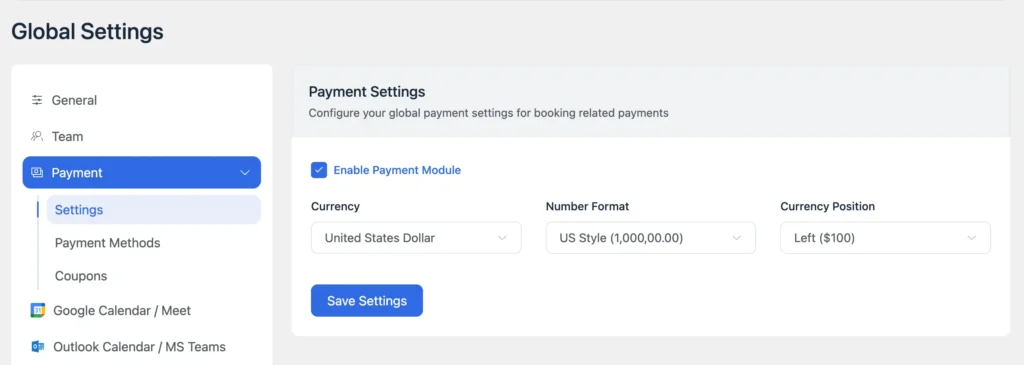
Go to Settings → General → Payment, then turn on the payment module. Set your currency and formatting preferences, and save.
Connect your payment method
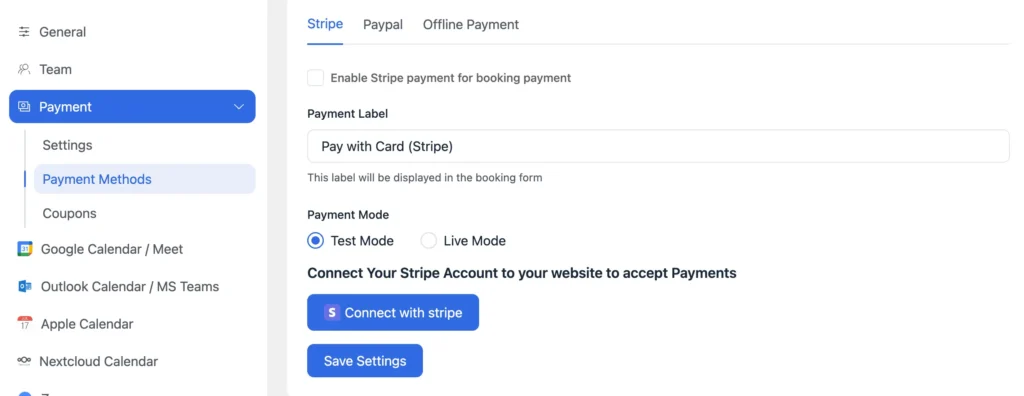
Next, open Payment Methods and connect the option you want to use, such as Stripe, PayPal, or even Offline Payment (if you prefer manual transfers). Save your changes.
Turn on payments for this specific group coaching event
Now go back to your group coaching event, click Edit, and open Payment Settings. Enable the option to collect payment on booking so participants must complete payment to confirm their spot.

Once this is done, your booking flow becomes complete: people choose a slot, answer your booking questions, pay, and get confirmed—without any extra admin work from your side.
Send Automated Confirmation and Reminder Email
After saving the event, go to Email Notification and customize the automated email notification for both the host and attendee.
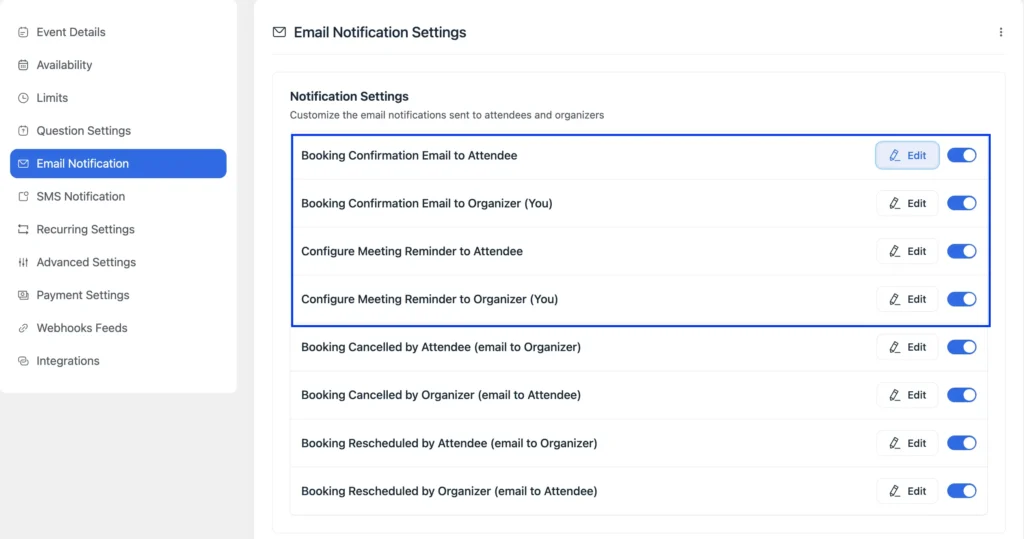
You can edit the booking confirmation email and send it immediately when someone registers, which includes the session date and time, the meeting link or location, what to prepare, and how to contact you if they need to cancel, and a reschedule link, etc.
You can also enable reminders. Set at least two reminders. A common setup is 24 hours before the session and 1 hour before the session. Also, you can send follow-up emails to keep everyone informed before and after the session.
This step is especially useful for reducing no-shows and making the whole experience feel more professional.
Connect Calendar and Meeting Details
FluentBooking integrates with Google Calendar and other calendar tools. Connect your calendar from the global settings so the sessions automatically appear on your schedule and you avoid double-booking.
You can also share your Google Calendar and other calendars with team members or clients when needed to keep scheduling more transparently.
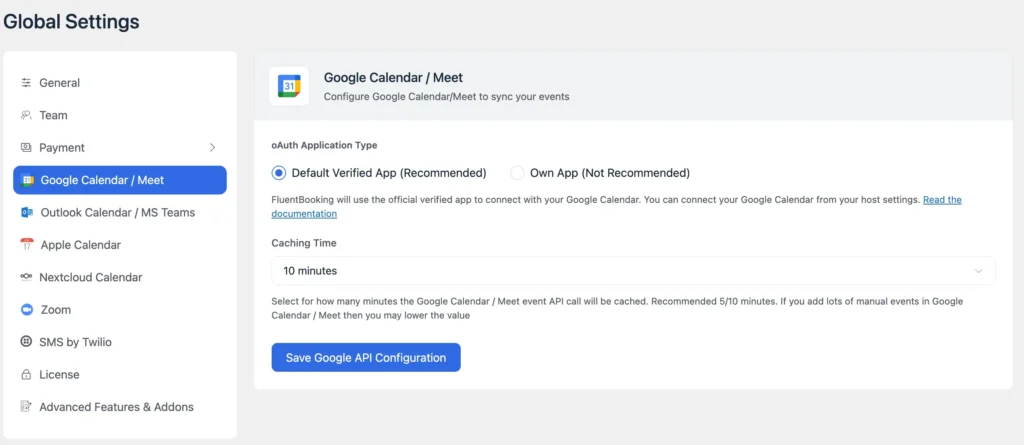
For online sessions, add your Zoom or Google Meet link in the meeting details section. FluentBooking can automatically include this link in confirmation emails and reminders so attendees always have it.
Share the Booking Link
Finally, go back to the Calendar tab and click the share icon for your event. From the Landing Page tab, copy the booking link.
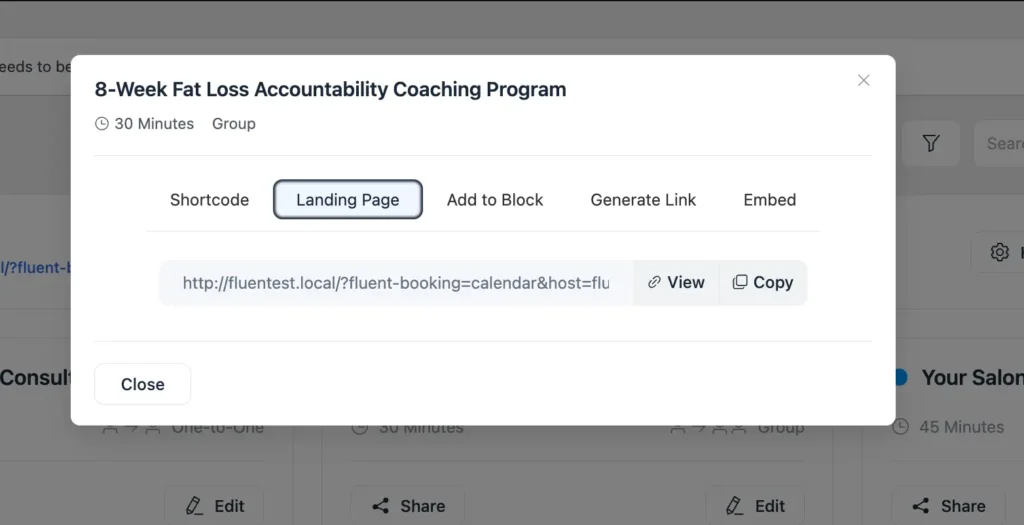
Share it in the places your audience already is:
- Add it to your website’s coaching or services page
- Link to it from your email newsletter
- Post it in your Facebook group, community, or Discord
- Pin it to your social media profiles
- Include it in your email signature
For an embedded booking experience, FluentBooking provides shortcodes you can drop into any WordPress page, so the booking form appears directly on your site rather than redirecting visitors to a separate page.
Example: How This Works in Real Life
Let’s say you want to run an 8-week group fitness coaching program every Monday at 7:00 PM for busy adults who want help with fat loss, workout consistency, and accountability. In FluentBooking, you would create a Group Meeting, set the attendee limit to 12 participants, define your Monday evening time slot, and then enable a recurring event with a weekly frequency and a total of 8 sessions.
Once the booking page is live, clients can reserve their spot in the full coaching series, receive instant confirmation emails, and get automatic reminders before each session. That means less manual scheduling for you and a smoother, more professional experience for everyone joining the program.
Best Practices for Managing Group Coaching Sessions
If you are running group coaching as an ongoing program rather than a one-off session, a few habits will save you a lot of headaches.
- Plan the structure before launching the program. Decide the goal of the coaching session, group size, schedule, and format so participants know what to expect.x
- Use a group meeting setup for shared sessions. This allows multiple participants to book the same time slot and join the coaching session together.
- Schedule recurring sessions for multi-week programs. Recurring events help you run coaching series like 6-week or 8-week programs without manually creating each session.
- Collect useful information through custom booking questions. Ask participants about their goals, experience level, or expectations so you can tailor the coaching session to their needs.
- Follow the 70/30 coaching rule. Encourage participants to speak about 70% of the time while you guide the discussion with questions, feedback, and structure.
- Create a safe and open environment. Thoughtful questions and active listening encourage vulnerability, which helps participants share their challenges and learn from each other.
- Set clear participation boundaries. In group settings, some people may dominate the conversation. Gently guide the discussion so everyone has a chance to contribute.
- Use technology to improve the experience. If your session is online, use tools that support features like screen sharing, chat, or breakout rooms to keep the session interactive.
- Keep your schedule consistent. Running sessions at the same day and time each week helps participants build the session into their routine.
- Automate reminders and confirmations. Automated emails help participants remember the session and reduce the chances of missed meetings.
When these habits become part of your routine, running group coaching sessions becomes far easier. Instead of constantly managing logistics, you can focus more on coaching, supporting participants, and helping them make real progress.
Common Mistakes to Avoid
Even experienced coaches can run into challenges when managing group coaching sessions. Most issues are not caused by the coaching itself but by small organizational mistakes that build up over time.
- Skipping the agenda. Without a structure, group sessions drift. Even a loose agenda with three or four topics keeps things on track.
- Not setting participation guidelines. In a group with ten people, it is easy for one or two voices to dominate. Set ground rules at the start. Everyone gets time to speak.
- Opening bookings without a deadline. Leaving a booking page open indefinitely with no urgency usually means slow signups. A cohort start date or a seat limit creates natural urgency.
- Forgetting to follow up. The session is not over when the call ends. A follow-up email is part of the service. Skipping it makes the experience feel incomplete.
- Trying to run too large a group without support. If your group grows past 20 or 25 people, consider bringing in a co-host or assistant to manage chat, questions, and tech issues while you focus on coaching.
- Using a generic meeting link that never changes. Sharing the same Zoom link for all sessions is a security risk. Use unique links per session or enable waiting rooms.
Avoiding these mistakes keeps your sessions organized and professional while making the experience more valuable for participants.
Final Thoughts
Running a great group coaching session comes down to preparation and process. When you know your topic, your audience, and your logistics before you open bookings, the session itself becomes the easy part.
The step-by-step setup in this guide gives you a repeatable system. Plan the offer, set up the event, configure your reminders, share the booking page, run the session, and follow up. Do that consistently, and your group coaching program runs smoothly without the admin chaos.
If you are on WordPress and want to automate the booking side of things, FluentBooking gives you the group meeting tools you need to manage attendees, send reminders, and keep your calendar in order from a single plugin.
Start with one session, run it well, then scale from there.
Frequently Asked Questions
Ratul Hasan Ripon
I enjoy making complex ideas simple and engaging through my writing and designs. With a strong knowledge on content writing and SEO, I create technical content that’s both easy to understand and interesting.
Table of Content
Subscribe To Get
WordPress Guides, Tips, and Tutorials
Add your first comment to this post