

The Ultimate Guide to Salon Management & Appointment Scheduling


Running a salon isn’t just about delivering great services. You also manage bookings, phone calls, cancellations, and daily schedule changes. On busy days, this can quickly become overwhelming.
Many salon owners rely on phone calls, WhatsApp messages, or simple calendars. These methods work at first, but often lead to double bookings, missed appointments, and confused staff as the business grows.
A smarter salon management system keeps everything organized in one place. With better scheduling and clearer workflows, you save time, reduce mistakes, and run your salon with less stress.
This guide will show you how smart salon management and scheduling with your WordPress site can help you save time, reduce mistakes, and run your salon with less stress.
Why Traditional Methods Don’t Work Long-Term
Many salon owners rely on manual systems at first, but these quickly create problems as the business grows:
- Phone calls and messages interrupt work and often get missed
- Pen-and-paper booking leads to errors and double bookings
- Calendar confusion increases with multiple staff and services
- Client information gets lost or scattered
- No-shows happen more often without reminders
Over time, these issues slow down your operations and affect customer experience. That’s why you need a professional appointment management system that brings structure, automation, and clarity to daily scheduling.
12 Smart Ways to Manage Your Salon More Efficiently
Managing a salon can be overwhelming, especially if you’re just starting out or don’t have much time for admin tasks. By using an automated system, you can handle bookings, schedules, and client communication almost on autopilot.
A smart tool like FluentBooking, an appointment booking plugin in WordPress, fits naturally into your salon workflow, with features designed to reduce manual work and make your daily operations run smoothly. And the best part? You can manage these things in your single WordPress dashboard.
Online Booking & Availability Management
Managing appointments manually can be stressful, especially when calls, messages, and last-minute changes pile up. You can simplify this by setting up an online booking system that lets your clients book themselves while keeping your schedule organized.
24/7 Self-Booking For Clients
You can allow clients to book appointments anytime, even outside your working hours. This means fewer phone calls to handle, no interruptions during busy periods, and a smoother experience for both you and your clients. Clients see available slots in real time and can confirm their appointments instantly.
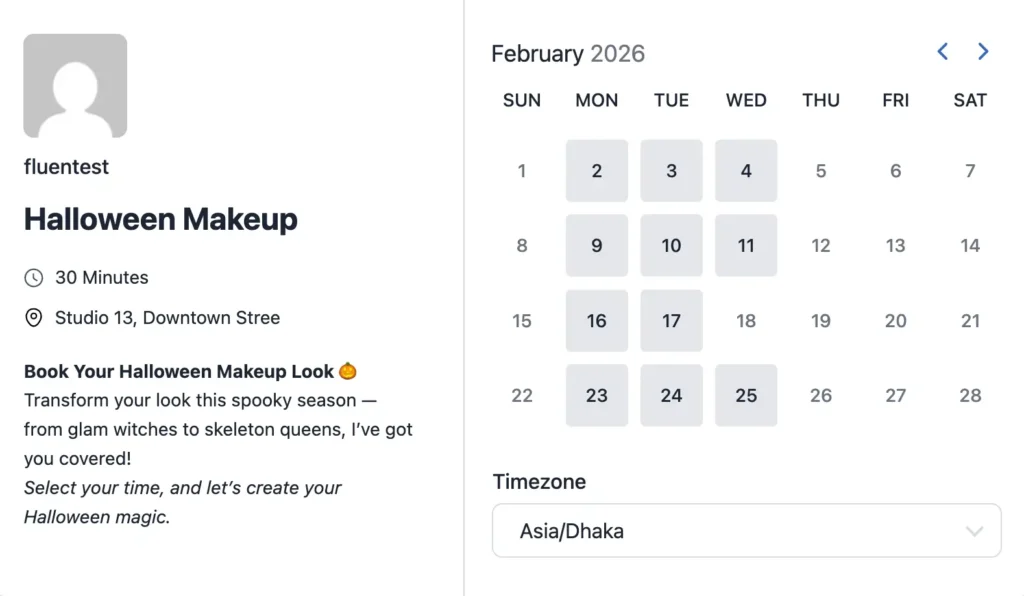
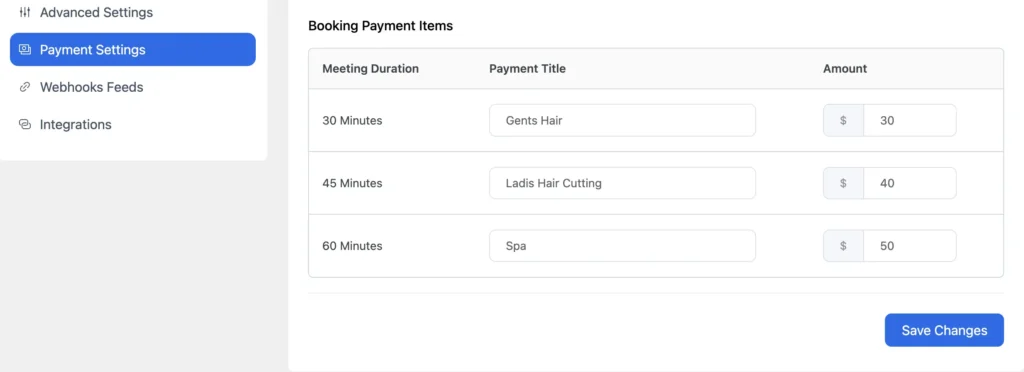
Flexible Service Durations For Different Treatments
You can set the duration and price for each service, like a 30-minute haircut or a 90-minute spa session. This helps prevent overlapping appointments and keeps your daily schedule realistic, so you and your staff aren’t rushed or overwhelmed.
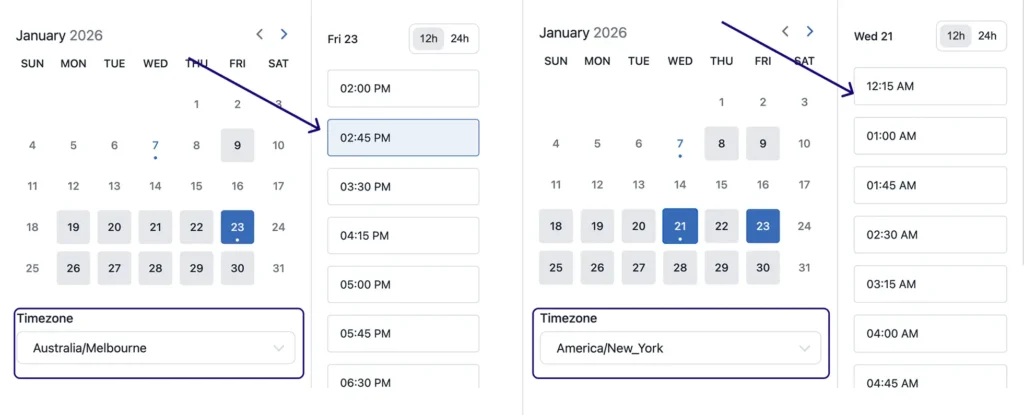
Automatic Time-Zone Handling
If some clients book while traveling or from different locations, you can make sure they see available slots in their local time. This avoids confusion, missed appointments, and last-minute rescheduling caused by time differences.
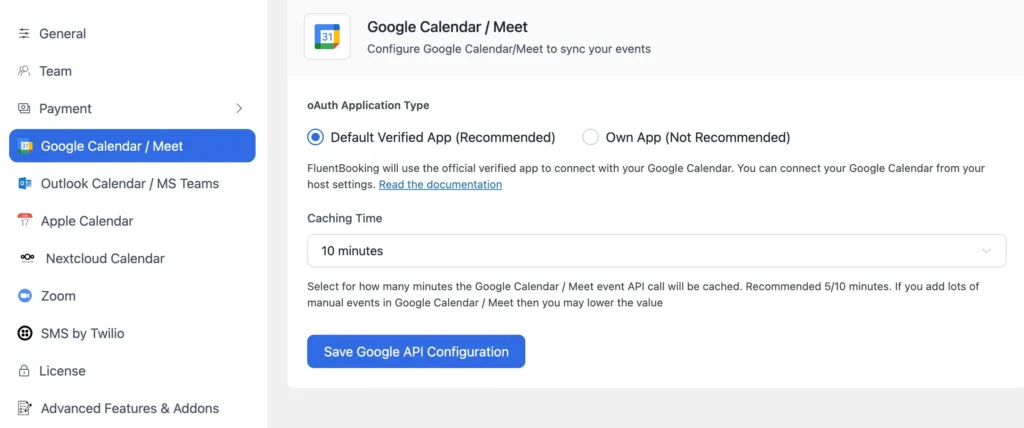
Keep Your Schedule Organized
By setting clear availability, managing service durations, and using automatic time-zone adjustments, you can reduce errors and free up time for yourself. You can integrate with multiple calendar like Google Calendar, Apple calendar etc to keep all your appointments on track. This helps you focus on providing great service while your calendar stays accurate and easy to manage.
Custom Booking Page
A professional and easy-to-use booking page can make a big difference in how your clients experience your salon. You can create a page that shows your services clearly, reflects your brand, and makes it simple for clients to schedule appointments on their own.
Show Your Services Clearly
You can list all your services on the booking page with their duration and pricing. This helps clients choose the right service without confusion and ensures they book the correct slot for their needs.
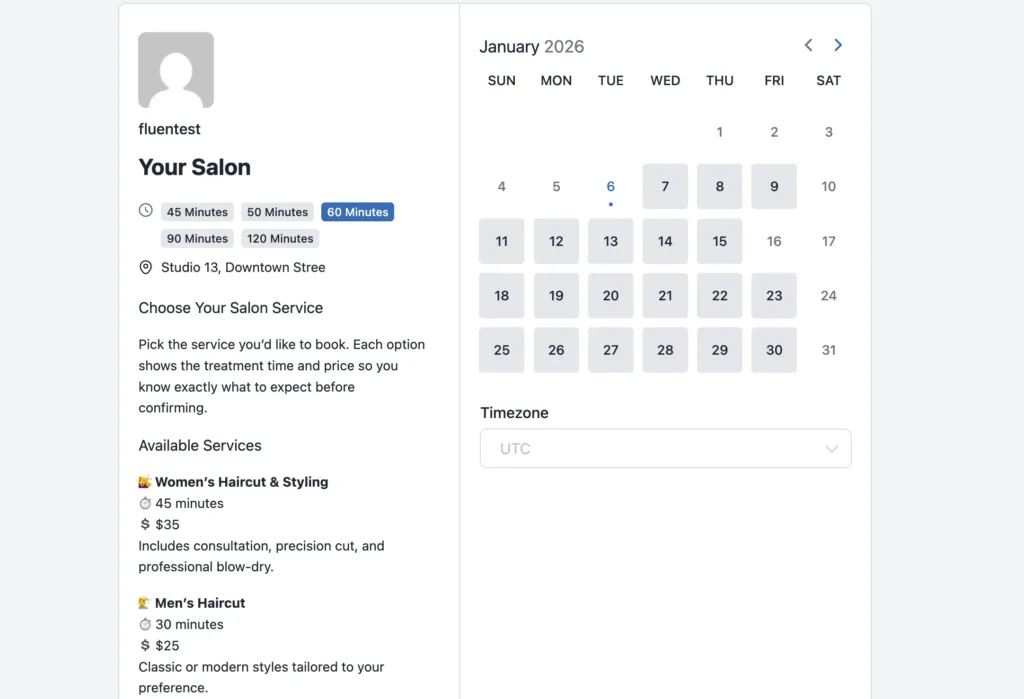
Make it Shareable and Easy to Access
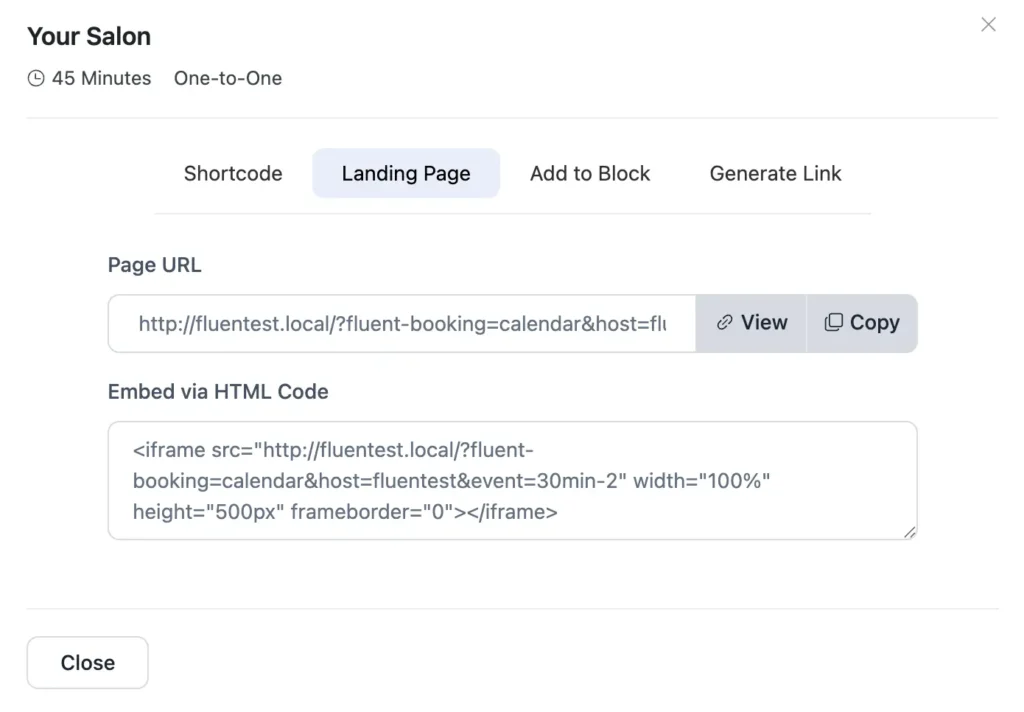
You can share your booking page via WhatsApp, email, or social media, or even embed it on your website. This makes it easy for clients to book from anywhere, increasing the chances they’ll schedule an appointment. You can,
- Copy the shortcode to easily add the booking page to your WordPress site
- Share the booking page link or embed it using HTML on any webpage
- Add the booking form using a Gutenberg block—no coding needed
- Generate and customize your booking link to make it easy to share and remember
Pro Tip: Want more clients without working longer hours? Explore proven salon marketing ideas that help you attract, retain, and grow like a pro.
Keep It Consistent with Your Brand
You can customize the booking page with your salon’s logo, colors, and style. This creates a professional look that matches your brand, making clients feel confident and welcomed before they even arrive.
Bonus Tip: Struggling to find the perfect salon name? Explore our 300+ salon name ideas to spark inspiration and attract more clients to your business.
Make Mobile Booking Simple
Many clients book from their phones, so you can ensure your page is mobile-friendly. This makes scheduling convenient for clients on the go and helps reduce abandoned bookings.
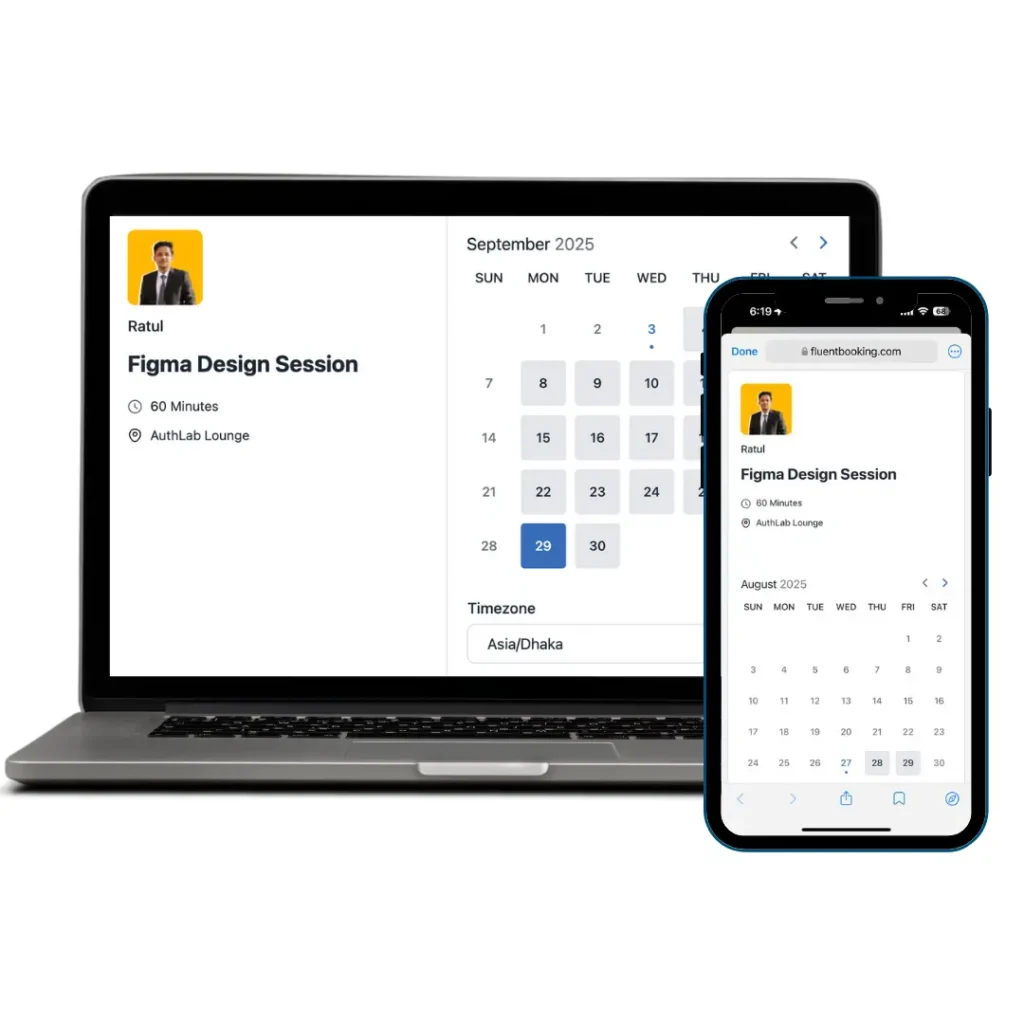
So, by creating a clear, accessible, and branded booking page, you can reduce booking errors, save time answering questions, and give your clients a smooth, professional experience, even before they walk in the door.
Automatic Email Confirmations & Reminders
Clients missing appointments is frustrating and costly. You can reduce no-shows and avoid awkward follow-up calls by setting up automatic confirmations and reminders that keep clients informed without extra effort from you or your staff.
Send Instant Booking Confirmations
You can automatically send a fully customizable confirmation email as soon as someone books an appointment, and you can fully customize your emails. This reassures clients that their booking is successful and clearly shows the service, stylist, date, and time, so there’s no confusion later.
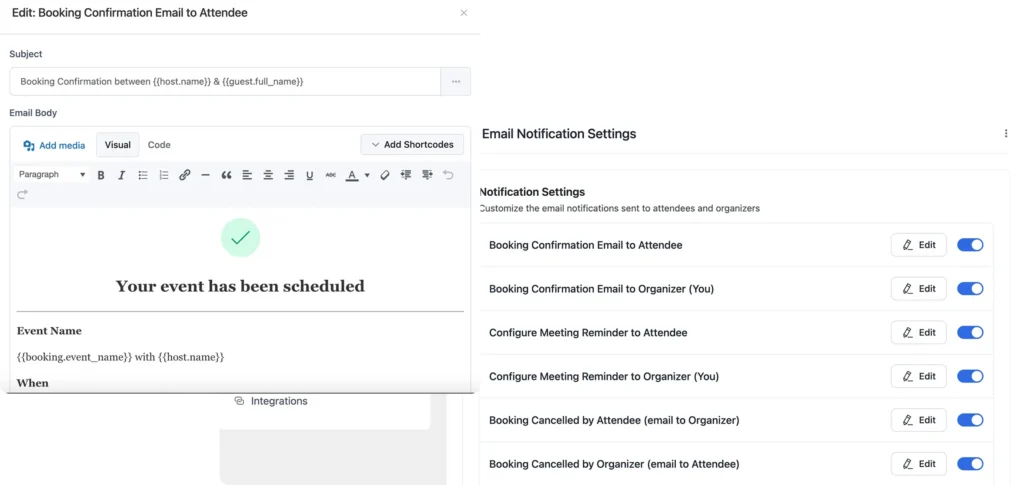
Bonus Tip: Want to customize your appointment confirmation emails? Check out our complete guide with 20+ proven confirmation email templates to save time, reduce confusion, and keep your salon workflow running smoothly.
Remind Clients Before Their Appointment
You can schedule multiple customizable appointment reminder emails to go out before the appointment, such as 24 hours or a few hours in advance. These gentle reminders help clients remember their visit and plan their day, which significantly reduces the number of forgotten appointments.
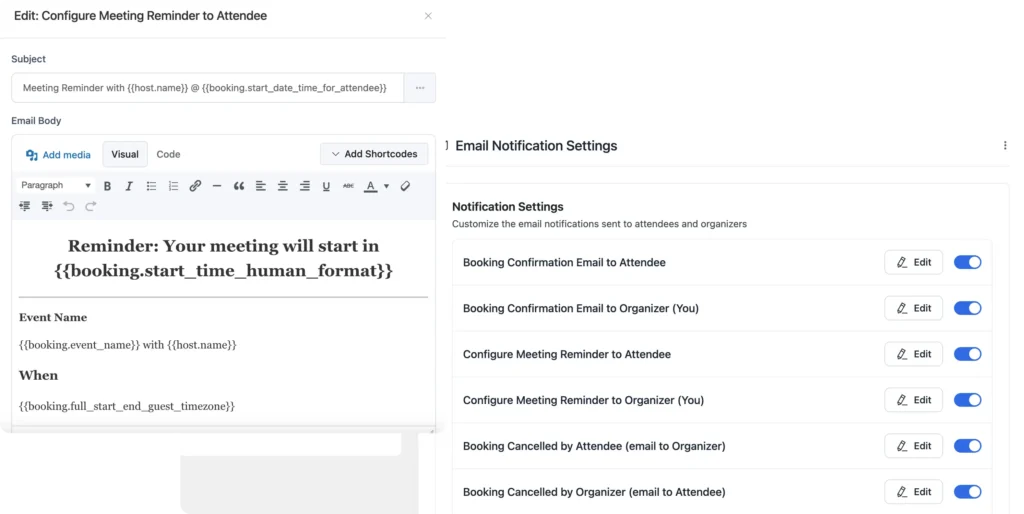
By automating appointment notification, you spend less time chasing clients and more time focusing on service. Your schedule stays more predictable, no-shows decrease, and your salon runs more smoothly day to day.
Appointment Management Dashboard
When you’re managing multiple appointments every day, things can get messy fast. You can stay in control by using a single dashboard that shows everything clearly, so you’re never guessing what’s coming up next.
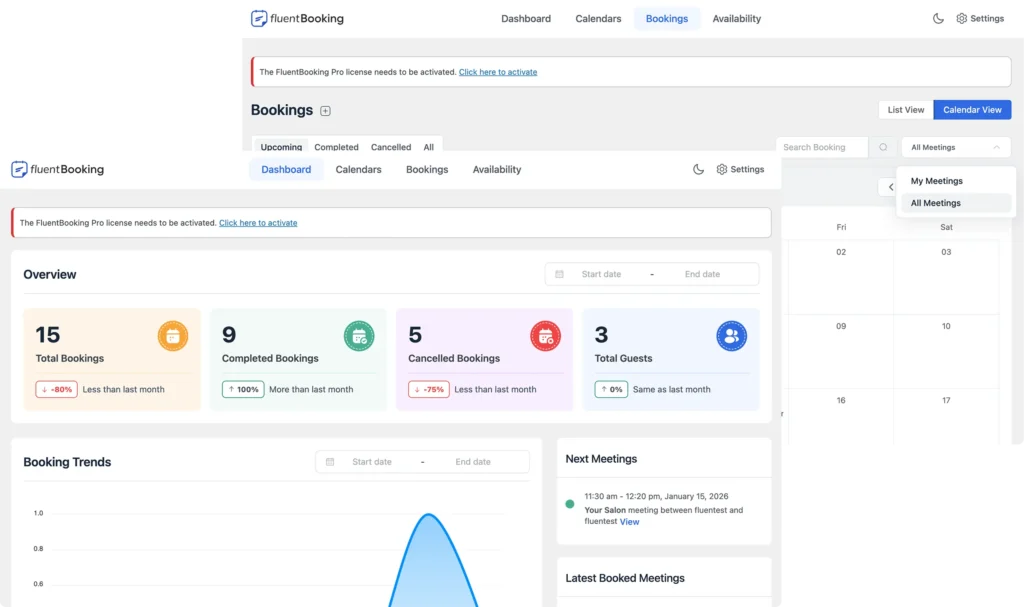
See All Appointments in One Place
You can see all upcoming and past appointments in one place and quickly filter them by stylist, service, or date. This makes it easier to plan your day, prepare your team, check availability, and handle changes without searching through messages or notes.
Reschedule or Update Appointments Easily
If a client needs to reschedule or you need to adjust a time slot, you can update the appointment directly from the dashboard. Everything stays organized and synced, so both you and your clients always have the correct information.
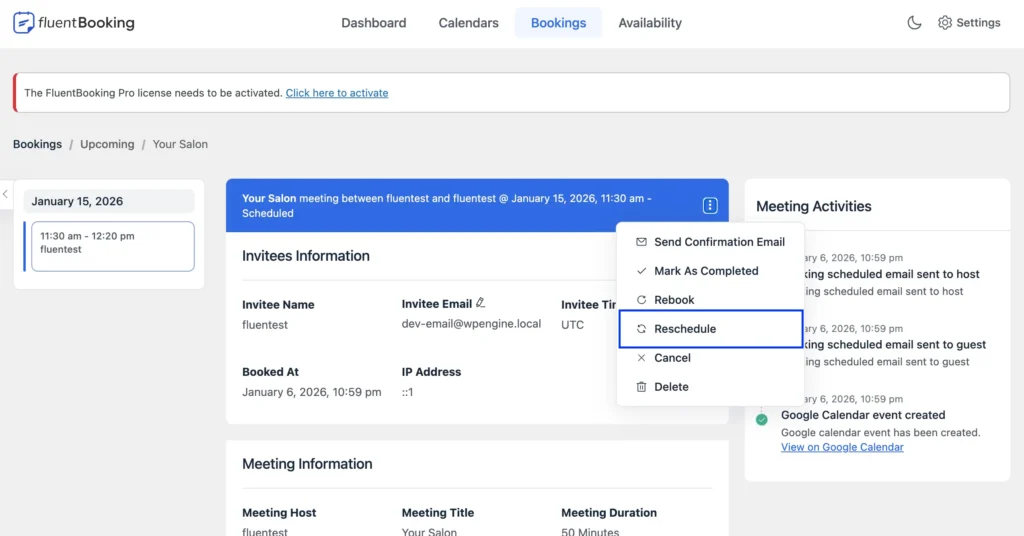
By keeping all appointments in one organized view, you reduce mistakes, save time on admin work, and keep your salon running smoothly, even on busy days.
Pro Tip: Send automated meeting reschedule emails to keep clients informed, avoid confusion, and keep your workflow smooth.
Buffer Times & Booking Limits
Back-to-back appointments can quickly lead to delays, stressed staff, and rushed service. You can avoid this by creating realistic schedules that allow your team sufficient time to prepare, clean up, and reset between clients.
Add Buffer Time Between Appointments
You can add extra buffer time before or after each appointment to allow for cleanup, preparation, or short breaks. This helps you stay on schedule, even when a service takes longer than expected.
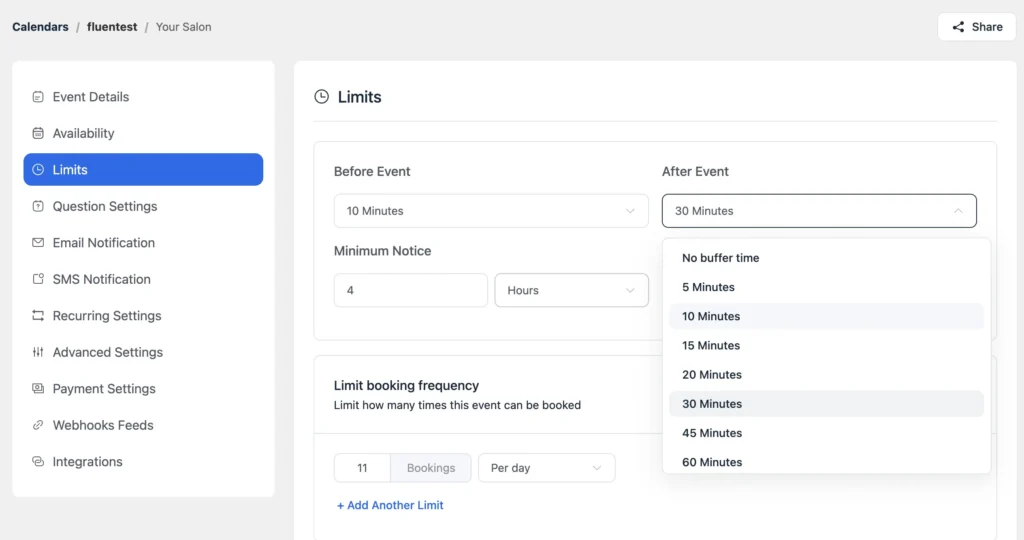
Set Limits on Daily Bookings
You can control how many appointments are allowed per day. This prevents overbooking, protects your team from burnout, and ensures every client receives proper attention.
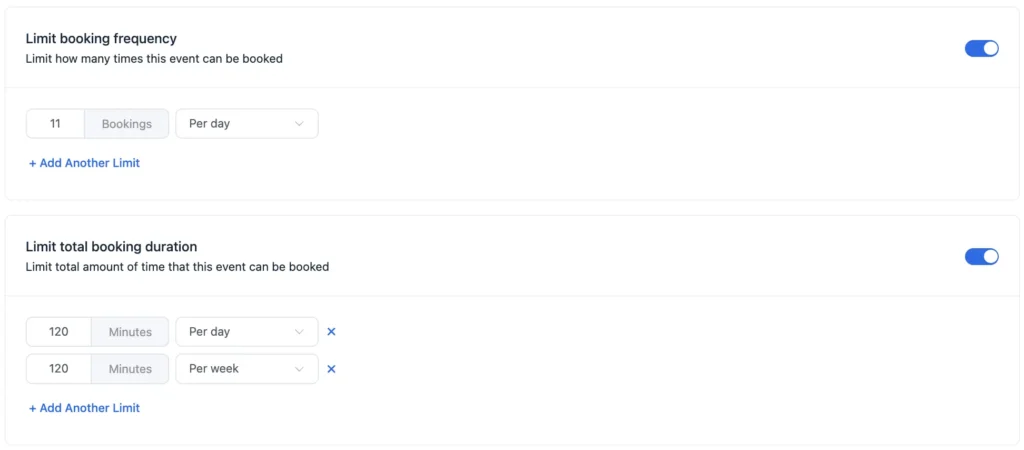
By spacing out appointments and limiting bookings, you can keep your salon running calmly, even during peak hours. Your team stays focused, and clients enjoy a more relaxed experience.
Client Info & Custom Fields
Every client comes with different needs and preferences. You can deliver better service when you collect the right information upfront, instead of asking questions at the last minute or relying on memory.
Collect Important Details During Booking
You can add custom booking questions to your booking form to gather information like hair type, preferred stylist, color history, skin sensitivity, or special requests. This helps you prepare properly before the client arrives.
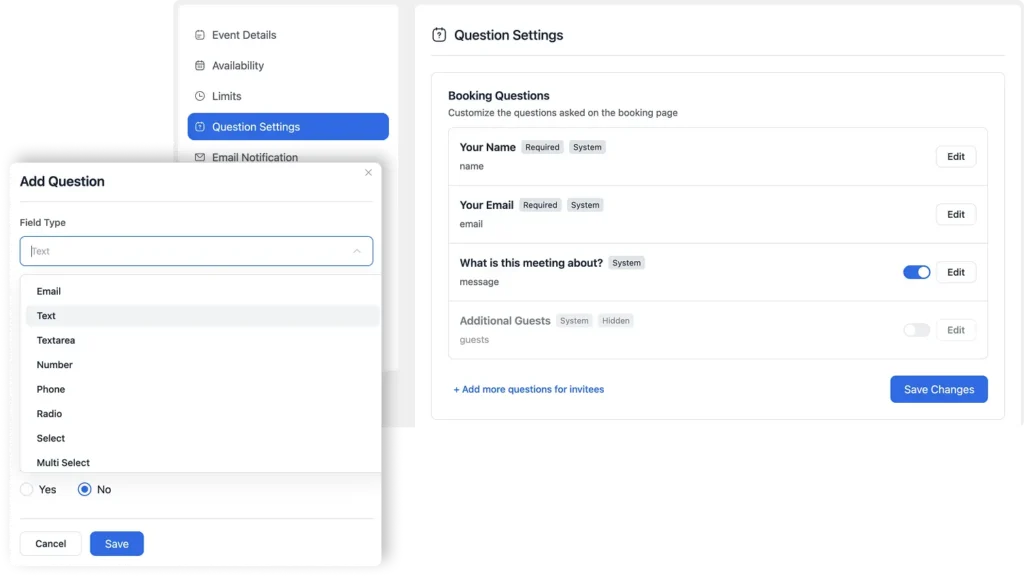
Keep Client Information Organized
All the information clients provide stays connected to their appointments. Over time, you build a clear record of preferences and past services, so you don’t have to rely on handwritten notes or scattered messages.
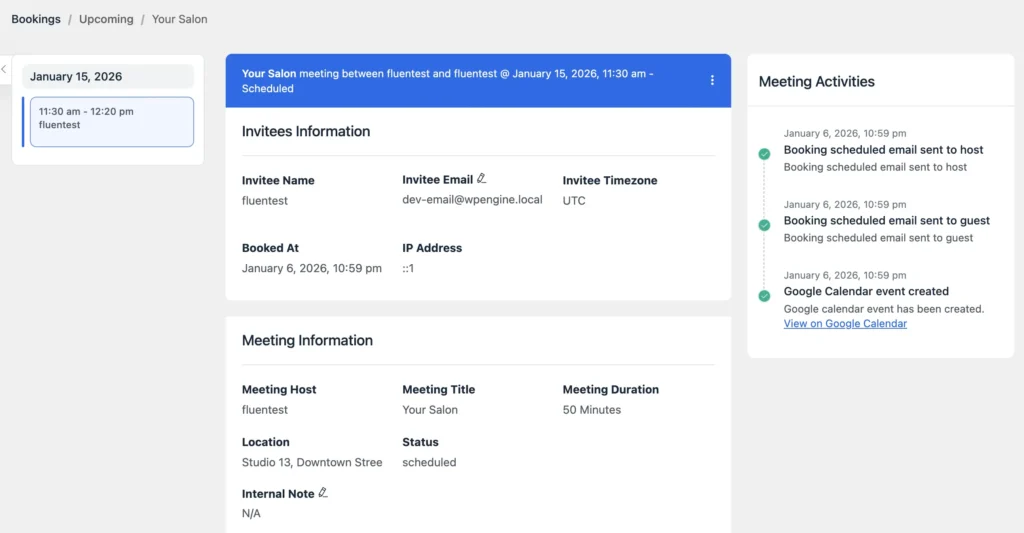
Offer more personalized service
When you already know what a client wants, appointments feel smoother and more thoughtful. Clients feel understood and are more likely to return because the experience feels tailored to them.
By collecting and organizing client information in one place, you save time, reduce mistakes, and deliver more consistent, personalized service—without extra effort during busy hours.
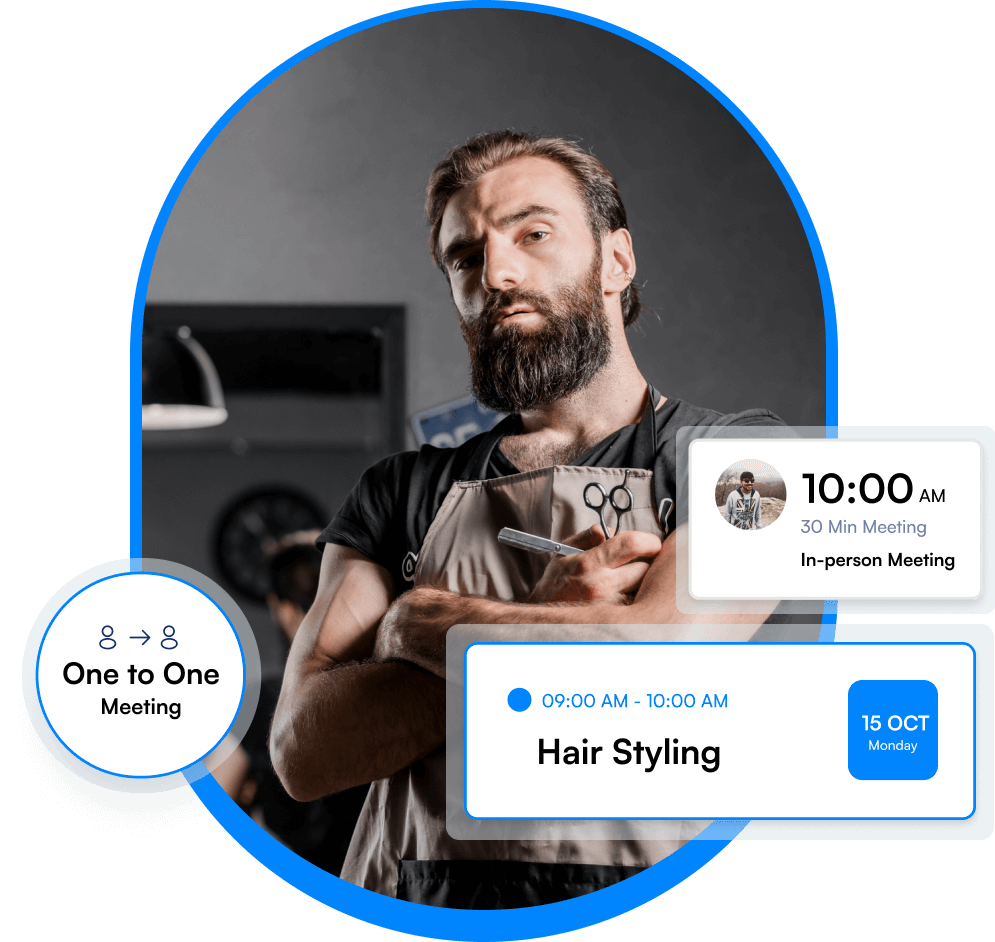
Team & Round-Robin Scheduling
Managing a team becomes much easier when everyone’s schedule is clear and balanced. You can organize your staff, reduce conflicts, and make sure appointments are shared fairly, without constant manual coordination.
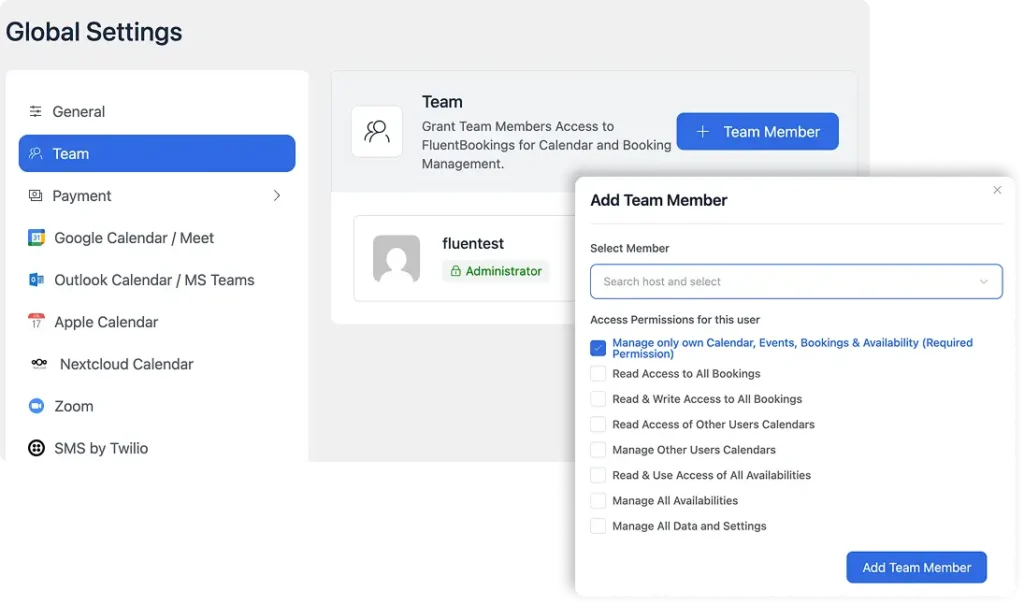
Add multiple team members
You can allow more than one team member or give them admin access to manage bookings and schedules. This is helpful when you have front-desk staff or managers handling appointments, so everything doesn’t depend on one person.
Distribute appointments evenly
You can use round-robin scheduling to automatically share bookings among available team members. This helps maintain a fair workload and avoids overloading a single stylist while others remain free.
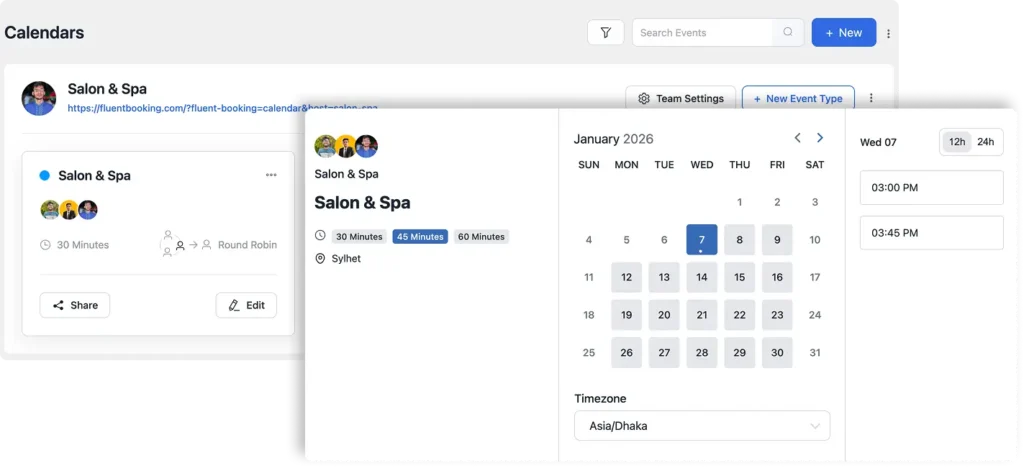
Let clients choose a specific expert
If a client prefers a particular stylist or specialist, you can allow one-on-one booking. This builds trust and encourages repeat visits from loyal clients.
With balanced scheduling and clear roles, your team stays less stressed and more productive. You avoid conflicts, improve morale, and create a smoother experience for both staff and clients.
Payments for Appointments
Chasing payments or dealing with last-minute cancellations can hurt your salon’s cash flow. You can simplify this by collecting payments during booking, so appointments are confirmed and your time is protected.
Accept Payments During Booking
You can allow clients to pay when they book their appointment. This makes the booking more serious and reduces the chances of clients canceling at the last minute or not showing up at all.
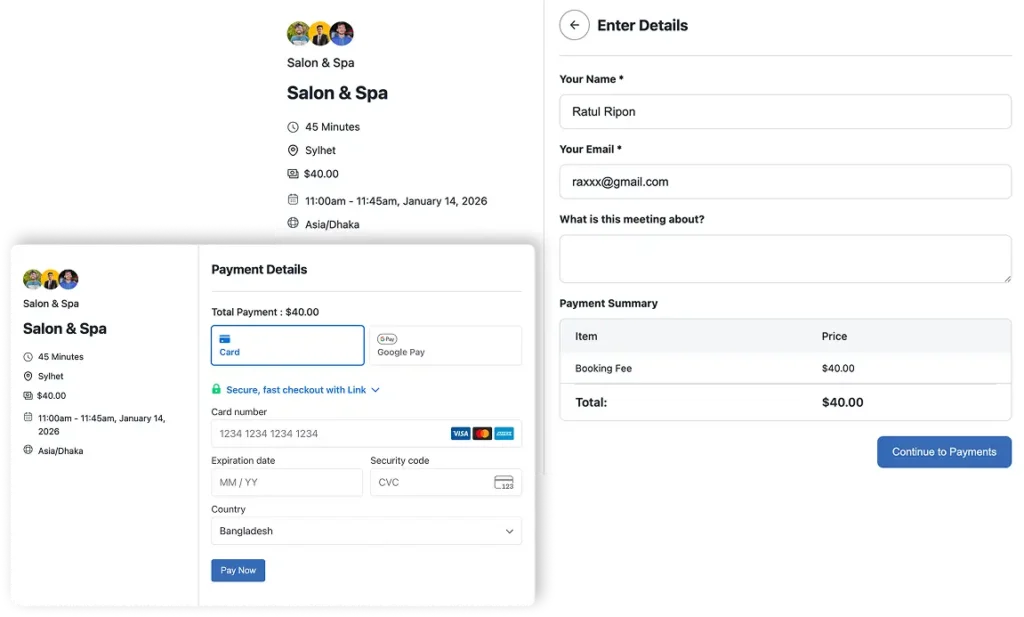
Reduce Fake or Careless Bookings
By requiring payment upfront, you discourage clients from booking slots they don’t plan to attend. This helps keep your calendar accurate and your staff’s time respected.
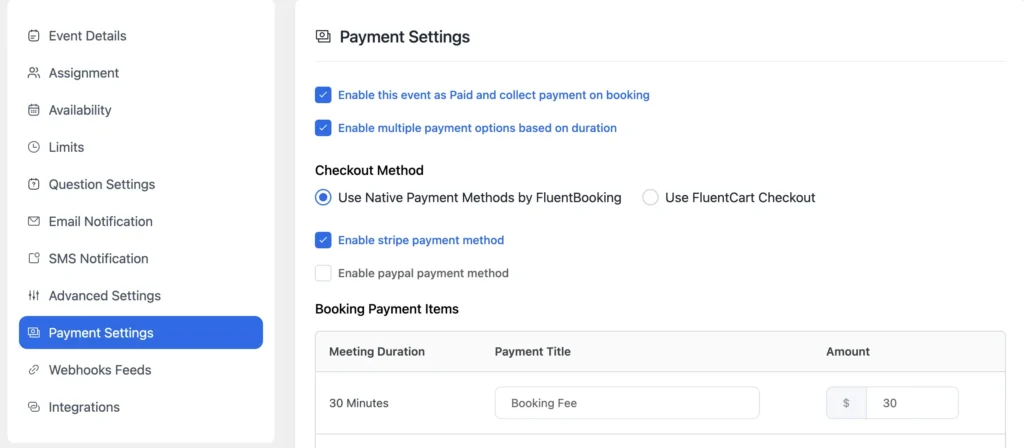
Keep Payment Records Organized
Payments stay connected to appointments, so you can easily see what’s been paid and what hasn’t. This saves you from manually tracking transactions across different tools or spreadsheets.
With upfront payments, you gain more predictable revenue, fewer no-shows, and less administrative work. You can focus on running your salon, knowing your bookings are secured.
Automated Follow-Ups & Client Communication
Your relationship with a client doesn’t end when the appointment is over. You can build stronger connections and encourage repeat visits by staying in touch after the service—without sending messages manually every time.
Send follow-ups after appointments
You can automatically send a thank-you message or a short follow-up after a client’s visit by integrating Fluentbooking with FluentCRM. This shows appreciation and keeps your salon fresh in their mind.
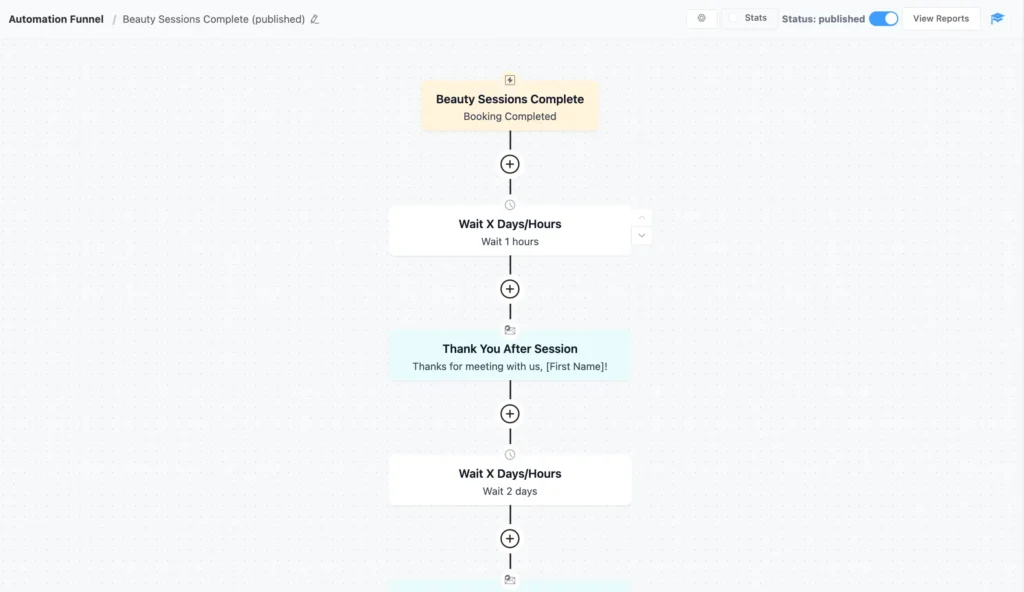
Also, you can schedule follow-up messages that suggest related services or remind clients when it’s time for their next visit. This helps bring clients back without coming across as pushy.
Learn more about how to send an automated follow-up email after an appointment with FluenCRM.
Collect feedback and reviews
You can ask clients for feedback or reviews through automated messages. This helps you understand what’s working and builds trust with future clients.
Automated follow-ups save time while helping you retain clients, improve service quality, and grow your salon naturally through consistent, meaningful communication.

Still Sending Follow-up Emails Manually?
Sync FluentBooking with FluentCRM and save your time from the manual follow-up and winback your customers!

Offer Discounts & Promotions with Coupon Codes
Running promotions doesn’t have to mean extra work or confusion. You can use coupon codes to attract new clients, reward loyal ones, and fill empty slots, without disrupting your daily operations.
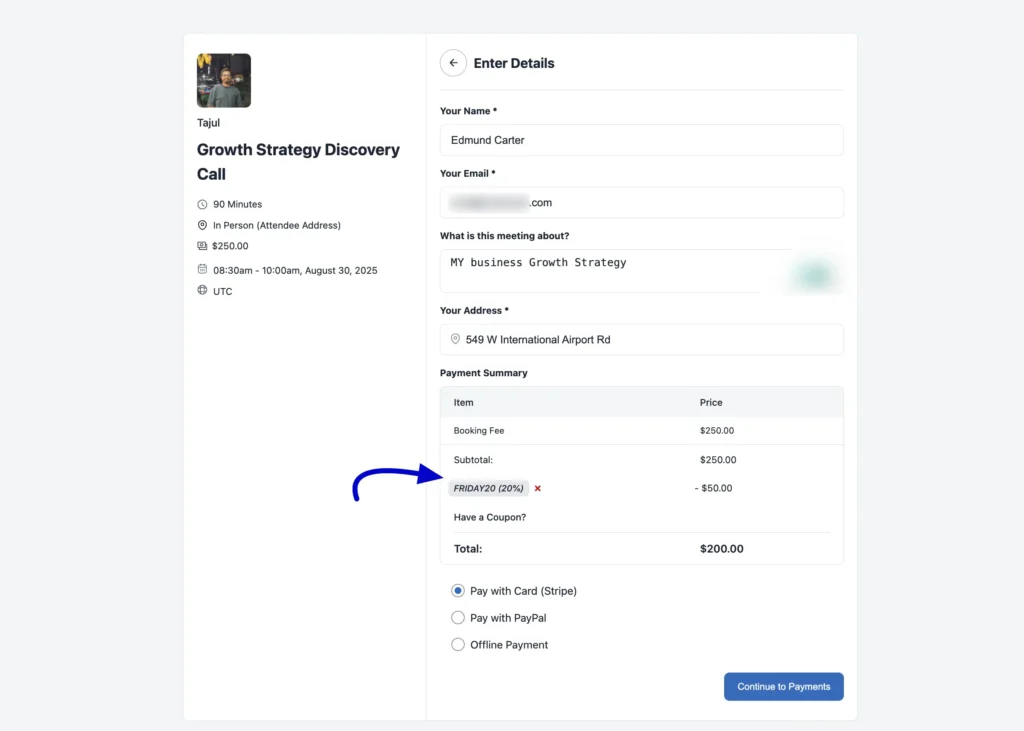
Use coupon codes for promotions, first-time offers, or loyalty rewards
You can create coupon codes for seasonal campaigns, special events, or slower periods to encourage bookings at the right time. You can also offer a small discount to first-time clients to help them try your salon with confidence, and reward returning clients with exclusive codes that make them feel valued and more likely to book again.
Measure What Works
You can see which coupons are being used and which offers bring in the most bookings. This helps you understand what’s working and plan better promotions in the future.
By using coupon codes thoughtfully, you can attract more bookings, retain existing clients, and boost revenue, without running complicated marketing campaigns.
Reports & Analytics
To grow your salon, you need to understand what’s actually happening in your business. You can make better decisions when you have clear insights into your bookings, services, and client behavior, without manually tracking everything.
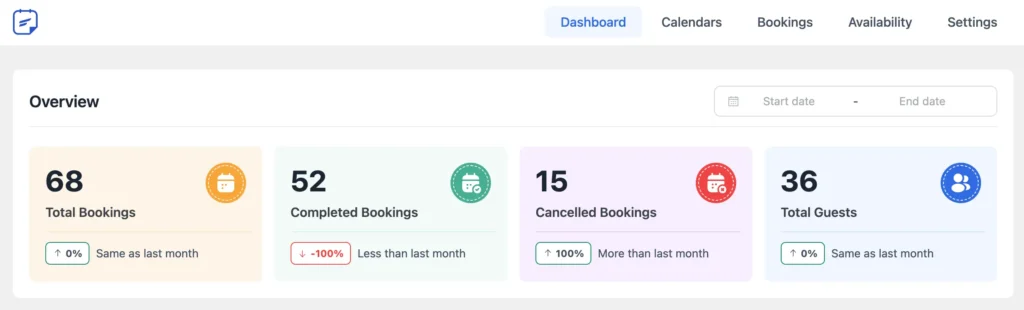
You can see which services are booked most often, track cancellations and no-shows, and understand how frequently clients return and what they prefer. By reviewing these patterns along with busy hours, you can plan staff schedules more effectively, reduce revenue loss, and focus on promoting the services that truly drive your salon’s growth.
With clear reports and analytics, you spend less time guessing and more time making informed decisions. You can improve efficiency, reduce revenue loss, and grow your salon with confidence.
Take Control of Your Salon Today
Running a salon doesn’t have to be chaotic. By organizing bookings, managing staff, and keeping clients happy with the right tools, you can save time, reduce mistakes, and focus on what you do best: delivering great service.
Start implementing smarter salon management practices today and watch your salon run more smoothly than ever.
Ratul Ripon
I enjoy making complex ideas simple and engaging through my writing and designs. With a strong knowledge on content writing and SEO, I create technical content that’s both easy to understand and interesting.
Table of Content
Subscribe To Get
WordPress Guides, Tips, and Tutorials


Leave a Reply