

10 Proven Ways to Automate Your Recruitment Process in 2026 [+Tips, Benefits, and Tools]


Hiring today is more demanding than ever. With growing hiring volume and limited recruiter time, it’s easy to spend more hours on admin work than on meaningful conversations with candidates. And candidates notice too, 60% of job seekers abandon applications that feel too long or complex.
However, recruitment automation helps address this issue.
It’s not about replacing recruiters. It’s about removing repetitive tasks so you can focus on people, not paperwork. Used thoughtfully, automation supports your workflow in the background while you stay in control.
In this guide, you’ll learn practical ways to automate your recruitment process, improve candidate experience, and scale hiring without losing the human touch.
What Recruitment Automation Really Means
Recruitment automation simply means using tools to handle the repetitive, time-consuming parts of hiring, things like posting jobs, screening applications, scheduling interviews, and sending follow-up emails.
Instead of spending hours on manual tasks, automation clears your plate so you can focus on what actually matters: talking to candidates, evaluating potential, and making better hiring decisions.
For recruiters, automation means faster hiring, fewer manual tasks, and more time to connect with top talent. For candidates, it means quicker responses, smoother scheduling, and a more professional experience from start to finish.
The result? Better hiring decisions, shorter time-to-hire, stronger candidate relationships, and a recruitment process that actually scales with your growth.
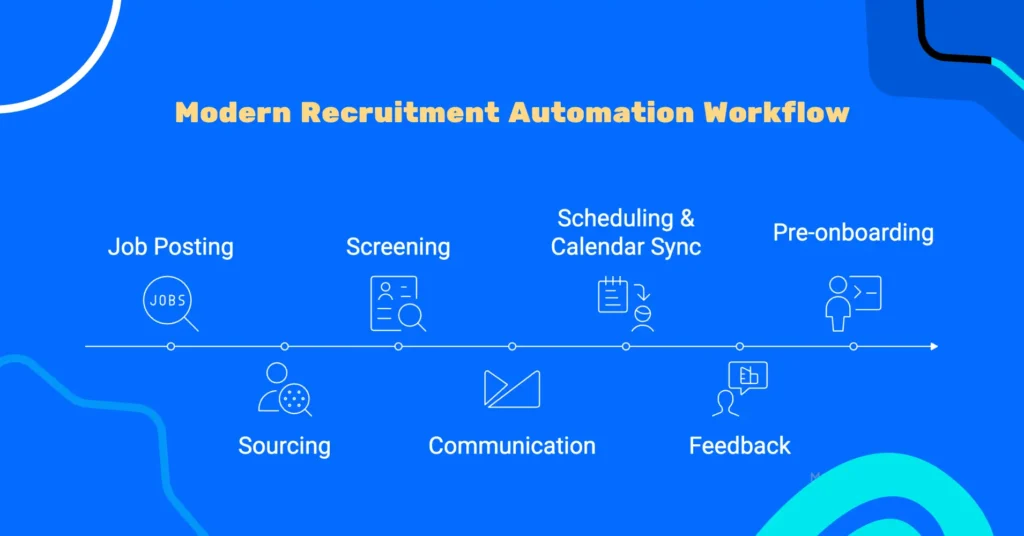
Best 10 Ways of The Modern Recruitment Automation Workflow
Hiring today can feel like juggling a dozen tasks at once. Between posting jobs, sourcing candidates, scheduling interviews, and keeping everyone updated, it’s easy to get buried in admin work.
In fact, on average, a recruiter spends 23 hours just screening resumes for a single hire, and that’s time you could spend on meaningful conversations with candidates.
Below are 10 ways you can use automation to make your workflow smoother, faster, and more efficient, from attracting candidates to onboarding new hires.
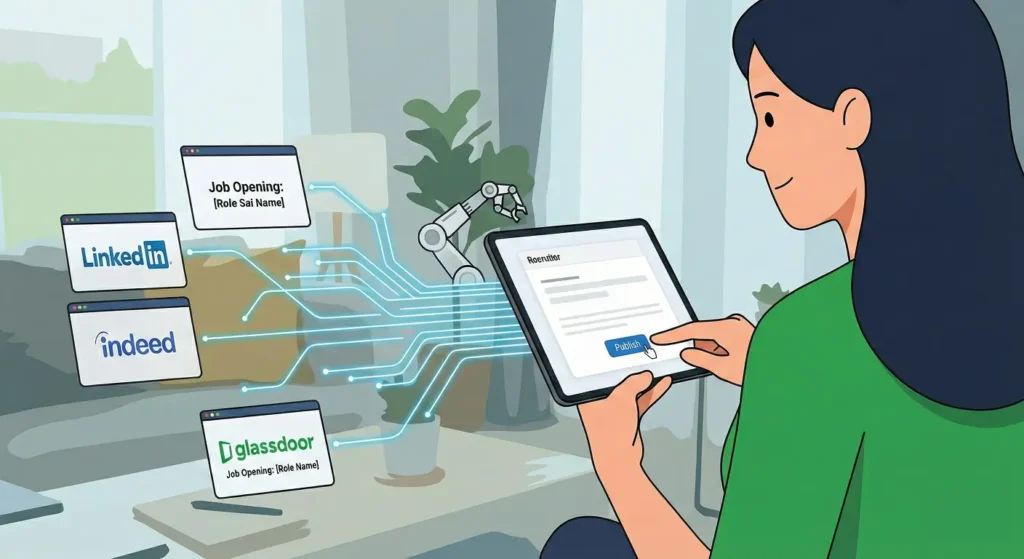
Publish Job Openings without Extra Work
Posting a job is often the first real step in the hiring process. But when you’re hiring for multiple roles or posting across several platforms, it quickly becomes repetitive. Writing the same job details, updating listings, and making sure everything stays consistent can take more time than expected. Making it essential to follow hiring best practices to stay efficient and organized.
Automation doesn’t just help with publishing; it also helps you get the job description right from the start. Tools like Datapeople, SeekOut, and Textio help recruiters write clearer, more inclusive job descriptions by analyzing language, highlighting missing details, and flagging biased or unclear wording.
This approach saves time, reduces errors, and ensures candidates see the same, accurate information no matter where they find your job listing. It also allows recruiters to spend less time managing postings and more time focusing on qualified candidates.
Find the Right Candidates Faster With Automated Sourcing
If you wait only for applications to come in, hiring can feel slow, especially when you’re looking for specific skills. You often end up jumping between job boards, LinkedIn, and spreadsheets just to find a few good profiles.
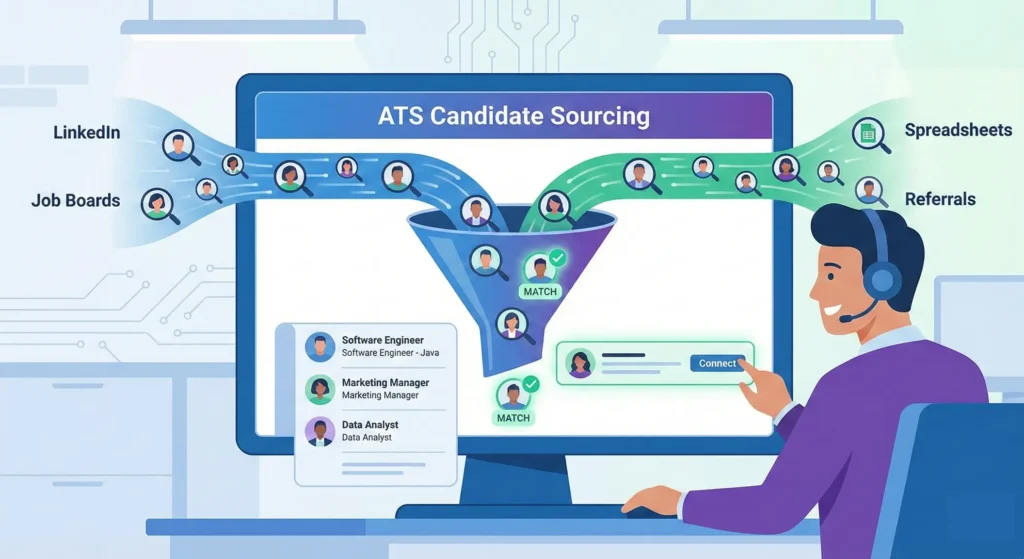
This is where an ATS can really help you. An ATS brings candidates from different sources into one place, so you don’t have to search everywhere manually. Instead of tracking profiles across multiple tools, you can see who applied, where they came from, and who looks promising, all in a single system.
Some ATS tools also help you spot potential candidates faster by matching profiles to your role. That means you spend less time searching and more time having real conversations with the right people.
Turn Applications Into Structured, Screened Candidate Data
Using an application form helps you stay in control from the start. Instead of unstructured emails, you ask candidates specific questions about their experience, skills, and availability. That way, you’re not just reading resumes, you’re reviewing clear, consistent information for every candidate.
If you’re using WordPress, a form builder like FluentForms can make this even easier. You can create role-specific application forms, collect resumes and links, and add simple screening questions, all without touching code.
For larger teams managing high volumes, dedicated applicant tracking systems offer more advanced filtering and pipeline management features.
You can also filter out candidates who don’t meet basic requirements before you ever open a resume. This reduces overload and helps you focus on applicants who are genuinely worth your time.
Keep Every Candidate Organized From Day One
An ATS or candidate management system helps you keep everything in one place. You can see each candidate’s details, track their status, and understand where they are in your hiring process, without relying on spreadsheets or scattered notes.
In WordPress, a tool like FluentCRM can help here. When a candidate applies, their information can be stored automatically, tagged by role or stage, and updated as they move through the pipeline. This way, you always know who’s shortlisted, who’s been interviewed, and who needs a follow-up.
With everything organized from the start, you spend less time managing data and more time focusing on the right hiring decisions.
Let Candidates Schedule Interviews
If you’ve ever tried to schedule interviews manually, you know how messy it gets. You suggest a time. The candidate suggests another. The interviewer isn’t available anymore. A few emails later, you’re still not booked.
Instead of coordinating everything yourself, you can let candidates pick an available interview slot based on your real availability. Your calendar stays accurate, interviews get booked faster, and no one has to chase emails.
If you’re using WordPress, FluentBooking takes care of this for you. You can set your interview availability once, define buffer times between interviews, and decide how many interviews you want to handle per day. Candidates only see time slots that actually work for you and your team.
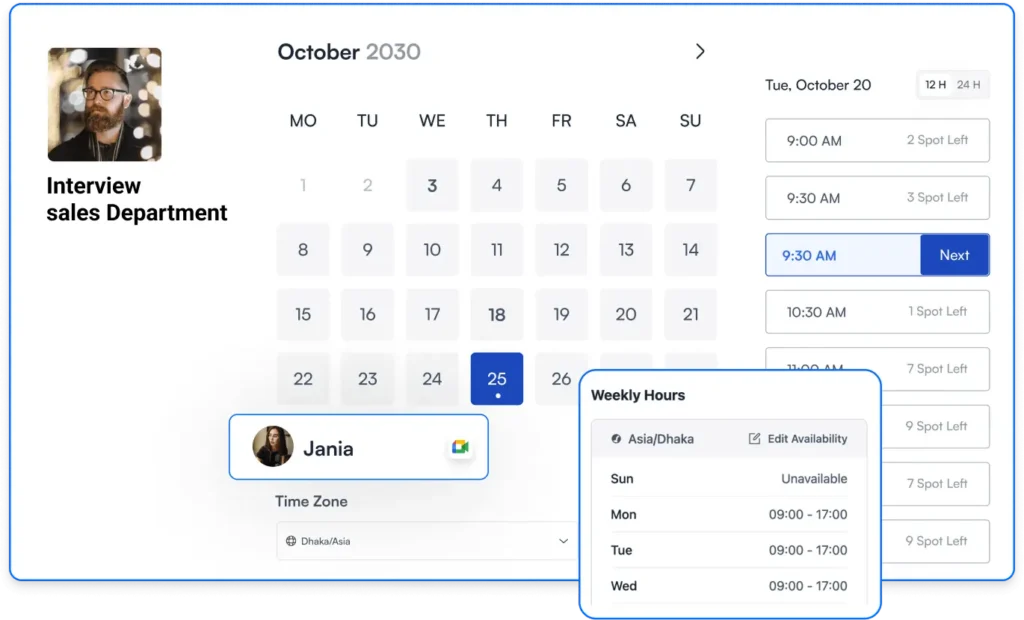
When someone books an interview, FluentBooking automatically updates your calendar, blocks the time, and adjusts availability if anything changes. No double bookings, no manual updates, no awkward rescheduling emails.
You stay in control of your schedule, and candidates get a smooth, professional booking experience, without all the back-and-forth.
Keep Communication Strong Without Back-and-Forth
Interview scheduling is one of the most time-consuming parts of hiring. You suggest a time, the candidate suggests another, someone reschedules, and suddenly, a simple interview takes days to confirm.
With automated scheduling, everything updates automatically with automated notifications reminder, so you don’t have to manage calendars or email threads.
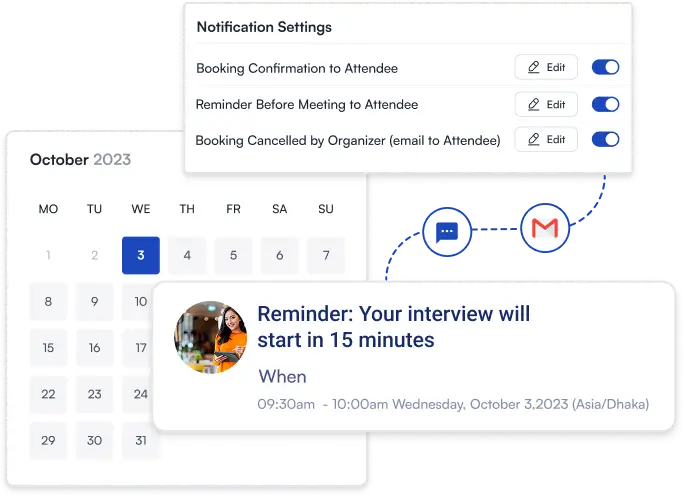
In WordPress, FluentBooking can also handle this smoothly. Once a candidate books an interview, it automatically sends a confirmation email. If anything changes, reschedule and cancellation emails go out instantly, so everyone stays informed. You can also set up reminder emails to reduce no-shows.
This way, interviews stay organized, candidates know exactly what’s happening, and you don’t have to chase schedules or send manual updates.
Bonus Tip: Pair automated interview scheduling with clear communication. Use these interview invitation email templates and interview reminder email examples to reduce no-shows and keep candidates informed.
Sync Interviews With Your Calendar and Reduce No-Shows
Scheduling interviews is only half the battle; making sure they actually appear on your calendar is just as important. Without proper sync, it’s easy to miss meetings or create conflicts.
With FluentBooking, every interview you schedule syncs automatically with your Google or Outlook calendar. You don’t have to manually add times, check availability, or worry about double bookings. Any changes, like a reschedule or cancellation, are updated in real-time on your calendar, so you and your team are always on the same page.
This seamless integration keeps your schedule organized, reduces errors, and ensures you never miss an interview.
Collect Interview Feedback While It’s Still Fresh
After an interview, getting feedback from interviewers can be a headache. Sometimes forms aren’t filled out, emails get buried, or feedback comes in late, making it harder to move forward quickly.
Using simple, structured forms can solve this. You can send a short feedback form to each interviewer right after the interview, asking for scores, notes, or key takeaways. This keeps everything consistent and easy to compare across candidates.
You can handle this smoothly with FluentForms. Create a feedback form once and automatically send it to the right interviewers. Responses are collected in one place, so you don’t have to chase anyone or dig through emails.
Follow Up Professionally, and Build a Future Talent Pool
After interviews, following up with candidates can feel repetitive, but it’s crucial for keeping a positive impression. Sending timely updates, even if it’s a rejection, shows respect and keeps candidates engaged for future opportunities.
If you’re on WordPress, FluentCRM can handle these automated follow-ups. You can create customizable email sequences for rejected candidates, next-round invitations, or even nurturing emails for those who aren’t a fit yet. This keeps your communication consistent and professional, without adding to your workload.
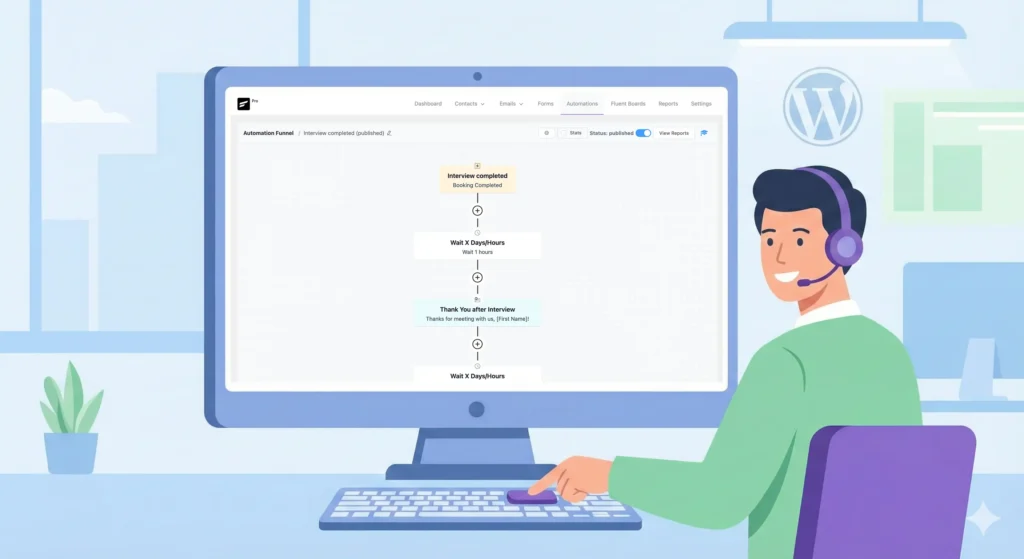
Automation makes this easy. Instead of writing each email manually, you can set up automated follow-up email templates that send the right message at the right time. You can also tag promising candidates for future roles, building a talent pool without extra work.
Prepare New Hires Before Day One With Pre-Onboarding Automation
Once a candidate accepts the offer, the work isn’t over. You still need to send offer-related communication, collect essential documents, and make sure everything is ready before their first day. Doing this manually can be time-consuming and easy to miss.
Automation helps you handle all of this seamlessly. You can send offer letters and welcome emails automatically, collect documents through online forms, and track what’s completed, all in one place. This reduces manual handoffs between HR and recruiters and ensures nothing gets overlooked.
New hires arrive prepared, paperwork is complete, and the transition from hiring to onboarding is effortless. You save time, reduce errors, and make a great first impression on your candidates.
What You Should Not Automate in Recruitment
Automation can save you hours, but there are still parts of hiring that need a human touch. Trying to automate everything can actually hurt your candidate experience and hiring decisions.
Here’s what you should keep personal:
- Final hiring decisions: Tools can rank and filter candidates, but choosing the right person requires your judgment.
- Relationship-building conversations: One-on-one chats, check-ins, and personalized messages help candidates feel valued.
- Culture-fit evaluation: Understanding how someone will fit with your team and company culture is something a system can’t judge.
Even with automation, your instincts and experience are what turn data into great hiring decisions. Tools can help you work faster, but you’re the one who understands the nuances of your team, the role, and the candidate. Balancing automation with your judgment ensures better hires and a stronger candidate experience.
How to Get Started with Recruitment Automation
Getting started with automation can feel overwhelming, but you don’t have to do everything at once. The key is to start small and focus on areas that save the most time.
- Start with one automation: Pick a single task, like interview scheduling or candidate communication, and get it working smoothly before adding more.
- Prioritize scheduling and communication first: These are the most repetitive and time-consuming tasks. Automating them frees up hours every week.
- Avoid common mistakes: Don’t overcomplicate workflows, avoid sending impersonal emails, and make sure your automations match your hiring process.
- Scale gradually as hiring grows: Once you’re comfortable, add more automation, like pre-boarding, feedback collection, or talent nurturing step by step.
By starting small and building gradually, you can make automation a natural part of your workflow without overwhelming yourself or your team.
When Should You Invest in Recruitment Automation?
Investing in recruitment automation can be a game-changer—but how do you know it’s the right time for your team? Here are some signs that it might be time to make the move:
- You’re hiring a lot: If your team is managing many applications at once, automation helps keep everything organized and moving efficiently.
- Your hiring process is slow: Long delays in screening resumes, scheduling interviews, or sending updates can cost you top candidates. Automation speeds these tasks up.
- Talent is hard to find: In a competitive market, automation helps you reach, engage, and hire the best candidates faster than your competitors.
- Your HR team is stretched thin: Repetitive administrative tasks take time away from meaningful work. Automation frees up your team to focus on strategic activities.
- Candidate experience is inconsistent: Delays, missing updates, or mixed messages frustrate candidates. Automation keeps communication smooth and professional.
- You want data-driven insights: Automation tools can track metrics like time-to-hire, candidate sources, and bottlenecks, helping you make better decisions.
- Your company is growing: Scaling your hiring process without proportionally adding HR staff becomes much easier with automation.
- High turnover: Automation helps refill positions quickly and keeps a steady pipeline of qualified candidates.
- Diversity and inclusion matter: Automated screening can help reduce bias and ensure a wider, more diverse candidate pool.
- You use multiple HR systems: Automation that integrates with your existing tools improves efficiency and keeps data consistent.
If you see yourself nodding at a few of these, it might be the perfect time to start automating parts of your recruitment process.
Final Thoughts: Automate the Process, Not the People
Recruitment will always be about people. The conversations you have, the judgment you apply, and the relationships you build can’t and shouldn’t be automated.
What can be automated are the repetitive tasks that slow you down: scheduling interviews, sending reminders, collecting feedback, and managing candidate data. When those tasks run quietly in the background, you get more time to focus on what actually matters: finding the right people and giving them a great hiring experience.
Start small, build gradually. And let automation work for you, so you can spend less time managing processes and more time connecting with people.
Ratul Hasan Ripon
I enjoy making complex ideas simple and engaging through my writing and designs. With a strong knowledge on content writing and SEO, I create technical content that’s both easy to understand and interesting.
Table of Content
Subscribe To Get
WordPress Guides, Tips, and Tutorials

Leave a Reply