7 Best Cal.com Alternatives in 2026 (Compared, Ranked & Reviewed)
Scheduling should feel simple.
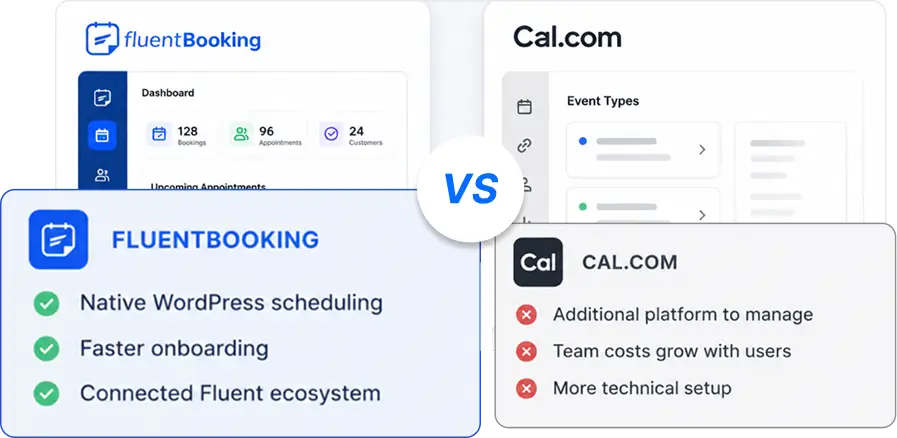
But if you’ve used Cal.com, you already know it can feel complex for everyday use. It’s powerful, flexible, and developer-friendly. But for many businesses, it takes more effort than expected to set up and manage.
That’s why people are actively searching for alternatives that are easier, faster, and more practical.
In this guide, you’ll find:
- The best Cal.com alternatives (updated list)
- A clear comparison table
- Real pros, cons, and use cases
- A simple way to choose the right tool

Let us guide you in finding the perfect alternative.
Keep reading!
TL;DR (Quick Picks)
- Best overall: Calendly
- Best for WordPress users: FluentBooking
- Best for businesses: Acuity Scheduling
- Best for teams: SavvyCal
- Best for group scheduling: Doodle
Why Look for Cal.com Alternatives
Cal.com is built for flexibility. But flexibility often brings complexity. For developers, that’s great. For most users, it creates friction.
Many users want something that:
- Works instantly
- Requires less setup
- Feels easy to manage
Here’s where Cal.com becomes challenging:
- Technical setup: You may need a developer-level understanding.
- Slower onboarding: Compared to plug-and-play tools.
- Overkill for simple needs: If you just want bookings, it feels heavy.
- Not ideal for WordPress workflows: You still depend on external systems.
Cal.com Alternatives Comparison (At a Glance)
Here’s a quick way to compare your options:
| Tool | Best For | Ease of Use | Pricing Model | Key Strength | Limitation |
|---|---|---|---|---|---|
| Calendly | Beginners & SMBs | ⭐⭐⭐⭐⭐ | SaaS | Simple & reliable | Limited control |
| FluentBooking | WordPress users | ⭐⭐⭐⭐⭐ | Plugin | Full ownership | WordPress only |
| SavvyCal | Teams | ⭐⭐⭐⭐ | SaaS | Better scheduling UX | Higher cost |
| Doodle | Group meetings | ⭐⭐⭐⭐ | SaaS | Poll-based scheduling | Limited automation |
| SimplyBook.me | Service businesses | ⭐⭐⭐⭐ | SaaS | All-in-one booking | Complex UI |
| Setmore | Small businesses | ⭐⭐⭐⭐ | Freemium | Free plan | Limited flexibility |
| YouCanBook.me | SMBs | ⭐⭐⭐⭐ | SaaS | Flexible scheduling | Outdated UI |
How We Evaluated These Tools
Not all scheduling tools are built the same. Some focus on simplicity, while others focus on control or advanced workflows.
To make this list useful, we evaluated each tool based on:
- Ease of setup
- Booking experience
- Automation (reminders, workflows)
- Calendar integrations
- Pricing and value
- Real-world usability
7 Best Cal.com Alternatives (Detailed Review)
Check out these Cal.com alternatives that might offer exactly what you’ve been looking for to make scheduling simpler and more enjoyable.
Calendly — Best Overall for Simplicity
Calendly is one of the most widely used scheduling tools, and for good reason. It focuses on doing one thing really well – ‘Making scheduling effortless.’

You can connect your calendar, set your availability, and share a booking link within minutes. There’s almost no learning curve, which makes it ideal for beginners and busy professionals.
Key Features
- Team Scheduling Links: Enables easy collaboration by pulling availability from multiple team members into one booking link.
- Multi-Use Booking Links: Share links for recurring appointments or events.
- Payment Handling: Allows users to accept payments directly through the platform.
- Integrations: Supports a wide range of integrations with tools like Zoom, Slack, Google Calendar, CRM systems, and email marketing tools.
- Automated Reminders: Sends email or SMS reminders to reduce no-shows.
- Customizable Event Types: Tailor your booking settings to different types of appointments or meetings.
Pros & Cons
| Pros | Cons |
| Extremely easy to use | Limited customization |
| Fast setup | Monthly subscription required |
| Trusted by millions | Data stored on external platform |
Pricing
- Free plan: Available
- Standard: ~$10 per user/month
- Teams: ~$16 per user/month
- Enterprise: Custom pricing (starts around $15k/year)
Best for
Users who want a quick and hassle-free scheduling solution.
FluentBooking — Best for WordPress Users
If your business runs on WordPress, FluentBooking offers a completely different approach.

Instead of relying on a third-party platform, it lets you manage bookings directly inside your website. That means more control, better customization, and no dependency on external tools.
This is especially useful for service businesses, agencies, and coaches who want a seamless booking experience tied to their own brand
Key Features
- Full GDPR Compliant: Securely manage all appointments and client data within the WordPress dashboard.
- Multiple Meeting Types: One-on-one, group meetings, round robin, and exclusive one-time single/group events are ideal for organizing special, limited-time events that occur just once!
- Automated Notifications: Send unlimited email reminders and SMS notifications (through Twilio Integration) to keep clients informed and prevent last-minute cancellations.
- Calendar Integrations: Automatically sync appointments with Google, Apple, Outlook, or Nextcloud Calendars to avoid scheduling conflicts or double booking.
- Video Conferencing Integrations: Easily connect with your favorite video conferencing tools like Zoom, Microsoft Teams, and Google Meet for a smooth and hassle-free meeting experience.
- CRM Integration: Integrate with FluentCRM to run automation for different booking event triggers and increase your revenue with email marketing.
- Manage Booking Questions: Easily ask attendees for key details to make their experience more personalized and meaningful.
- Webhook Integration: Use webhooks for instant data sync and workflow automation.
- Payment Integrations: Take secure payment with Stripe or PayPal and offer clients a hassle-free experience.
- Customizable Booking Forms: With FluentForms, you can effortlessly customize your booking process to suit your business perfectly.
- Advanced Availability Management: Set custom hours, date overrides, and buffer times between meetings.
- Booking Limit: Set buffer time and booking limits like total booking frequency, and total booking duration and control your appointments.
- Team Management: Assign meetings to different team members and coordinate schedules efficiently.
- Multi-Language & Full RTL Support: Offer booking forms and notifications in multiple languages and full RTL support for flawless experiences with global clients.
- Custom Branding: Add your own branding to booking and landing pages to create a consistent experience.
- Insightful Analytics: You can use features to visualize your booking data and trends, helping you track performance and make informed decisions with ease.
Pros & Cons
| Pros | Cons |
| Full data ownership | Requires a WordPress website |
| No SaaS dependency | – |
| Deep WordPress integration | – |
| One-time pricing option | – |
Pricing
- Standard: $79/Year
- Small Business: $199/Year
- Agency: $399/Year
Best for
- Agencies
- Coaches
- Service-based businesses
If you want control, branding, and flexibility in one place, this is a strong choice.
SavvyCal — Best for Teams and Professionals
SavvyCal focuses on improving the scheduling experience itself.

Instead of forcing people to pick from fixed time slots, it allows them to overlay their calendar with yours. This creates a smoother and more collaborative scheduling process.
It’s especially useful for professionals who frequently book meetings with clients.
Key Features
- Calendar Overlay: See your schedule alongside others to find common availability.
- Meeting Polls: Create polls for participants to vote on preferred meeting times.
- Multiple Meeting Types: Set up different meeting types with customized time lengths.
- Team Scheduling: Schedule meetings with multiple team members using a shared link.
- Buffer Times: Set buffer periods between meetings to prevent back-to-back scheduling.
- Time Zone Support: Automatically adjusts for participants in different time zones.
- Custom Scheduling Links: Create personalized scheduling links for various meeting types.
- Integration: Works with Google, Outlook, iCloud, and Zoom.
Pros & Cons
| Pros | Cons |
| Better user experience | Higher pricing compared to competitors |
| Ideal for client-facing professionals | – |
Pricing
- Starts from: ~$12 per user/month
Best for
Teams and professionals who value a better scheduling experience.
Doodle — Best for Group Scheduling
Doodle takes a different approach to scheduling.

Instead of booking directly, it allows participants to vote on available time slots. This makes it perfect for coordinating meetings with multiple people.
If you often deal with group scheduling, Doodle can save a lot of time.
Key Features
- Polling: Doodle’s signature feature allows organizers to propose multiple time slots, letting participants vote for their preferred options, and simplifying group scheduling.
- Customizable Booking Pages: Doodle offers some degree of booking page customization, though it’s not as flexible or extensive as Cal.com’s options.
- Ads in Free Version: The free version includes ads, which can detract from the user experience, unlike Cal.com’s ad-free free plan.
- User Interface: While Doodle’s interface has been modernized over the years, Cal.com offers a more streamlined and intuitive UI.
- Calendar Integration: Doodle syncs with Google Calendar, Outlook, Office 365, and iCloud, ensuring smooth scheduling across platforms.
- Time Zone Detection & Notifications: Both Doodle and Cal.com automatically adjust for time zones and send reminders to participants, keeping everyone on track.
Pros & Cons
| Pros | Cons |
| Simple and effective for teams | Not a full booking system |
| Easy to use | Limited automation |
Pricing
- Free plan: Limited features
- Paid plans: From ~$6.95 per user/month
Best for
Group meetings and team coordination.
SimplyBook.me — Best for Service Businesses
SimplyBook.me is more than just a scheduling tool. It’s a complete booking system designed for service-based businesses.

It includes features like payments, client management, and booking pages, making it suitable for businesses that need more than basic scheduling.
Key Features
- Advance and Recurring Booking: Schedule appointments in advance or set up recurring services. Automated notifications alert clients when new slots become available.
- Mobile and Web Access: Manage bookings on the go with the admin app, and clients can view their booking history and receive notifications through the client app.
- Social Media Integration: Clients can book appointments directly from Facebook, Instagram, and Google My Business.
- Payment Options: Accept payments using popular methods like Stripe, PayPal, Alipay, Skrill, and Mollie.
- Customizable Booking Site: Personalize your booking page with templates, custom messages, appointment deposits, and client intake forms.
- Calendar Sync: Connect with Google, Apple iCloud Calendar, Yahoo, and Outlook calendars.
- Multi-Language Support: Available in 14 languages to accommodate global clients.
- Reporting and Analytics: Generate customizable reports and integrate them with tools like Google Maps, Zoom, and Microsoft Teams.
Pros & Cons
| Pros | Cons |
| Feature-rich | Interface can feel complex |
| Great for service businesses | Learning curve for beginners |
Pricing
- Free plan: Available (limited bookings)
- Basic: ~ €11.9/month
- Standard: ~ €24.9/month
- Premium: ~ €49.9/month
Best for
Businesses that need an all-in-one booking system.
Setmore — Best Free Option
Setmore is a great starting point for small businesses and freelancers.

It offers a solid free plan that includes basic scheduling features, making it ideal for those who are just getting started.
Key Features
- Advance and Recurring Booking: Schedule appointments in advance or set recurring bookings for regular clients. Keep your calendar organized without manual effort.
- Mobile and Web Access: Manage your bookings from anywhere using the mobile app or web dashboard. Clients can book and manage appointments easily.
- Social Media Integration: Let clients book directly from your Facebook and Instagram pages. Turn social traffic into real appointments.
- Payment Options: Accept payments through Stripe, Square, and PayPal. Get paid in advance and reduce no-shows.
- Customizable Booking Page: Create a branded booking page with your services, availability, and business details. Let clients book anytime.
- Calendar Sync: Sync with Google Calendar, Office 365, and other supported calendars to avoid double bookings.
- Automated Reminders: Send email and SMS reminders automatically to reduce missed appointments.
- Reporting and Insights: Track bookings, appointments, and performance with built-in reports.
Pros & Cons
| Pros | Cons |
| Free plan available | Limited advanced features |
| Easy to set up | – |
Pricing
- Free plan: Available (up to small team usage)
- Paid plan: Starts around ~$5 per user/month
Best for
Users looking for a budget-friendly solution
YouCanBook.me — Best for Flexible Scheduling
YouCanBook.me focuses on giving users more control over their availability and scheduling rules.

It’s a reliable tool for those who need flexibility in how bookings are managed.
Key Features
- Custom Booking Pages: Personalize booking pages with logos and colors.
- Easy Client Communication: Automatic confirmations, reminders, and rescheduling notifications.
- Data Export and Integration: Export data to .csv and integrate with services through Webhooks and Zapier.
- Syncs with Popular Calendars: Works with Google and Microsoft calendars.
- Mobile-Friendly: Responsive design for managing schedules on mobile devices.
- Security: Password-protected booking pages to keep data safe.
- Book Soon Notification: Schedule in advance or for recurring services with automated notifications.
- Waitlist Feature: Allows customers to join a waitlist and receive automated emails for slot openings.
- Social Media Integration: Allows for bookings through Facebook, Instagram, and Google.
- Mobile Apps: Help professionals book sessions through downloadable apps.
Pros & Cons
| Pros | Cons |
| Flexible scheduling system | Interface feels outdated |
| Reliable performance | Slight learning curve |
Pricing
- Free plan: Available
- Paid plans: Start from ~$7.20/month
Best for
Users who need custom scheduling rules.
Final Verdict: Which Cal.com Alternative is the Best for You?
If you’re a developer or need full customization, Cal.com is still a strong option. But for most users, simplicity wins. You don’t need complexity. You need something that saves time and works reliably.
Different users have different needs, and here’s how these tools compare in real scenarios:
- For businesses and consultants: Calendly, SavvyCal
- For WordPress users: FluentBooking
- For teams: SavvyCal, Calendly
- For group scheduling: Doodle
- For budget users: FluentBooking, Setmore, Calendly (free plan)
Choose a tool that makes your workflow easier, not harder.
Frequently Asked Questions
Have more questions about Cal.com alternatives? We are here to help!
Maisha Abedin
Hey, it’s Maisha! I enjoy crafting stories and producing content that adds value to readers. Outside of work, you will either find me capturing the beauty in the mundane or daydreaming about the perfect lasagna!
Table of Content
Subscribe To Get
WordPress Guides, Tips, and Tutorials


Leave a Reply