

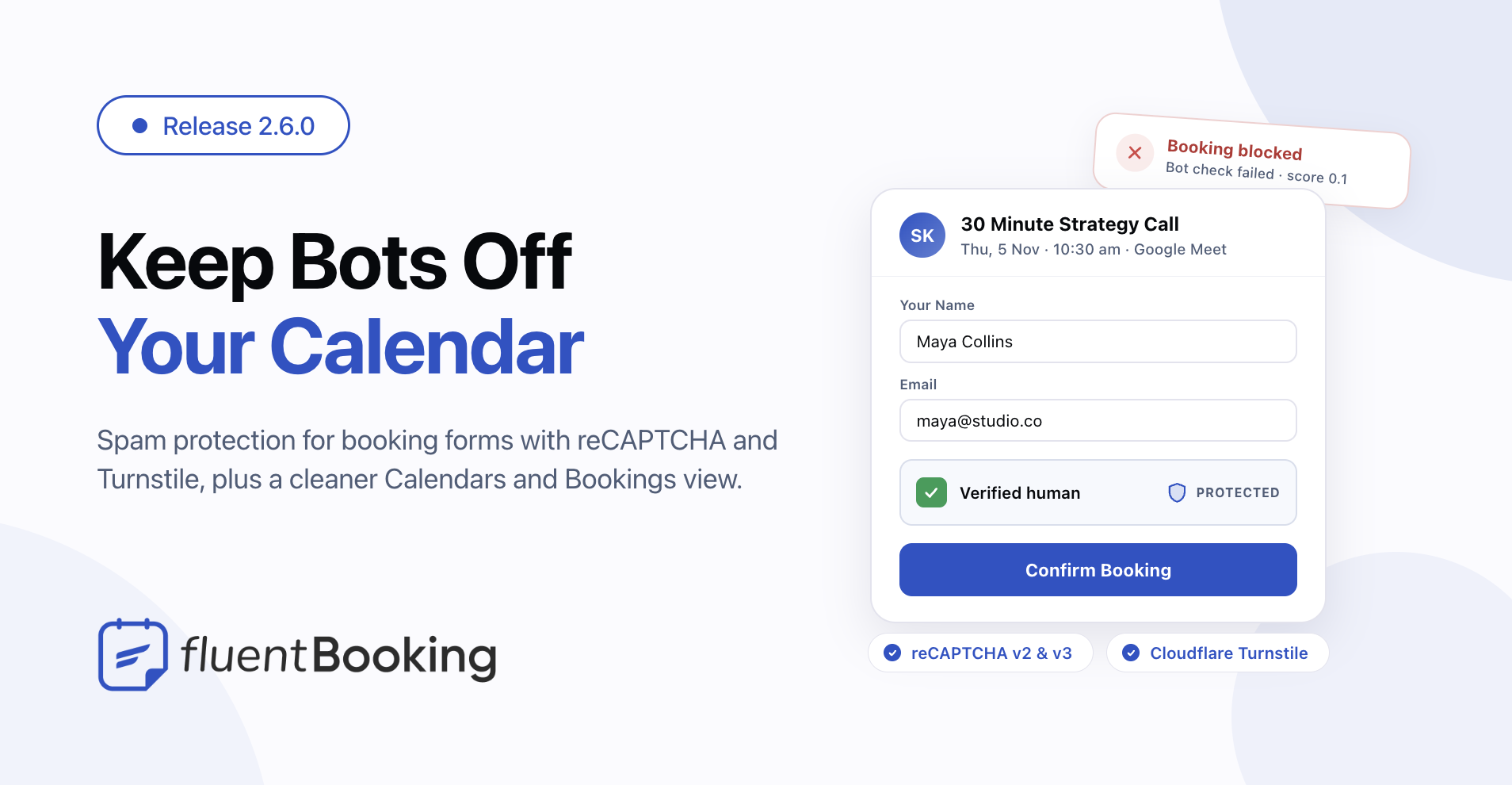
FluentBooking 2.6.0: Booking Spam Protection, a Calendars List View and a Clearer Bookings List


Last Updated:
FluentBooking 2.6.0 keeps fake bookings off your calendar and makes the two pages you open most each day easier to read. Bots can no longer fill your open slots, your event types now sit in a tidy list, and every booking shows what matters at a glance.
Here’s what’s new: spam protection for booking forms, a list view on the Calendars page, a clearer Bookings list, and a System option for dark mode. We also locked down paid meeting links and fixed a set of rescheduling and group-event bugs.
Stop Spam Bookings Before They Reach Your Calendar
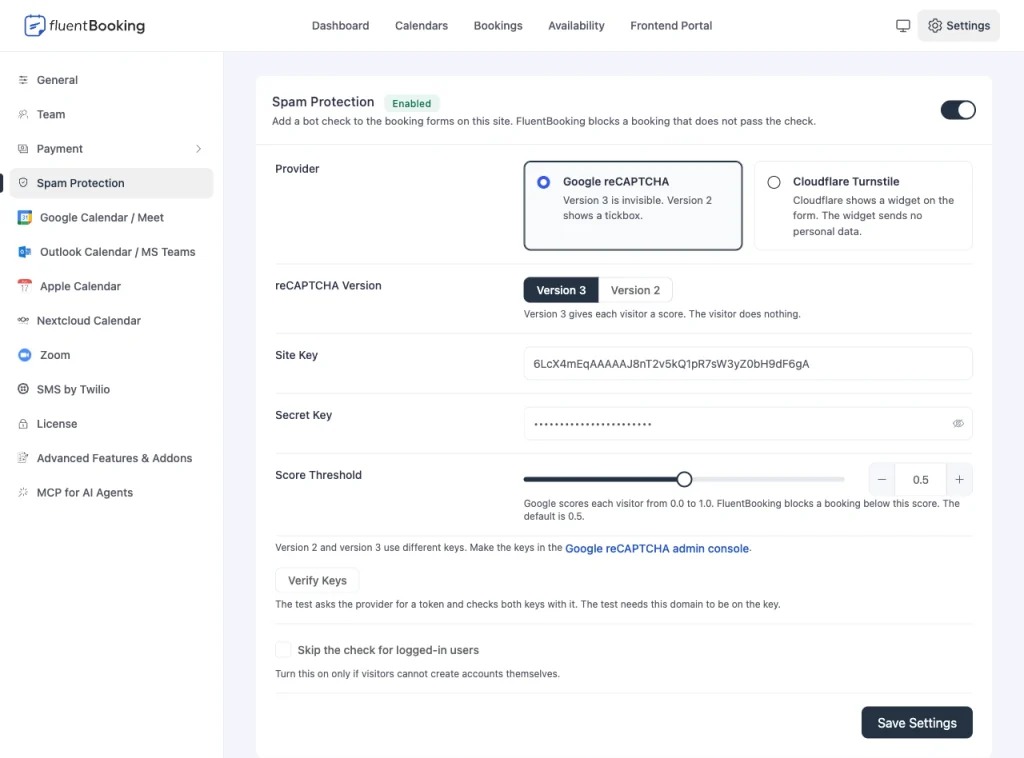
A bot that finds your booking page can grab your open slots and fill your calendar with people who never show up. You can now add a bot check to your booking forms (pro) from Settings → Spam Protection. A booking that fails the check is refused before anything is saved, so no slot is held and no host is notified.
Pick the provider that suits your site:
- Google reCAPTCHA version 3 scores each visitor in the background. Your clients do nothing. You set the score that counts as a bot, and the default is 0.5.
- Google reCAPTCHA version 2 shows the familiar “I am not a robot” tickbox.
- Cloudflare Turnstile shows a small widget that sends no personal data.
Setup guides: Google reCAPTCHA setup guide · Cloudflare Turnstile setup guide. Each guide shows how to make your keys and add them to FluentBooking.
Click Verify Keys to test your keys on the spot, before a real client ever sees the form. If the provider has an outage, bookings keep coming in and the problem is logged, so a third-party hiccup never blocks your calendar. Cancellations, reschedules and bookings you add from the admin skip the check. The booking field inside Fluent Forms uses Fluent Forms’ own spam protection instead.
See All Your Event Types in One Tidy List
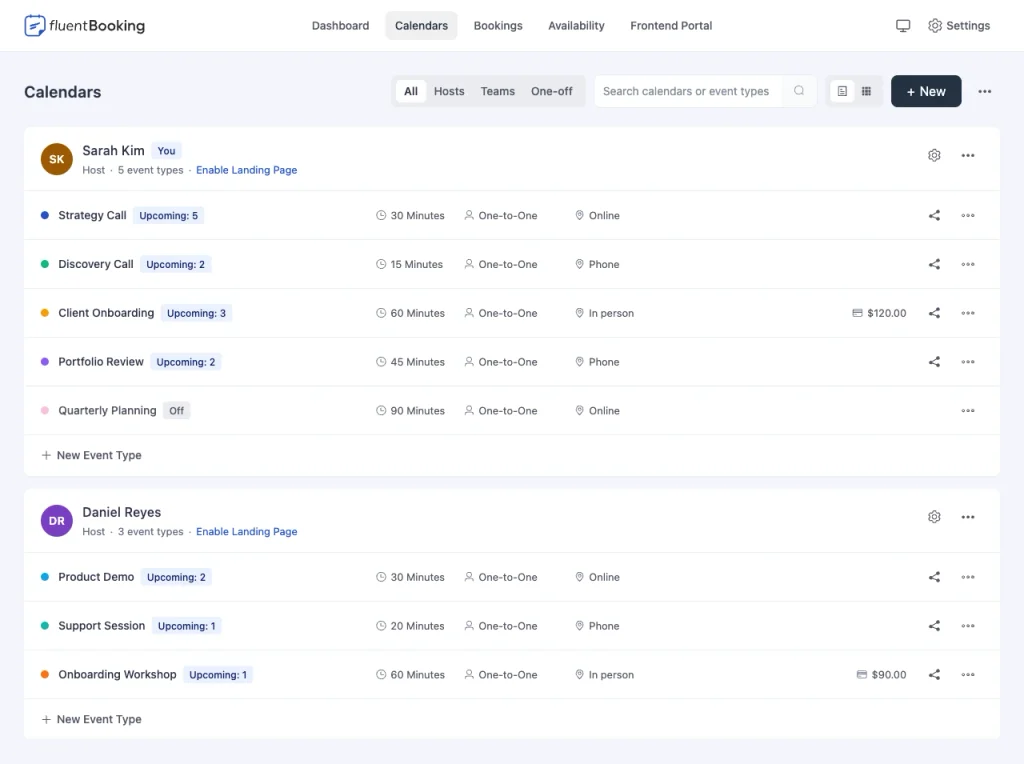
The Calendars page used to give each calendar a big card with a lot of empty space, so you scrolled a long way to find one event type. It now opens in a list view: each calendar is one panel, and each event type is one row with its duration, type and location lined up in columns. Prefer cards? Switch to grid view, and FluentBooking remembers your choice.
A few more things make the page quicker to use:
- Each event type shows how many meetings are coming up, so you can spot your busiest ones. The chip hides when nothing is booked.
- Search now finds a calendar by its name too, so typing a host’s name brings up their calendars.
- Your own calendar comes first, marked with a “You” badge, even on sites with many hosts.
- Share sits right next to each event type, and clicking a calendar’s name or avatar opens its settings.
- Turn an event type on or off from its menu. An event type that is off carries a clear “Off” label.
A Bookings List You Can Read at a Glance
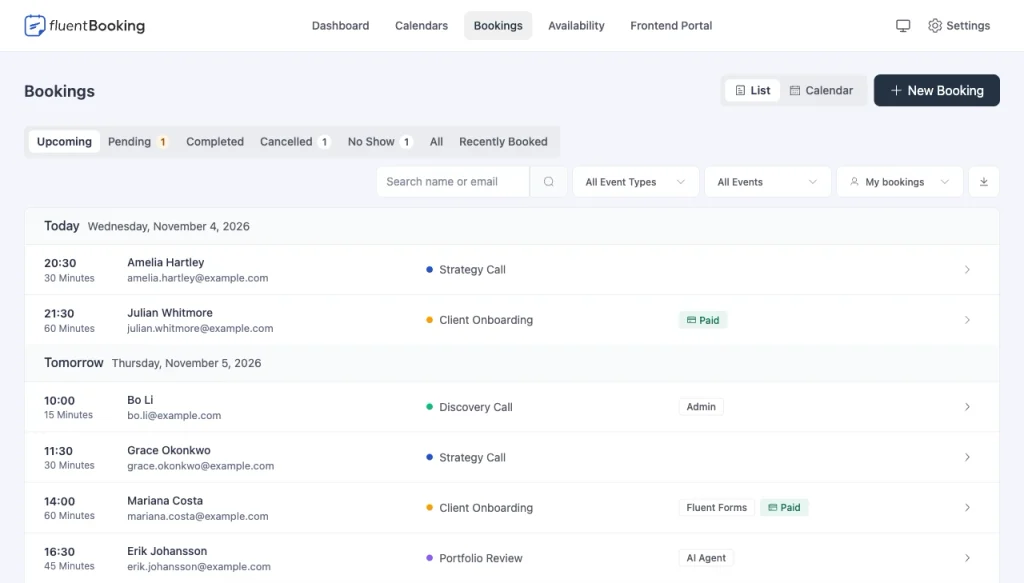
Each booking used to be one long sentence, with the guest’s name at the very end. Now every row has clear columns: the start time and length, the guest’s name and email, the event, and chips for status, payment and where the booking came from. Days are labelled “Today”, “Tomorrow” and “Yesterday”, so you know where you are without reading dates.
The top of the page is easier too. New Booking is a proper button, status tabs show their counts (pending bookings stand out in amber), and “Latest Bookings” is now called Recently Booked. The search box tells you it matches a name or an email.
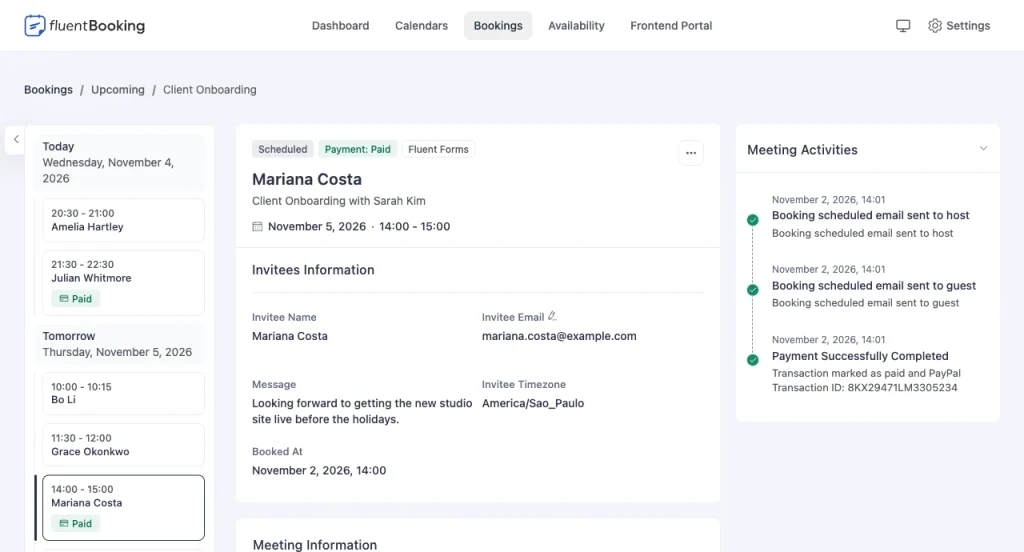
Open a booking and the header now shows its status, payment and source as chips, then the guest’s name, the event with its host, and the date and time. If you set a custom booking title on the event, that title shows instead.
Easier on the Eyes, Day or Night
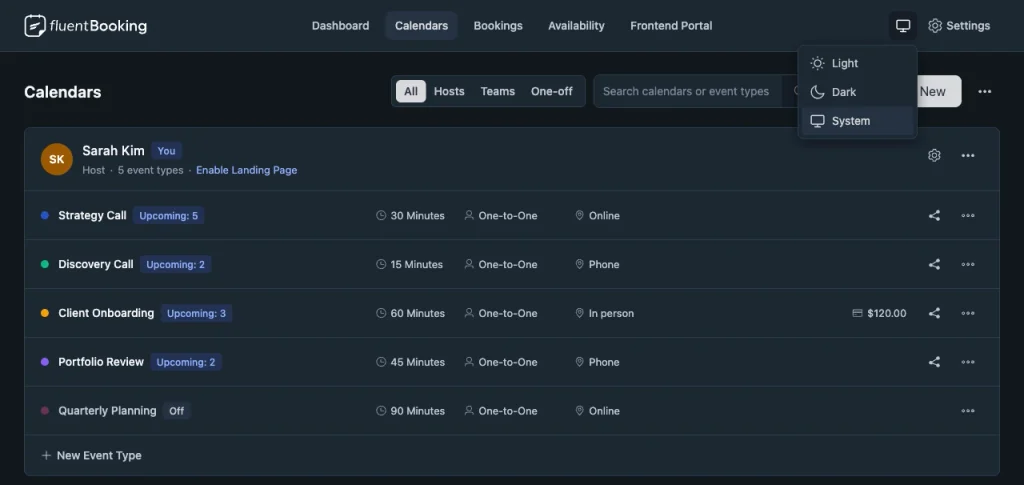
The theme button in the top bar now opens a menu with Light, Dark and a new System option. System follows your device, so FluentBooking turns dark when your computer does. You can also reach the menu from the keyboard now.
We also went over the whole admin for readability. Grey helper text is twice as easy to read as before, keyboard focus is clearly visible, and many colors that stayed light in dark mode now switch with it.
More Small Additions
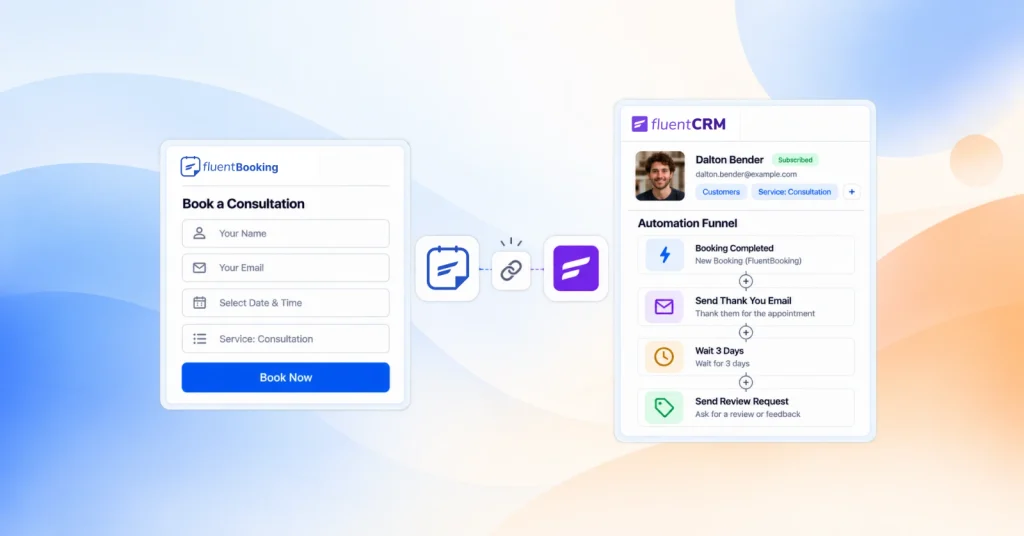
A proper logo in FluentCRM. When you create an automation in FluentCRM, the Booking category now shows the FluentBooking logo instead of a generic icon, so it’s easy to find.
New hooks for developers. The new fluent_booking/mail filter lets you change or take over any email FluentBooking sends, and it tells you which email it is, which booking it’s about and who receives it. fluent_booking/public_booking_url lets you rewrite every public booking link in one place. New permission filters, including fluent_booking/user_permissions and fluent_booking/can_manage_platform, let you shape who can do what.
Safer Paid Bookings and Tighter Access
No meeting link before payment. A guest booking a paid event could see the meeting link on the confirmation page before they paid. Now the video link, and any host location you keep off the booking page, stays hidden in the confirmation and the calendar file until the payment goes through. Free, offline-payment and host-scheduled bookings keep showing it as before, and the guest always sees the address or phone number they typed in.
Each person sees only what they should. We tightened access across the plugin: availability and “My Bookings” stay with their own people, FluentBoards and FluentCRM feeds respect board access and the fields you offer, and bookings no longer link to a WordPress user just because the email matches. Stripe settings and Nextcloud URLs are for admins only, and Zoom accounts stay inside the team (pro).
Safer input everywhere. Guest and host names can no longer add extra recipients to booking emails, redirect links only accept safe addresses, and payment methods and file uploads are checked on every request (pro).
Bug Fixes and Stability
Redirects and smartcodes work again. Smartcodes in a custom redirect URL were stripped when you saved it, and relative redirect links stopped working. Both are back. The Booking Rescheduled trigger in FluentCRM also shows the booking smartcodes now.
Rescheduling and group events behave. A reschedule now checks availability for the booking’s real length, so it can’t land on top of another booking. A full one-off group event reopens when a cancellation frees a seat (pro). Deleting a group booking now removes every attendee’s data, and the guests field can’t be used to add guests when you’ve turned it off.
Everyday polish. A paid event with an empty price no longer breaks the Calendars page. One-off events that filled up stay visible in the admin until the meeting ends. Booking links read cleanly on sites without pretty permalinks. Disabled radios, checkboxes and switches no longer show a second, native input. And logged-out visits to the frontend portal no longer write PHP warnings (pro).
Wrapping Up
FluentBooking 2.6.0 keeps bots away from your open slots and makes your calendars and bookings faster to scan, in light mode or dark. Update when you’re ready, and let us know what you think.
FluentBooking 2.6.0
- Introduced: Booking Spam Protection With reCAPTCHA and Turnstile
- Added: List View on the Calendars Page
- Added: Upcoming Booking Count per Event Type and Calendar Name Search
- Added: Booking Logo in FluentCRM Automation Categories
- Added: Developer Hooks for Emails, Public Booking URLs and Permissions
- Added: System Option in the Dark Mode Switcher
- Improved: Your Own Calendar Listed First With a “You” Badge
- Improved: Quicker Share, Settings and On/Off Actions for Event Types
- Improved: Bookings List Layout, Filters and Status Chips
- Improved: Booking Detail Header With Status, Payment and Source Chips
- Improved: Admin Contrast, Focus Rings and Dark Mode Colors
- Security: Meeting Link Hidden Until the Booking Is Paid
- Security: Hardened Access Checks, Integration Feeds, Payments and Input Handling
- Fixed: Smartcodes and Relative URLs Dropped From Custom Redirects
- Fixed: Booking Smartcodes Missing in the Reschedule Trigger
- Fixed: Reschedule Checking the Wrong Meeting Length
- Fixed: Full Group Event Not Reopening After a Cancellation
- Fixed: Group Booking Delete Leaving Attendee Data
- Fixed: Guests Accepted When the Guests Field Is Disabled
- Fixed: Paid Events With an Empty Price Failing to Save or List
- Fixed: Expired One-Off Events Hidden From the Admin
- Fixed: Unreadable Booking Links on Sites Without Pretty Permalinks
- Fixed: Native Input Showing Through Disabled Radio, Checkbox and Switch
- Fixed: PHP Warnings on Logged-Out Visits to the Frontend Portal
Shahjahan Jewel
Hello, this is Jewel, CEO & Head of Ideas at WPManageNinja. I am obsessed with WordPress since 2009. My aim is to be a user-centric developer first, and a serial entrepreneur second. You will find me discussing various tech issues and trying to come up with scalable solutions on different forums when I am not busy coding.
Table of Content
Subscribe To Get
WordPress Guides, Tips, and Tutorials





Add your first comment to this post