

What Is MCP? How AI Assistants Can Book and Manage Appointments


Last Updated:
Imagine telling an AI assistant, “Book me a 30-minute appointment next Thursday afternoon.”
Instead of simply telling you where to book, the AI could check available slots and create the appointment through your WordPress booking plugin. But how can AI communicate with external software?
That’s where MCP, or Model Context Protocol, comes in. MCP is an open standard that allows AI applications to connect with external tools, data, and services. With the right permissions, an AI assistant can interact with connected software—not just generate answers.
For WordPress users, this opens up new possibilities for working with plugins and other tools. In the booking plugin, allowing AI to find availability, create bookings, and handle scheduling tasks.
In this blog, we’ll discuss what MCP is, how it works, how it connects AI with WordPress, and what you can do with MCP-powered booking workflows.
What Is MCP?
MCP stands for Model Context Protocol. It’s an open standard that helps AI applications connect with external tools, data, and services.
Normally, an AI assistant can understand your request and generate a response, but it may not have direct access to the software or information needed to complete a task. MCP provides a standardized way for the AI to communicate with connected systems and use the tools they make available.
For example, an AI assistant might know that you want to book an appointment, but it needs access to a booking system to see which time slots are actually available. Through an MCP connection, the assistant can interact with a supported booking tool and retrieve that information.
The important thing to remember is that MCP doesn’t give an AI automatic access to everything. The connected application decides which tools and information are available, while permissions determine what the AI can access or do.
In simple terms, think of MCP as a bridge between an AI assistant and the software you use. It gives the AI a standardized way to communicate with those external tools instead of keeping it limited to conversation alone.
Why Do We Need MCP in Appointment Booking?
AI assistants can understand requests, but they don’t automatically have access to your booking system.
For example, if you ask, “What appointment slots are available next Thursday?”, the AI needs access to your scheduling system to check real-time availability and give you an accurate answer.
Without a common standard, connecting AI assistants to booking systems can require separate integrations and custom solutions. MCP helps simplify this by providing a standardized way for AI applications to communicate with external tools and services.
With MCP, a booking system can make specific capabilities available to an AI assistant, such as checking availability, retrieving booking information, or managing supported appointments.
In simple terms, MCP helps bridge the gap between what you ask an AI to do and what your booking system can actually do. That’s what makes it useful for creating a more conversational appointment-booking experience.
How Does MCP Work?
MCP works as a communication layer between an AI application and an external system. It gives the AI a standard way to discover and use the tools made available by that system.
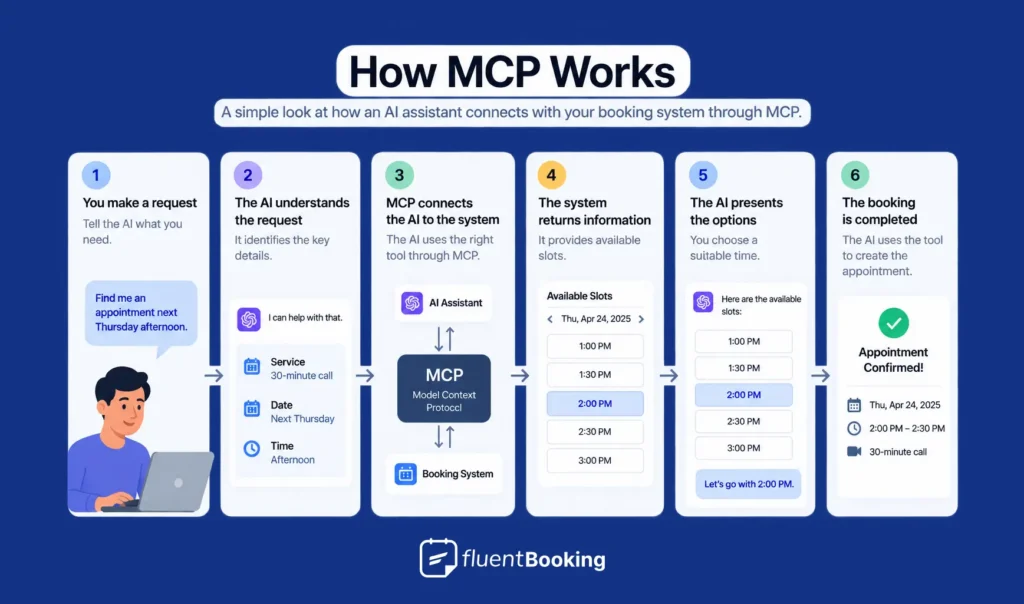
For appointment booking, the process can look like this:
- You make a request: “Find me an appointment next Thursday afternoon.”
- The AI understands the request: It identifies what you need, such as the service, date, and preferred time.
- 3. MCP connects the AI to the available tools: The AI application uses an MCP client to communicate with the MCP server and call the appropriate tool.
- The booking system returns information: The system provides available appointment slots.
- The AI presents the options: You can choose a suitable time.
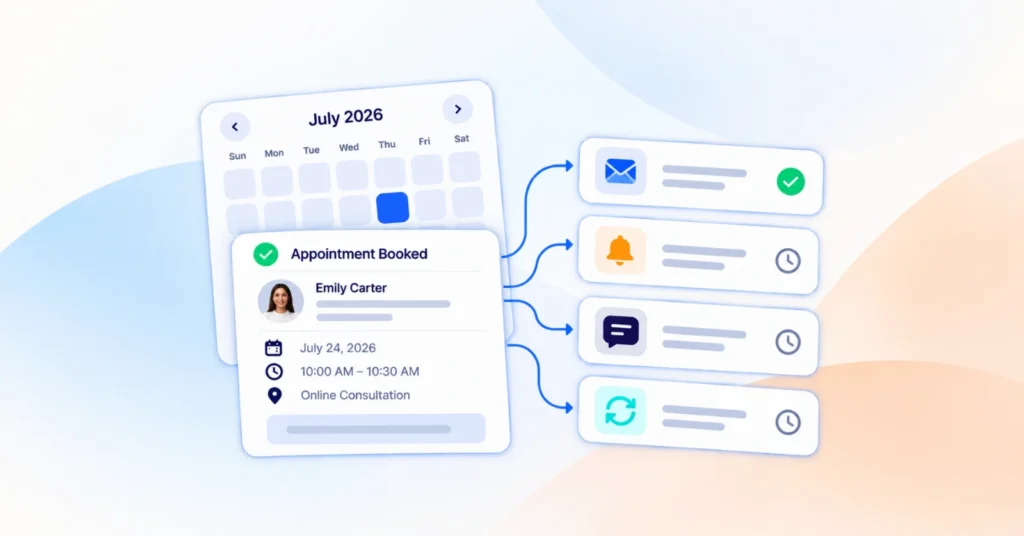
- The booking is completed: If the necessary permissions and confirmation are in place, the AI can use the available booking tool to create the appointment.
The important part is that MCP doesn’t handle the appointment itself. It provides a standardized connection that lets the AI and booking system communicate.
This lets the AI work with real information from the connected system instead of relying on assumptions or static data.
What Can You Actually Do With MCP?
“AI-powered booking” can sound abstract until you see what it can actually do. Here are a few practical examples.
Find and Book an Appointment
A customer could ask:
“I need a 30-minute consultation next Tuesday afternoon.”
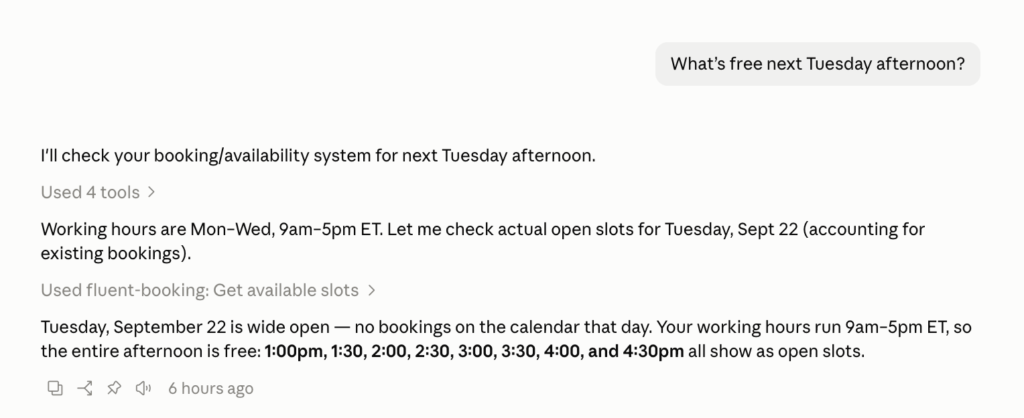
The AI can check the connected booking system, find available slots, and show the options that match the request.
Reschedule an Appointment
Instead of searching through a booking dashboard, a user could say:
“Move my Thursday appointment to Friday afternoon.”
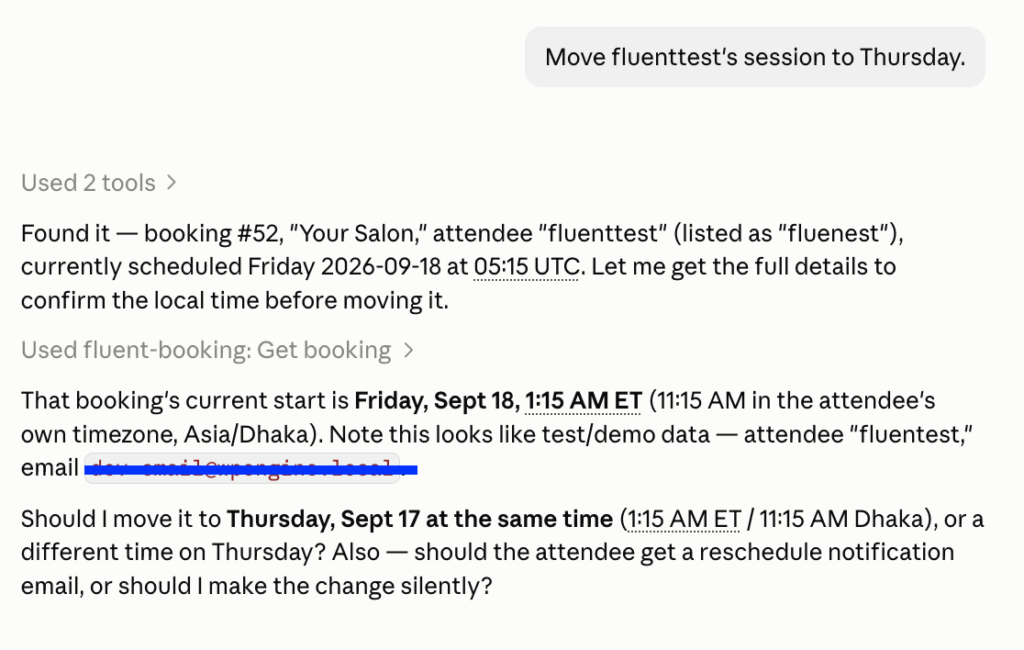
If the necessary tools and permissions are available, the AI can find a suitable slot and update the booking.
Check Your Schedule
A business owner could ask:
“What appointments do I have tomorrow?”
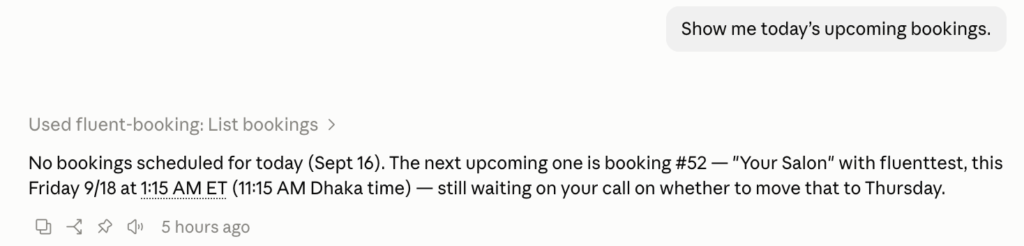
The AI can retrieve the relevant information from the connected scheduling system, saving the user from checking the calendar manually.
Access Booking Information
Depending on the tools provided by the integration, an AI assistant may also access information such as event types, availability, bookings, and reports.
The key point is that MCP doesn’t automatically give an AI access to everything. The connected application decides which tools are available, while permissions determine what the AI can access or change.
How Is MCP Different From a Chatbot or Automation Tool?
MCP can sound similar to chatbots and automation tools, but they solve different problems.
| Technology | Main purpose | Example |
| Chatbot | Communicates with users | Answers questions about services and booking |
| Automation | Runs predefined workflows | Sends a confirmation email after a booking |
| MCP | Connects AI with external tools | Lets an AI check availability or manage a supported booking |
MCP vs. Chatbots
A chatbot is mainly designed to communicate with users. It can answer questions, provide information, and guide visitors through a process.
For example, a booking chatbot might tell you which services are available and send you to a booking form.
MCP provides a way for an AI application to connect with external tools. If a booking system exposes the right tools, the AI can potentially check availability or manage an appointment instead of simply directing you to a form.
MCP vs. Automation
Automation tools usually follow predefined workflows.
For example:
New booking → Send confirmation email → Add customer to CRM
MCP works differently. An AI can interpret a natural-language request and use the appropriate connected tools based on what the user asks.
For example:
“Find me a 30-minute appointment next Thursday afternoon.”
The AI can understand the request, check the available booking tools, retrieve suitable slots, and continue the interaction based on the result.
So, while chatbots focus on conversation and automation focuses on predefined workflows, MCP provides a standardized way for AI applications to interact with external tools.
Is MCP Safe?
When AI can interact with external tools, permissions and access become important.
Permissions Matter
MCP doesn’t automatically give an AI unlimited access to your software. The MCP server and connected application determine which tools are available, while permissions control what the AI can access or change.
What About Confirmation?
For sensitive actions, the AI client or integration can require user confirmation before completing the action. The exact confirmation process depends on how the AI client and connected application are designed.
What Data Can an AI Access?
That depends on the tools exposed by the connected application. Before connecting an AI assistant, it’s important to understand what information and actions the integration makes available.
Do You Need to Know How to Code to Use MCP?
No, not always.
If the software you use already supports MCP, you generally don’t need to understand the underlying protocol or build the connection yourself.
Building an MCP integration is different. Developers need programming knowledge to create an MCP server, connect it to an application, and define the tools an AI can use.
For WordPress users, existing plugins with MCP support can handle much of this technical work.
No problem.
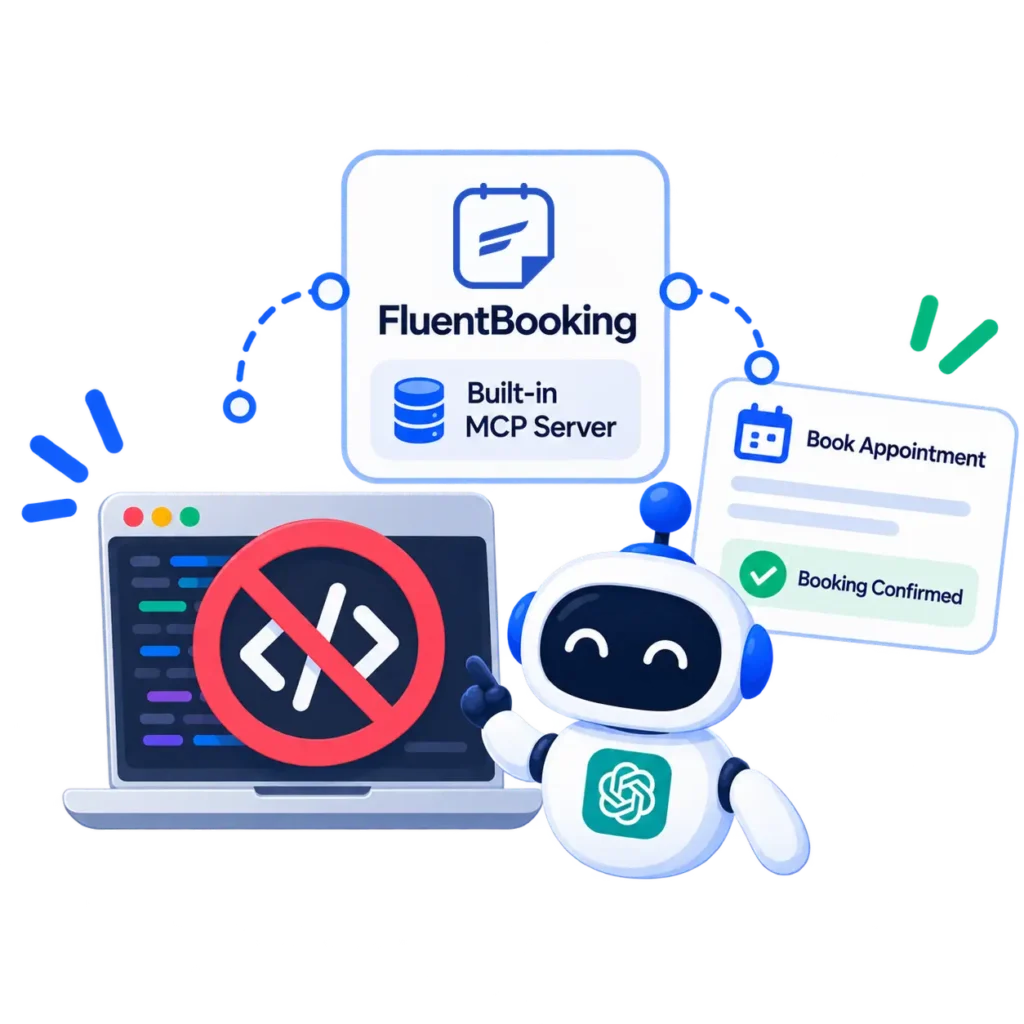
FluentBooking’s built-in MCP server lets you connect your booking system with an AI assistant—without writing code.
Which AI Assistants Support MCP?
MCP is designed as an open standard, so it isn’t limited to one AI provider.
Claude supports MCP, and OpenAI currently supports MCP apps in ChatGPT through developer mode, with full MCP support including write actions rolling out in beta for Business, Enterprise, and Edu plans. Availability and capabilities can vary by client and plan.
So, MCP compatibility doesn’t necessarily mean every AI assistant can perform every action with every MCP-enabled application.
Is MCP Only for Booking?
No. Appointment booking is just one practical use case.
MCP can connect AI applications with tools used for:
- Customer support
- Project management
- CRM
- E-commerce
- Data analysis
- Content management
- Business operations
The same basic idea applies across these use cases: an AI assistant can interact with external tools instead of being limited to conversation.
What Does MCP Mean for WordPress?
WordPress powers websites for businesses, creators, agencies, and organizations, many of which rely on plugins for everyday tasks.
MCP provides a standardized way for AI applications to interact with supported WordPress tools. For example, an AI assistant could potentially work with a booking plugin to check availability, retrieve booking information, or manage supported appointments.
Some WordPress plugins are already beginning to adopt MCP. FluentBooking, for example, introduced MCP support in version 2.4.0, allowing compatible AI clients to interact with supported booking tools. If you want to try it, you can follow the FluentBooking MCP setup guide to learn how to enable the MCP server and connect it to an AI client.
This is one example of how MCP can give users a new way to interact with WordPress functionality through AI.
From Asking AI to Getting Things Done
MCP gives AI applications a standardized way to connect with external tools, data, and services. Instead of simply answering questions, an AI assistant can use connected tools to retrieve information and perform supported actions.
For appointment booking, that could mean checking real-time availability, finding a suitable time, or
managing an existing booking through a connected scheduling system.
The important thing to remember is that MCP is the connection, not the booking system itself. What an AI can access or do depends on the tools exposed by the connected application and the permissions in place.
As more software adopts MCP, interacting with digital tools could become more conversational. And for WordPress users, appointment booking is just one example of how this shift can make everyday tasks easier to manage.
If you’re new to MCP, the easiest way to think about it is simple: it helps AI move from understanding what you want to interacting with the tools that can help get it done.
Ratul Hasan Ripon
I enjoy making complex ideas simple and engaging through my writing and designs. With a strong knowledge on content writing and SEO, I create technical content that’s both easy to understand and interesting.
Table of Content
Subscribe To Get
WordPress Guides, Tips, and Tutorials


Add your first comment to this post