

How to Set Up Recurring Class Bookings in WordPress (For Tutors & Educators)


If you teach the same students every week, manual scheduling gets old fast. The messages, the reminders, the reschedules, the missed sessions… it all adds up.
A recurring class booking system in WordPress gives you a cleaner way to handle repeat lessons without turning your inbox into a calendar.
This guide walks you through setting up an automated system that works for tutoring, coaching, and online classes.
What Are Recurring Class Bookings?
Recurring class bookings are repeat appointments that follow a fixed schedule.
Instead of booking each class one by one, the student selects a pattern once, and the system automatically schedules future sessions.
For example:
- Every Monday at 6 PM for 4 weeks
- Every Wednesday and Friday for a month
- Weekly group class for ongoing students
This works best for: weekly tuition, coaching programs, language classes, skill-based training, etc.
Why Tutors Need a Recurring Booking System
If you’re still managing classes manually, you’re doing extra work every single week. A recurring booking system helps you:
- Reduce back-and-forth messages
- Avoid double bookings
- Keep all sessions organized in one place
- Send automatic reminders
- Reduce no-shows
- Deliver a more professional experience
Most importantly, it saves time, and that time adds up fast.
What You Need Before Setting It Up
Before you start, make sure you have a few basics ready:
- A WordPress Website: You need a WordPress site where students can view your booking page and reserve a class.
- A Booking Plugin with Recurring Support: Not all plugins support recurring appointments. Make sure you’ve installed a booking plugin like FluentBooking that supports recurring class scheduling.
- A Clear Class Structure: Decide how your classes work before you build the booking flow. You should decide the class duration, frequency, class format (one-on-one/group), and booking rules to make the system smooth.
Step-by-Step Guide to Set Up Recurring Class Bookings
Here’s the simplest way to set up a recurring class booking that WordPress users can actually manage without headaches.
Install and activate a booking plugin
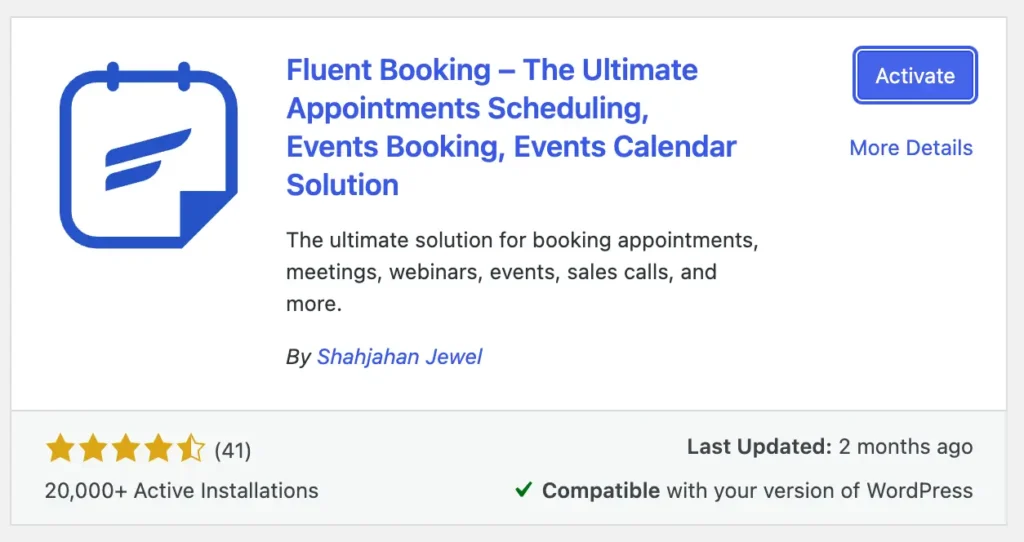
Start by choosing a booking plugin for WordPress that supports recurring classes. After installing it, activate the plugin and open its booking settings.
Look for features like:
- Recurring bookings
- Time slot management
- Calendar sync
- Automated reminders
So, install a recurring appointment booking plugin like FluentBooking that meets your requirements.
Create your class type
Next, set your class type to one-on-one or group. If it’s a personal tutoring, then select one-on-one, and in case of a group class, select group meeting. For FluentBooking:
- Go to Calendar > New > Add Host
- Then select between One-to-One/Group
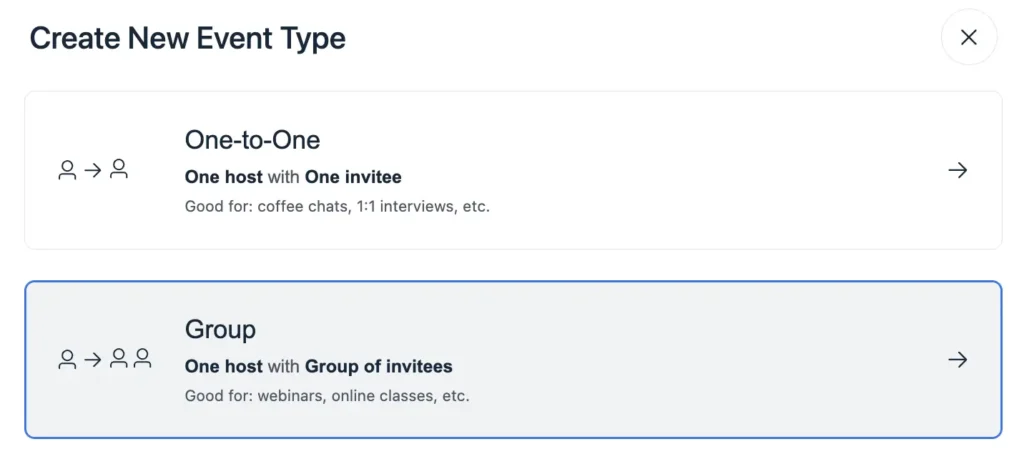
N.B. FluentBooking supports recurring appointments in the pro version only for one-on-one and group meetings.
Add event details
Next, you need to add all your important event details for the attendee.
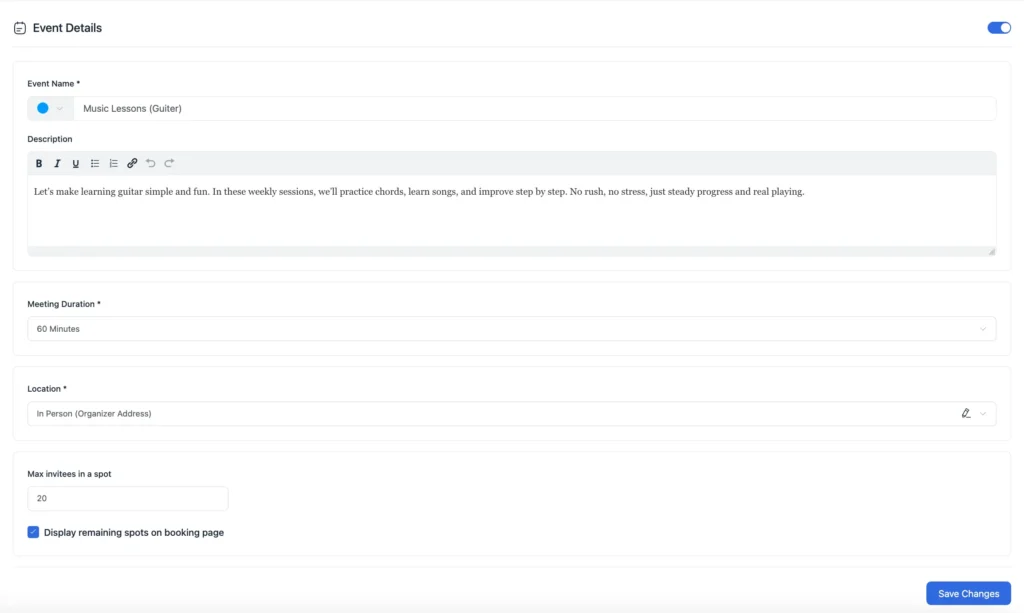
- Event Name: Set an engaging title for your class
- Description: Write a persuasive description to attract clients instantly
- Meeting Duration: Select your class duration or set a custom duration
- Location: Select between online/physical location
- Timezone: Set the timezone of your class schedule
Set your availability
Next, you need to set your weekly available time.
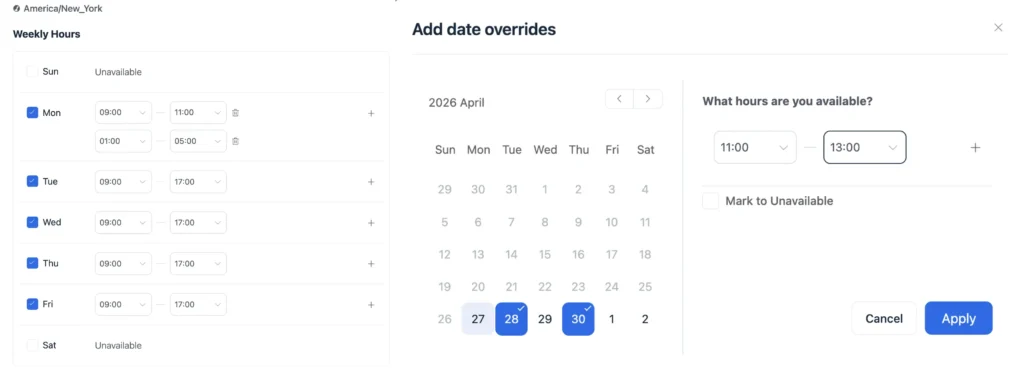
- Set your weekly available time and hours
- You can also set multiple availabilities for a single day
- If needed, you can add date overrides to add unavailable hours
Set booking limits
Then you can set the booking limits and control how your students book your time.
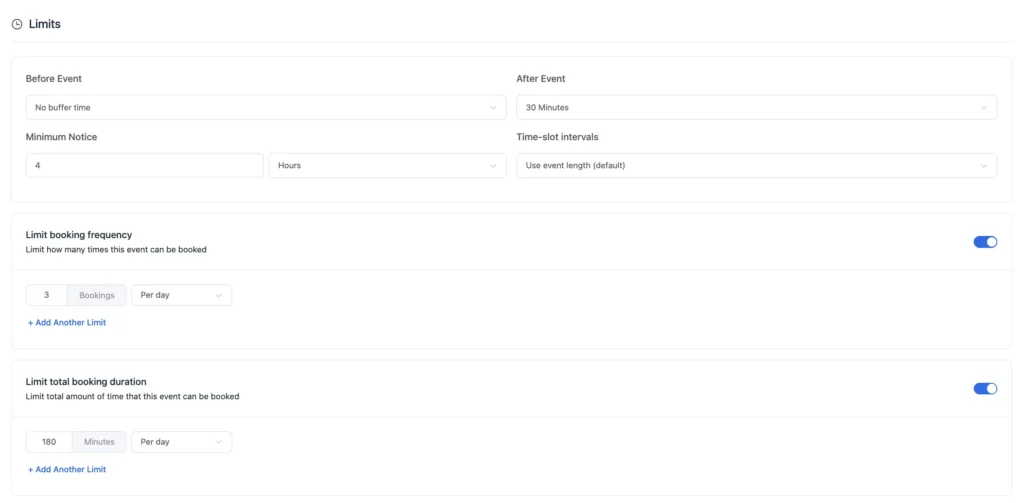
- Buffer Time: Add buffer time before or after any class
- Limit Booking Frequency: Assign limits on how many times students can schedule appointments on a daily/weekly/monthly basis
- Limit Booking Duration: Limit the total amount of time students can book daily/weekly/monthly
Add personalized questions
Next, you can add personalized questions for your students to make their experience even better. Adding personalized questions will not only make a great impression but also help you to deliver customized care for every student.
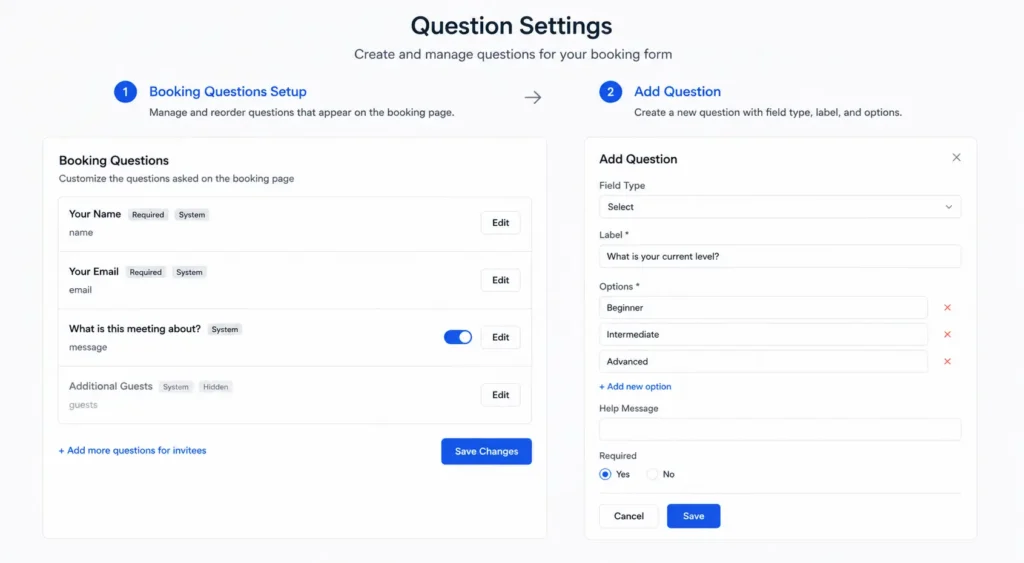
- Go to Questions Settings > + Add more questions for invitees
- Select Field Type, Add Label, and customize your questions accordingly
Activate email & SMS notifications
You can enable email and SMS notifications to keep your students notified about every important update during the course.
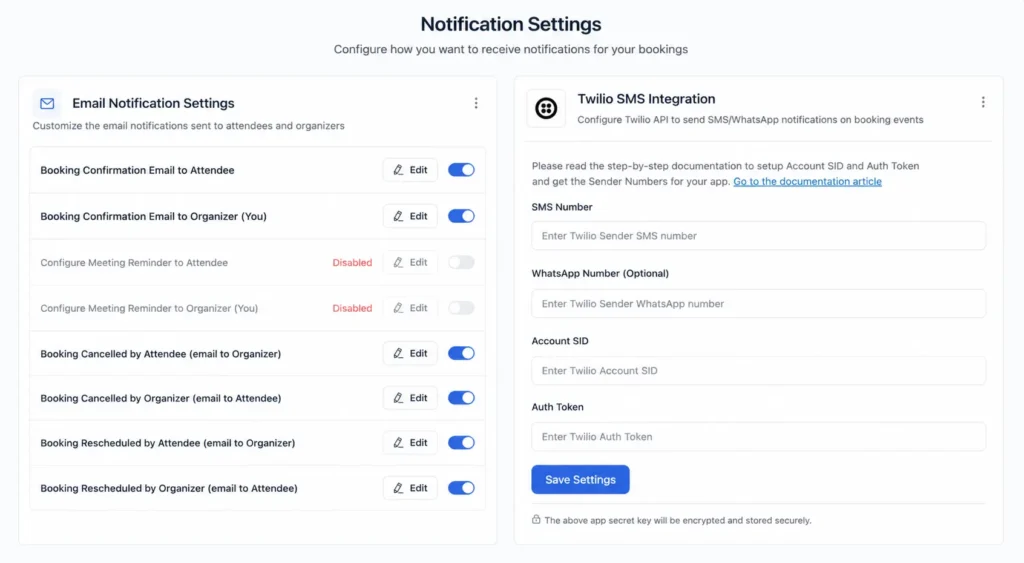
- Email Notifications: Set email notifications for booking confirmation, reminder, cancellation, etc.
- SMS Notifications: Connect with Stripe and set SMS/WhatsApp notifications for different booking events.
Enable recurring appointment
This is the most important part of the entire setup.
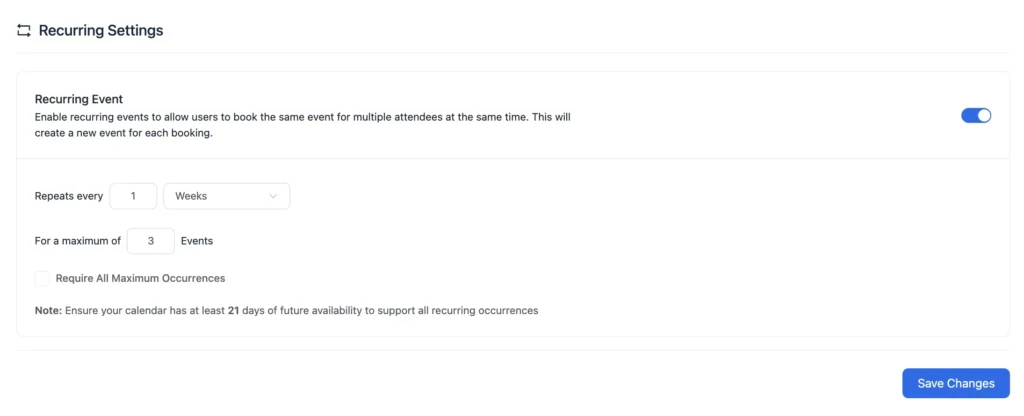
- Go to Recurring Settings > Enable Recurring Event
- Then set the recurring rules of your class events
- You can also check Requires All Maximum Occurrences if the attendee needs to book all slots
Connect with your calendar app
To avoid scheduling conflicts, you need to sync your calendar with FluentBooking.
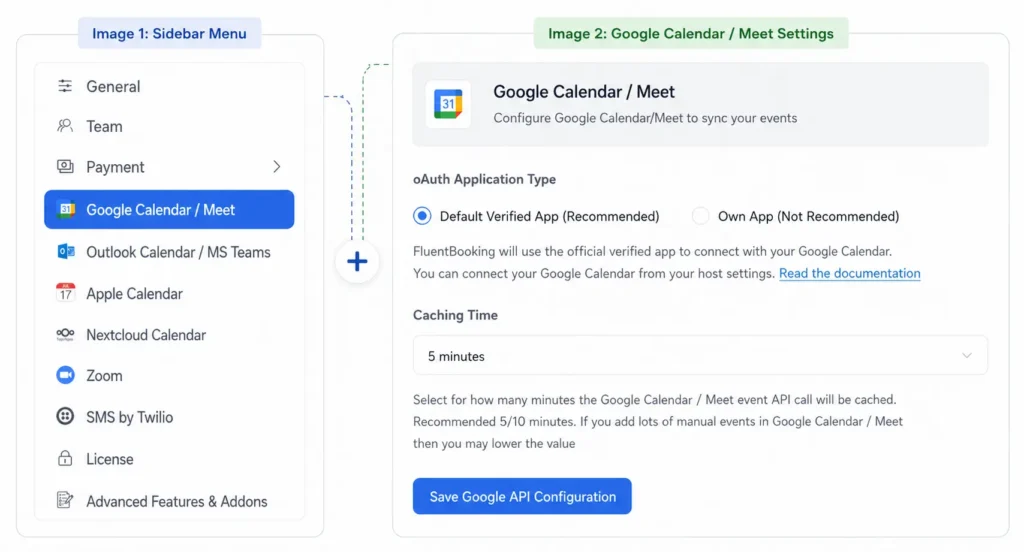
- Go to Settings, and you’ll discover all the supported calendars
- Select among Google/Apple/Outlook/Nextcloud and start syncing events
Enable payment
A secure payment system is mandatory if your classes are paid.
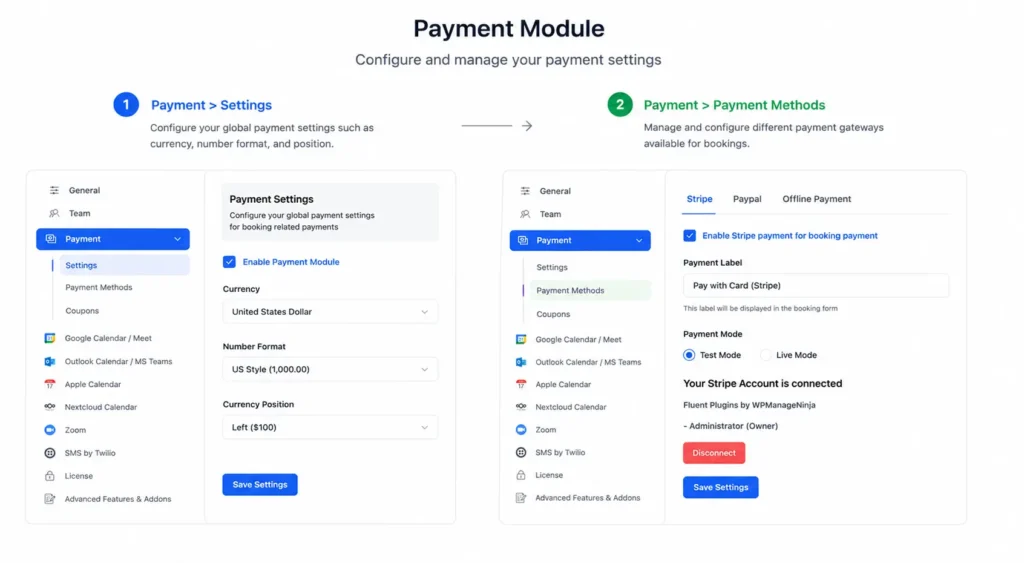
- Go to Settings > Payment > Enable Payment Module
- Next set currency, number format, etc.
- Then go to Payment Methods and select your preferred payment method
Publish your booking page
Finally, go live with your booking calendar and let your students schedule learning sessions.
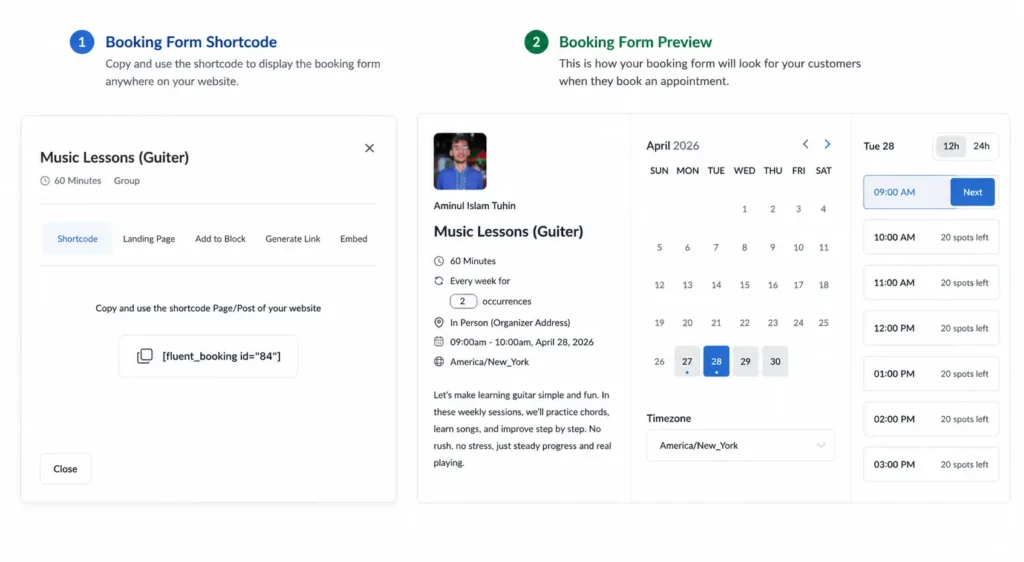
- You can select among Shortcode, Landing Page, Add to Block, Generate Link, etc.
- Finally, go live with your booking calendar and let your students schedule recurring sessions
Common Mistakes to Avoid
Avoid these common issues:
- Making the booking form too long
- Not setting reminders
- Offering too many options
- Ignoring mobile experience
- Overbooking time slots
- Not checking recurring conflicts
Make Recurring Classes Feel Effortless
Recurring classes inside WordPress make your teaching workflow stable, predictable, and stress-free.
Your students know exactly when they’re meeting you, your calendar stays organized, and you stop spending hours every week just trying to coordinate sessions.
The best part? You don’t need a complicated setup to get there.
Once it’s in place, you’ll notice the difference immediately, not just in how you manage bookings, but in how smoothly your entire teaching process runs.
Frequently Asked Questions
Aminul Islam Tuhin
Hi! Nice to meet you. I’m a guy who loves to explore, learn, and share knowledge. I spend most of my time catching up with marketing tips & tricks. When I’m not busy with any of these, you’ll find me with a book, exploring the city, or playing my favorite games.
Table of Content
Subscribe To Get
WordPress Guides, Tips, and Tutorials

Add your first comment to this post