

How to Add Coaching Calls to Your Online Course Using FluentBooking


Creating an online course is easier than ever. But creating a course that delivers real results is a different challenge.
Many course creators spend weeks building lessons, recording videos, and organizing learning materials, only to discover that students lose motivation halfway through the program. Some students get stuck and never ask for help. Others struggle to stay accountable and eventually stop progressing altogether.
That’s why many successful course creators add coaching calls to their courses.
The challenge? Managing coaching appointments manually can quickly become overwhelming as your student base grows.
In this guide, you’ll learn how to create an online course and add coaching calls using FluentBooking so students can schedule sessions automatically without endless emails, scheduling conflicts, or manual coordination.
Why Add Coaching Calls to Your Online Course?
Online courses are great for delivering knowledge at scale. However, they often lack personal interaction.
Students may have questions that aren’t covered in the lessons. They may need guidance to apply what they’ve learned. Some simply need accountability to stay on track.
Adding coaching calls helps solve these challenges.
Benefits of adding coaching calls to your course include:
- Better student engagement
- Higher course completion rates
- More personalized learning experiences
- Stronger relationships with students
- Opportunities to offer premium course packages
- Increased student satisfaction and success
Instead of relying solely on recorded content, you create a learning experience that combines flexibility with personal support.
What You’ll Need
To follow this setup, you’ll need:
- A Course Platform: You’ll need a course platform where students can access lessons, modules, and learning resources. For this tutorial, we’ll use FluentCommunity’s built-in course feature to organize and deliver course content directly inside WordPress.
- A Scheduling System: You’ll also need a scheduling solution that allows students to book coaching sessions without manual back-and-forth communication. This is where FluentBooking comes in. FluentBooking lets you create coaching events, manage your availability, automate reminders, and let students book appointments whenever they need support.
Create Your Online Course
Before adding coaching calls, you’ll need a course structure for your students.
With FluentCommunity, you can create courses directly inside WordPress and organize them into modules and lessons.
Start by creating a new course and adding your course details.
Next, create modules to organize your content into logical sections. Within each module, add lessons containing videos, text content, downloads, or any learning materials you want students to access.
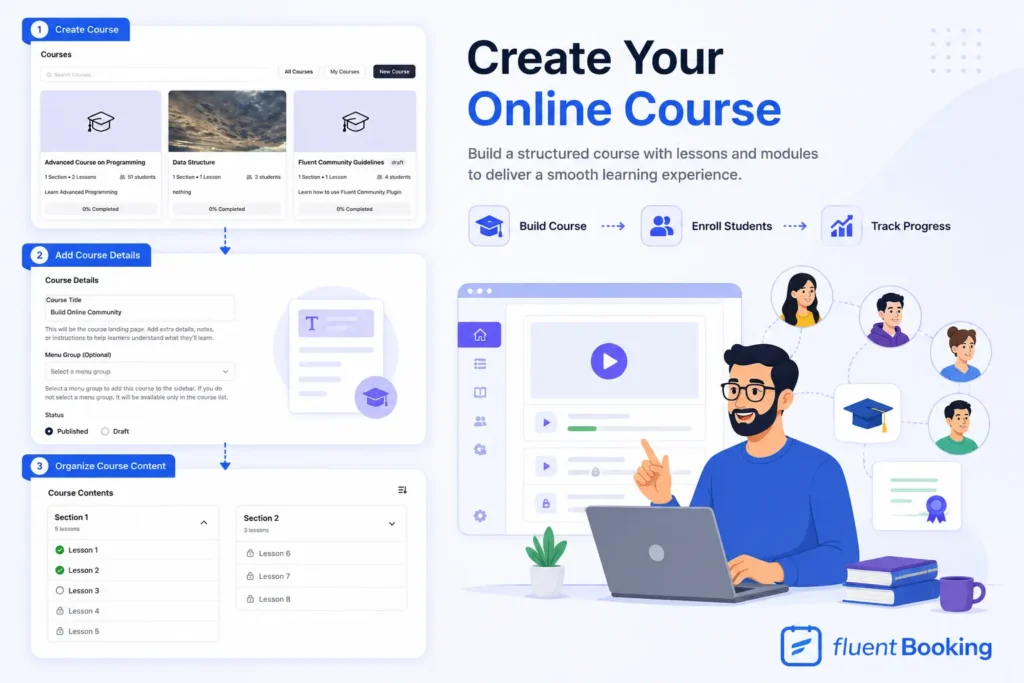
For example, a business coaching course might look like this:
- Module 1: Business Foundations
- Module 2: Client Acquisition
Once your lessons are ready, publish the course and enroll your students. Now it’s time to add the personal coaching element that makes your course more valuable.
Decide How Coaching Calls Fit Into Your Course
Not every course uses coaching in the same way. Before creating booking events, decide how students will access coaching sessions.
Here are a few popular models:
- One Coaching Call After Course Completion: Offer a personalized strategy session once students finish the course. This works especially well for business, marketing, and consulting courses.
- Weekly Coaching Sessions: Provide ongoing support through recurring coaching appointments. This model helps students stay accountable and continue making progress.
- Group Coaching Calls: Host regular group coaching sessions where multiple students can join the same call. This reduces your workload while still providing valuable support.
- VIP Coaching Packages: Offer premium coaching sessions as an upsell alongside your course. Students who want personalized guidance can purchase additional coaching access. Once you’ve decided on your coaching structure, you’re ready to set up scheduling.
Create a Coaching Event in FluentBooking
Now let’s create a coaching booking system using FluentBooking. Inside FluentBooking, create a new event and choose the meeting type that best fits your coaching model.
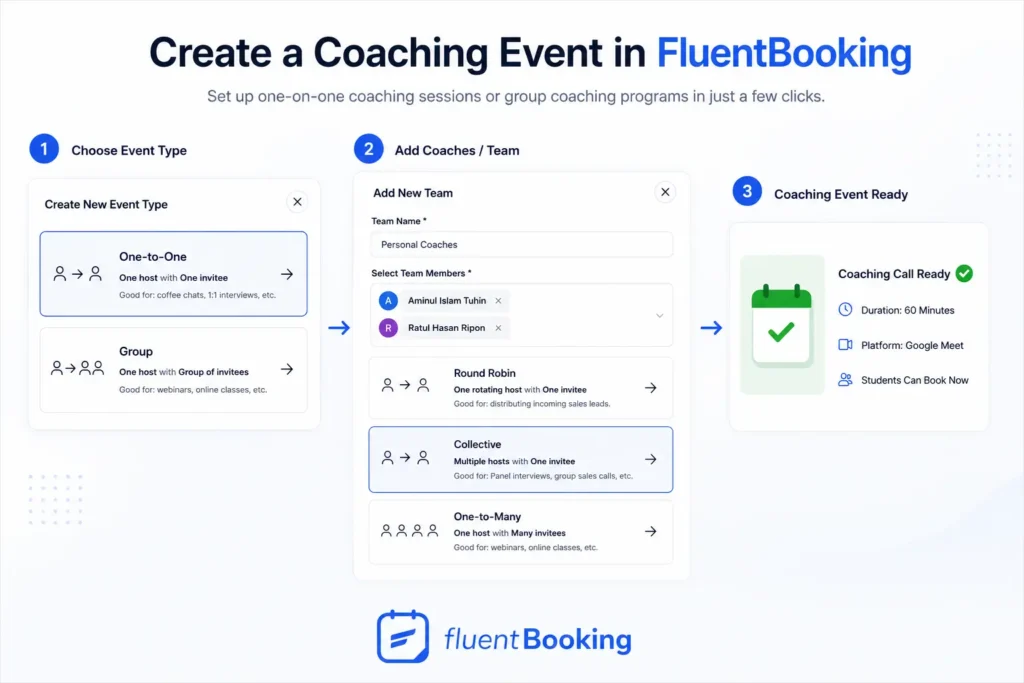
For example:
- One-on-One Coaching
- Group Coaching
- Team Coaching
Connect Your Calendar and Meeting Platform
A coaching business quickly becomes difficult to manage without calendar synchronization.
FluentBooking allows you to connect:
- Google Calendar
- Apple Calendar
- Outlook Calendar
- Nextcloud Calendar
This prevents double bookings and keeps your schedule updated in real time.
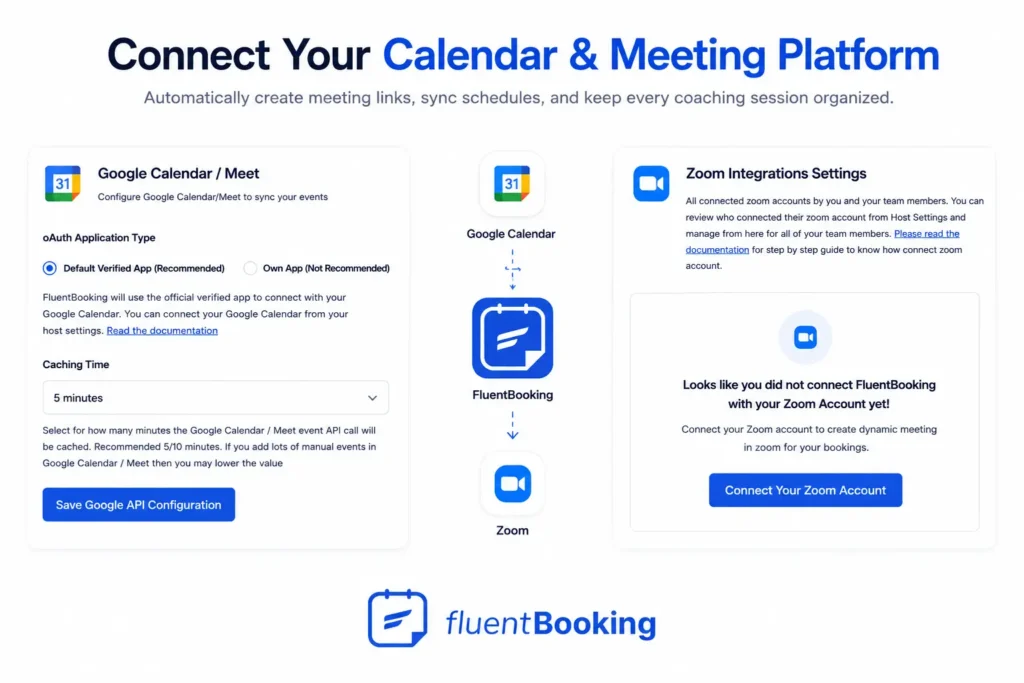
You can also connect your preferred meeting platform, including:
- Zoom
- Google Meet
- Microsoft Teams
When a student books a coaching session, meeting links can be generated automatically and included in confirmation emails.
Customize Your Coaching Booking Form
Before students schedule a session, it’s helpful to collect information about their goals and challenges.
FluentBooking allows you to add custom booking questions, such as:
- What would you like help with?
- Which lesson are you currently working on?
- What challenge are you facing?
- What outcome would you like from this coaching session?
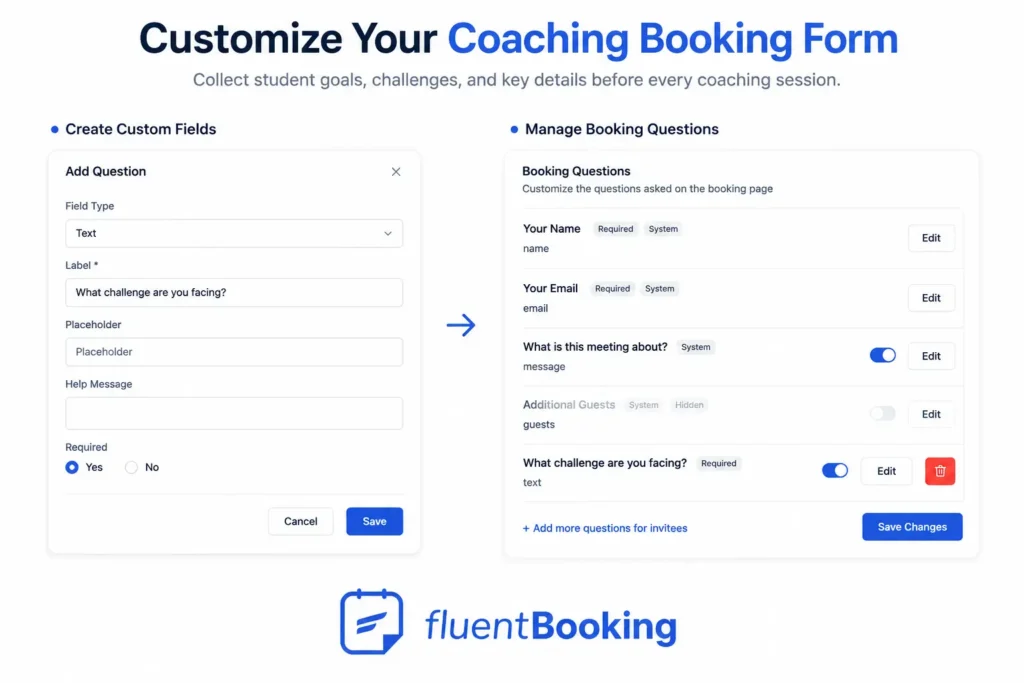
This information helps you prepare in advance and deliver more valuable coaching.
Instead of spending the first few minutes gathering context, you can jump straight into helping the student.
Add the Booking Link to Your Course
Now that your coaching event is ready, you need to make it accessible to students. This allows students to request help whenever they reach a challenging moment.
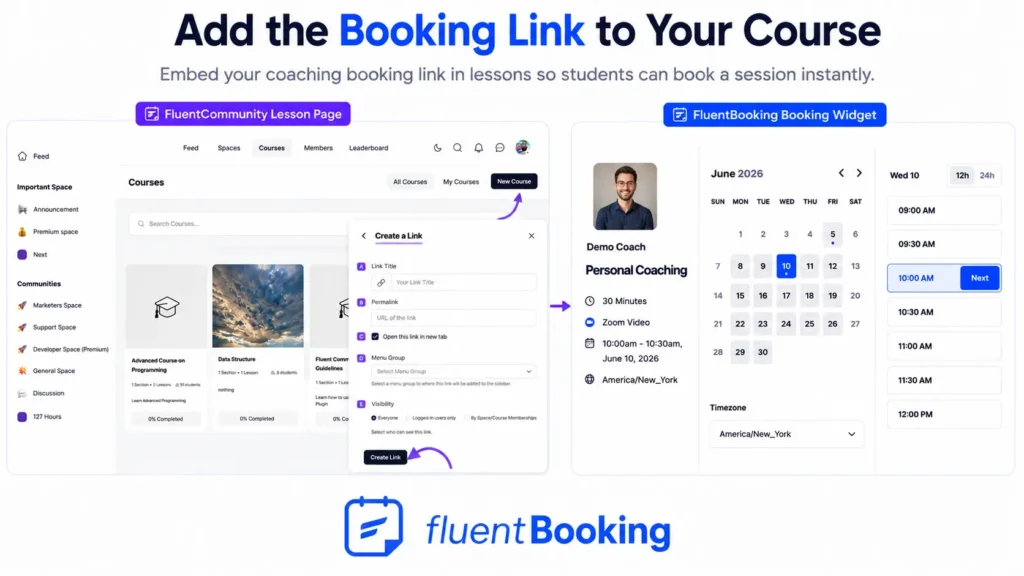
If you’re using FluentCommunity spaces, you can also share coaching opportunities within your student community.
Automate Coaching Reminders
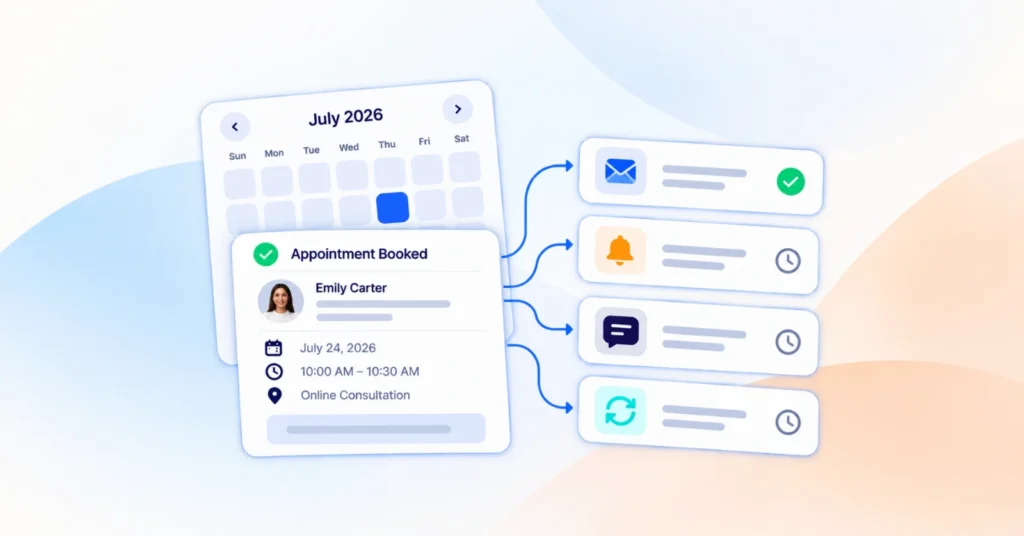
One of the biggest reasons students miss coaching calls is simple: they forget. FluentBooking helps reduce no-shows through automated notifications. You can automatically send: booking confirmations, appointment reminders, calendar invitations, reschedule notifications, and cancellation updates.
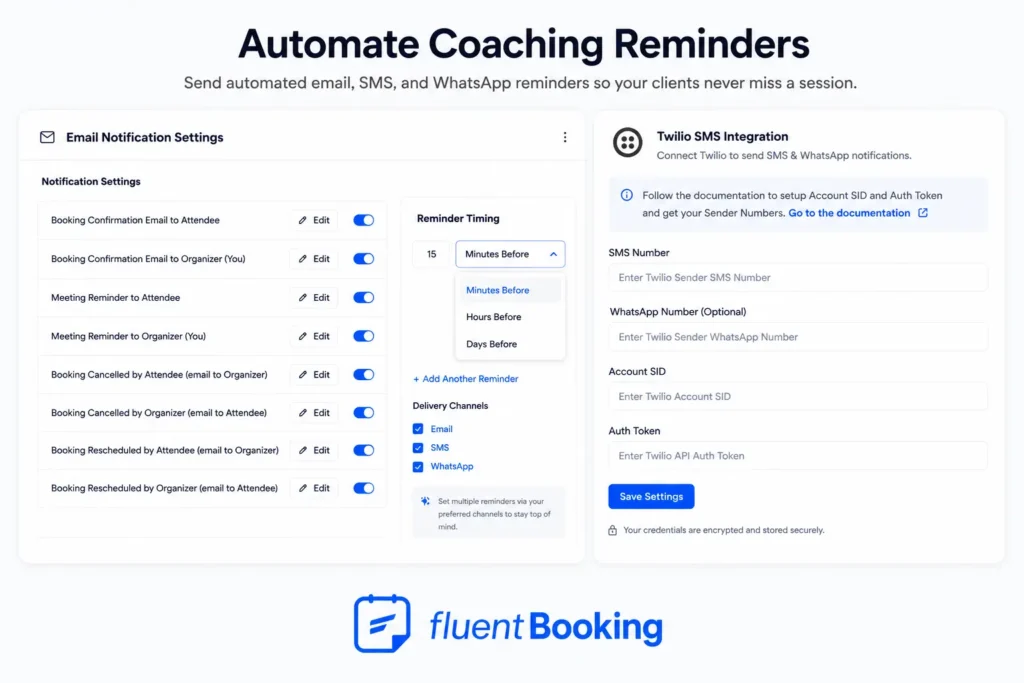
You can even send SMS reminders through supported integrations. As a result, students stay informed, and attendance rates improve.
Final Thoughts
Creating a great online course is only part of the equation.
Students often need guidance, accountability, and direct access to an expert to achieve meaningful results.
By combining a course platform like FluentCommunity with FluentBooking, you can create a complete learning experience that blends structured lessons with personalized coaching.
Students get the support they need, and you get a fully automated scheduling system that scales with your course business.
Instead of spending time coordinating appointments manually, you can focus on what matters most: helping your students succeed.
Aminul Islam Tuhin
Hi! Nice to meet you. I’m a guy who loves to explore, learn, and share knowledge. I spend most of my time catching up with marketing tips & tricks. When I’m not busy with any of these, you’ll find me with a book, exploring the city, or playing my favorite games.
Table of Content
Subscribe To Get
WordPress Guides, Tips, and Tutorials
Add your first comment to this post