


10 Best Free Calendly Alternatives in 2026 (Compared & Ranked)


Calendly is one of the most popular scheduling tools out there. But for many users, the free plan quickly starts feeling limited.
You only get one event type. Team scheduling is locked behind paid plans. Automation, reminders, routing, CRM features, and advanced customization all require upgrades. And once your business grows, the monthly cost keeps growing too.
That’s why many freelancers, agencies, coaches, consultants, and WordPress users are now searching for a better free Calendly alternative.
Some people want more flexibility. Some want lower long-term costs. Others want complete ownership instead of relying on another SaaS platform.
In this guide, we tested and compared the best free Calendly alternatives. Whether you need a simple meeting scheduler, a WordPress-native booking system, or a free scheduling tool for your team, you’ll find the right option here.
Best Free Calendly Alternatives
| Tool | Best For | Free Plan Quality | Starting Price |
| FluentBooking | WordPress users & businesses | Excellent | Free / $79 yearly |
| Cal.com | Open-source lovers | Excellent | Free / Paid plans available |
| HubSpot Meetings | Sales teams | Very Good | Free |
| Doodle | Group scheduling | Good | $6.95/user/month |
| Google Calendar | Personal scheduling | Good | Free |
| SimplyBook.me | Service businesses | Moderate | Free / €8.25/month |
| Setmore | Small teams | Good | Free / Paid plans |
| SavvyCal | Premium scheduling experience | Limited free access | Paid |
| Zoho Bookings | Zoho ecosystem users | Good | Free / Paid plans |
| Acuity Scheduling | Advanced booking workflows | Trial only | $16/month |
Why More Businesses Are Looking Beyond Calendly
Calendly made online scheduling mainstream. But many businesses eventually outgrow it.
The biggest reason? Scaling costs.
As your team grows, you often need:
- more calendars
- advanced meeting types
- routing
- reminders
- integrations
- automation
- team scheduling
Most of those features sit behind higher pricing tiers.
At the same time, businesses are becoming more careful about:
- recurring SaaS subscriptions
- platform dependency
- data ownership
- branding limitations
That’s why alternatives like Cal.com and FluentBooking are gaining attention. Many businesses now prefer tools that give them more flexibility, customization, and control without increasing monthly costs.
What Makes a Great Free Calendly Alternative?
Not every scheduling tool solves the same problem.
Some are built for:
- solo freelancers
- agencies
- coaches
- WordPress websites
- sales teams
- internal scheduling
- group booking
So instead of focusing only on “free,” we looked at what actually matters in real-world scheduling.
The Most Important Things to Look For
Here are the most important things to look for in a free Calendly alternative.
- A Free Plan That’s Actually Usable: Some tools advertise a free plan but lock basic features immediately. A good alternative should let you schedule meetings properly without forcing instant upgrades.
- Calendar Sync & Availability Control: The best scheduling tools automatically sync with Google Calendar, Outlook, Apple Calendar, or other calendar apps to prevent double bookings.
- Automation & Reminders: Automated confirmations and reminders reduce no-shows and save time.
- Customization: Your booking page should feel like part of your business, not someone else’s platform.
- Long-Term Scalability: Many businesses switch from Calendly because costs increase as teams grow. A good alternative should scale without becoming expensive too quickly.
- Ownership & Flexibility: More businesses now prefer self-hosted or WordPress-native solutions that keep everything under their own control instead of relying entirely on SaaS platforms.
Let’s break down the key differences between Calendly’s free and paid plans:
Top 10 Free Calendly Alternatives You’ll Love to Try
It’s time to say goodbye to Calendly and hello to something more flexible and budget-friendly. If you’re stuck with the basic features or the premium plan is draining your wallet, the best part starts right here.
Let’s dive in and find the perfect fit for you!
FluentBooking — Best Free Calendly Alternative for WordPress
If your business already runs on WordPress, FluentBooking is easily one of the strongest Calendly alternatives available right now.

Instead of sending visitors to a third-party scheduling platform, FluentBooking lets you run your entire booking system directly inside WordPress.
That means:
- your branding
- your website
- your customer data
- your workflow
all stay under your control.
Unlike many SaaS schedulers, FluentBooking focuses heavily on flexibility and ownership while still keeping the setup beginner-friendly.
Why FluentBooking Stands Out
FluentBooking supports:
- one-on-one meetings
- group meetings
- round robin scheduling
- recurring appointments
- custom availability
- booking limits
- timezone handling
- payment collection
- automated reminders
It also integrates deeply with tools like:
- Google Calendar
- Zoom
- Stripe
- PayPal
- FluentCRM
- FluentForms
- WooCommerce
One major advantage is pricing scalability.
Most SaaS schedulers charge per user or per seat. FluentBooking avoids that recurring scaling problem, which makes it attractive for growing businesses and agencies.
Free Plan Highlights
- Basic scheduling features
- Booking calendar
- Email notifications
- Calendar sync
- Booking management
- WordPress-native setup
Best For
- WordPress businesses
- Agencies
- Coaches
- Consultants
- Service providers
- Businesses wanting full ownership
Limitation
You need a WordPress website to use it.
Cal.com — Best Open-Source Calendly Alternative
Cal.com has rapidly become one of the most discussed Calendly alternatives in recent years.

The biggest reason is simple:
it combines modern scheduling features with open-source flexibility.
Many businesses prefer Cal.com because it offers:
- self-hosting options
- developer flexibility
- workflow customization
- modern scheduling UX
It’s especially popular among startups, developers, and privacy-focused users.
According to discussions from agency communities, Cal.com is increasingly becoming the “go-to free alternative” for users wanting strong scheduling features without heavy SaaS limitations.
Free Plan Highlights
- Unlimited event types
- Calendar integrations
- Routing options
- Team scheduling
- Open-source flexibility
Best For
- Developers
- Startups
- Open-source fans
- Privacy-focused businesses
Limitation
The setup can feel technical for beginners.
HubSpot Meetings — Best for Sales Teams
If your business already uses HubSpot CRM, HubSpot Meetings becomes a very strong free scheduling option.

Its biggest advantage is CRM integration.
Instead of treating scheduling as a separate workflow, HubSpot connects meetings directly with:
- contacts
- pipelines
- lead management
- sales workflows
This makes it especially useful for sales-focused businesses.
Free Plan Highlights
- Personal booking pages
- Google & Outlook sync
- CRM integration
- Website embed
- Meeting links
Best For
- Sales teams
- CRM-heavy businesses
- Lead generation workflows
Limitation
Some advanced scheduling flexibility is limited compared to dedicated scheduling tools.
Doodle — Best for Group Scheduling
Doodle works differently from most scheduling tools.

Instead of focusing mainly on direct appointment booking, Doodle shines in:
- group coordination
- polls
- team scheduling
- collaborative availability
It’s extremely useful when multiple people need to agree on a meeting time.
Free Plan Highlights
- Group polls
- Calendar sync
- Basic scheduling
- Video conferencing support
Best For
- Teams
- Group meetings
- Collaborative scheduling
Limitation
Not ideal for advanced client booking workflows.
Google Calendar — Best for Personal Scheduling
Google Calendar is still one of the simplest free scheduling tools available.

While it’s not as advanced as dedicated booking platforms, Google has improved appointment scheduling features significantly.
For solo users and simple workflows, it works surprisingly well.
Free Plan Highlights
- Appointment scheduling
- Calendar sharing
- Google Meet integration
- Notifications
- Multi-calendar management
Best For
- Personal scheduling
- Freelancers
- Lightweight workflows
Limitation
Limited customization and business-focused automation.
Setmore — Best for Small Teams
Setmore is a beginner-friendly scheduling platform designed mainly for small businesses and service teams.
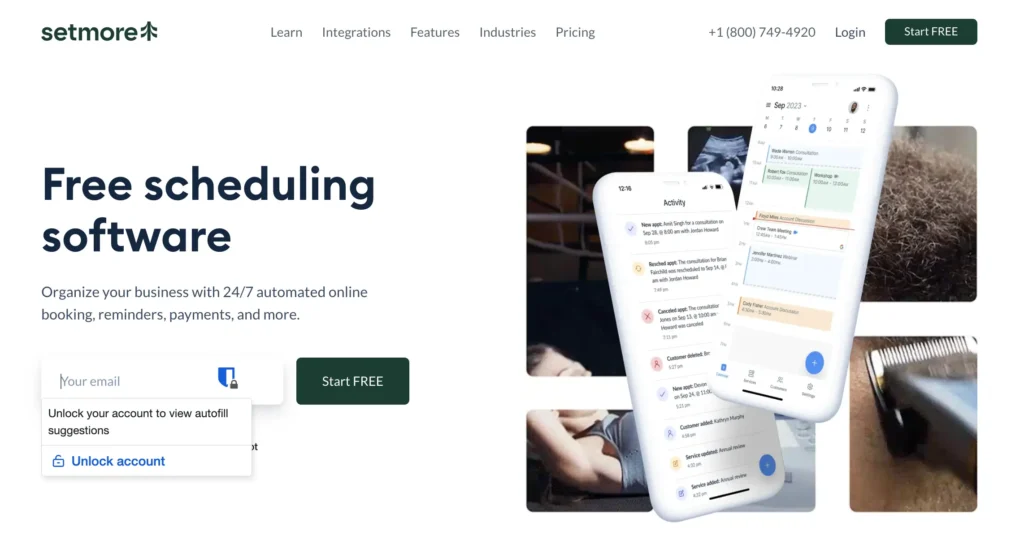
It balances simplicity with enough business-focused features to handle:
- appointments
- staff scheduling
- reminders
- customer booking
Free Plan Highlights
- Up to 4 users
- Booking page
- Calendar sync
- Video meeting support
Best For
- Small businesses
- Service teams
- Appointment-based businesses
Limitation
Customization flexibility is more limited than WordPress-native systems.
SimplyBook.me — Best for Service Businesses
SimplyBook.me focuses heavily on appointment-based businesses like:
- salons
- clinics
- wellness businesses
- local services

It includes many business-oriented booking features even in the free plan.
Free Plan Highlights
- Booking website
- Calendar sync
- Email notifications
- 50 bookings/month
Best For
- Salons
- Clinics
- Wellness businesses
Limitation
The free plan has booking limits.
SavvyCal — Best for Premium Scheduling Experience
SavvyCal approaches scheduling differently.

Its focus is less about feature overload and more about creating a smoother scheduling experience for recipients.
The interface feels modern, polished, and user-friendly.
Free Plan Highlights
- Scheduling links
- Calendar overlays
- Modern booking experience
Best For
- Consultants
- Executives
- Premium client experiences
Limitation
Not the strongest free plan for growing teams.
Zoho Bookings — Best for Zoho Users
Zoho Bookings fits naturally into the larger Zoho ecosystem.

If your business already uses Zoho CRM or other Zoho apps, this can simplify your workflow significantly.
Free Plan Highlights
- Calendar sync
- Team scheduling
- Booking pages
- Zoho integrations
Best For
- Zoho ecosystem users
- Small businesses
Limitation
Works best only inside the Zoho ecosystem.
Acuity Scheduling — Best for Advanced Booking Workflows
Acuity Scheduling is one of the more advanced scheduling tools on this list.

It supports:
- complex booking logic
- intake forms
- packages
- memberships
- advanced customization
However, unlike several alternatives here, it mainly offers a free trial instead of a permanent free plan.
Best For
- Advanced service businesses
- Coaches
- Complex booking workflows
Limitation
No long-term free plan.
Final Verdict: Which Free Calendly Alternative Should You Choose?
The best Calendly alternative depends entirely on your workflow.
If you want:
- open-source flexibility → choose Cal.com
- CRM-focused scheduling → choose HubSpot Meetings
- simple personal scheduling → use Google Calendar
- collaborative scheduling → choose Doodle
But if you run your business on WordPress and want:
- full ownership
- deep customization
- automation
- scalability
- recurring appointments
- payment collection
- no growing SaaS dependency
then FluentBooking is easily one of the strongest options available today.
Instead of paying more every time your business grows, you can build a complete scheduling system directly on your own website and keep full control of your workflow.
Frequently Asked Questions
Aminul Islam Tuhin
Hi! Nice to meet you. I’m a guy who loves to explore, learn, and share knowledge. I spend most of my time catching up with marketing tips & tricks. When I’m not busy with any of these, you’ll find me with a book, exploring the city, or playing my favorite games.
Table of Content
Subscribe To Get
WordPress Guides, Tips, and Tutorials
Add your first comment to this post