

How to Set Up Discovery Call Booking on WordPress with FluentBooking


A discovery call should move leads closer to becoming clients. It should not trap you in endless emails, delayed replies, and scheduling confusion.
Yet that is exactly what happens in many service businesses.
A potential client wants to talk. They fill out a contact form, wait for a reply, exchange multiple emails, and try to find a time that works. Somewhere in that process, the momentum disappears. Sometimes the lead disappears too.
That is why discovery call booking matters.
With FluentBooking, you can create a clean and professional booking experience directly inside WordPress.
In this guide, you will learn how to set up discovery call booking on WordPress step by step using FluentBooking.
Why Discovery Calls Matter for Service Businesses
Discovery calls are often the first real interaction between your business and a potential client. A smooth booking experience helps you create momentum before the conversation even starts.
- Qualify Leads Faster: A discovery call booking system helps you collect important details before the meeting happens. You can understand a lead’s goals, challenges, timeline, or budget early and spend more time speaking with people who are actually a good fit.
- Reduce Back-and-Forth Communication: Manual scheduling slows everything down. An automated booking system lets visitors choose a time instantly without endless emails or follow-ups.
- Create a Professional First Impression: Your booking process reflects your business. A clean and organized scheduling flow makes your brand feel more professional and trustworthy from the start.
- Increase Conversion Opportunities: The easier it is to book a call, the more likely leads are to take action. A fast booking experience helps turn interest into real conversations before momentum disappears.
Why Use FluentBooking for Discovery Calls?
FluentBooking helps you create a professional discovery call booking system directly inside WordPress without relying on disconnected third-party platforms.
- Easy Discovery Call Setup: Create booking events, define meeting duration, set availability, and publish your booking page without complicated setup.
- Google Calendar and Meeting Integrations: Connect tools like Google Calendar, Zoom, Google Meet, and Microsoft Teams to keep availability accurate and avoid scheduling conflicts.
- Automated Email and SMS Notifications: Automatically send confirmations and reminders so people stay informed and your team spends less time on manual follow-ups.
- Custom Booking Questions for Lead Qualification: Collect useful information before the call starts so you can qualify leads and prepare for better conversations.
- Flexible Availability and Buffer Time Management: Control your schedule with custom availability, blocked dates, and buffer time between meetings.
- Team Scheduling Support: Route discovery calls to the right team member and keep scheduling organized as your business grows.
What You Need Before Setting Up a Discovery Call Booking
Before building your booking workflow, make sure the basics are ready.
- A WordPress Website: Your booking page should live on your own website instead of sending visitors to disconnected third-party platforms. This gives you more control over branding, user experience, and the overall customer journey.
- FluentBooking Installed: Install and activate FluentBooking on your WordPress website before starting the setup process.
- Calendar Integration: Connect the calendar you actively use for meetings. This keeps your availability accurate and helps prevent scheduling conflicts.
- Video Meeting Platform Connection: If your discovery calls happen on Zoom, Google Meet, or Microsoft Teams, connect the platform before launching your booking flow so meeting links can be generated automatically.
How to Set Up Discovery Call Booking on WordPress with FluentBooking
Now let’s build the actual discovery call workflow.
Install and Activate FluentBooking
Start by installing FluentBooking from your WordPress dashboard and activating the plugin.
Once activated, open the plugin settings and begin the initial setup process.
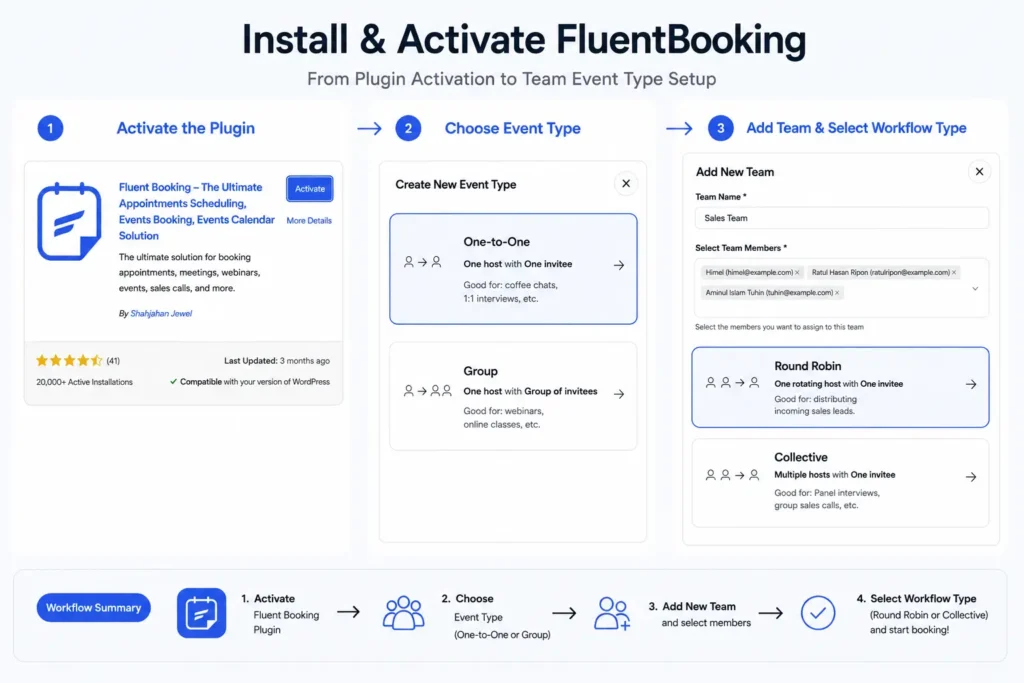
At this stage, your goal is simple: create a reliable system that allows qualified leads to book calls without manual coordination.
Connect Your Calendar
Next, connect your calendar account.
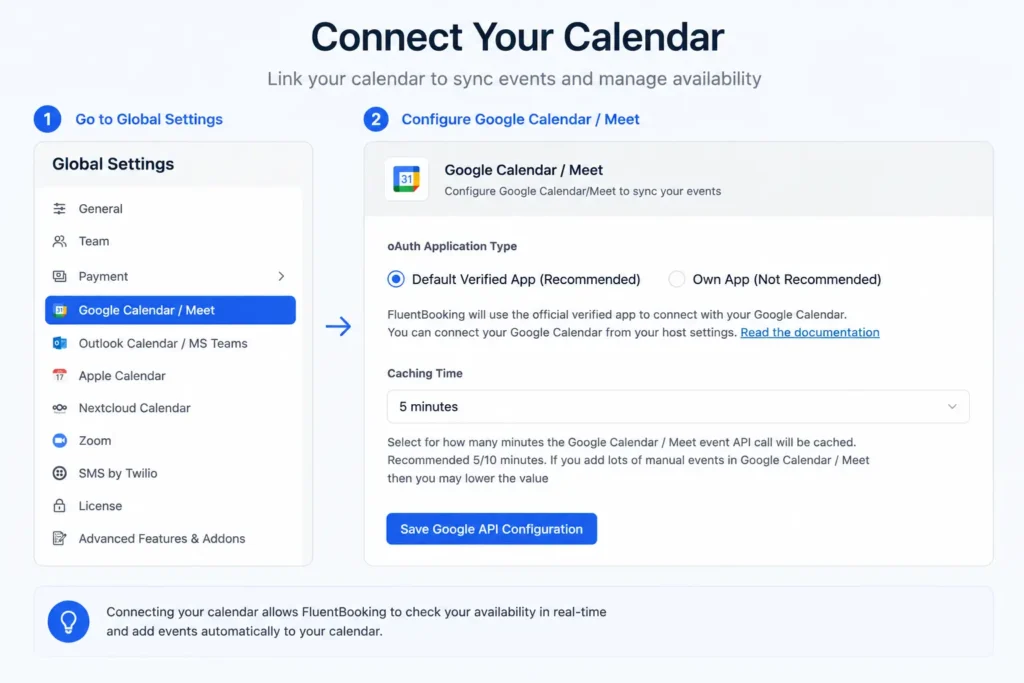
This step is important because FluentBooking uses your calendar to display real availability. Without calendar sync, you risk double bookings and scheduling conflicts.
A connected calendar keeps the booking process accurate and reliable.
Create a Discovery Call Event
Create a new booking event specifically for discovery calls.
Use a simple and clear title like:
- Discovery Call
- Strategy Session
- Consultation Call
Then define the meeting duration.
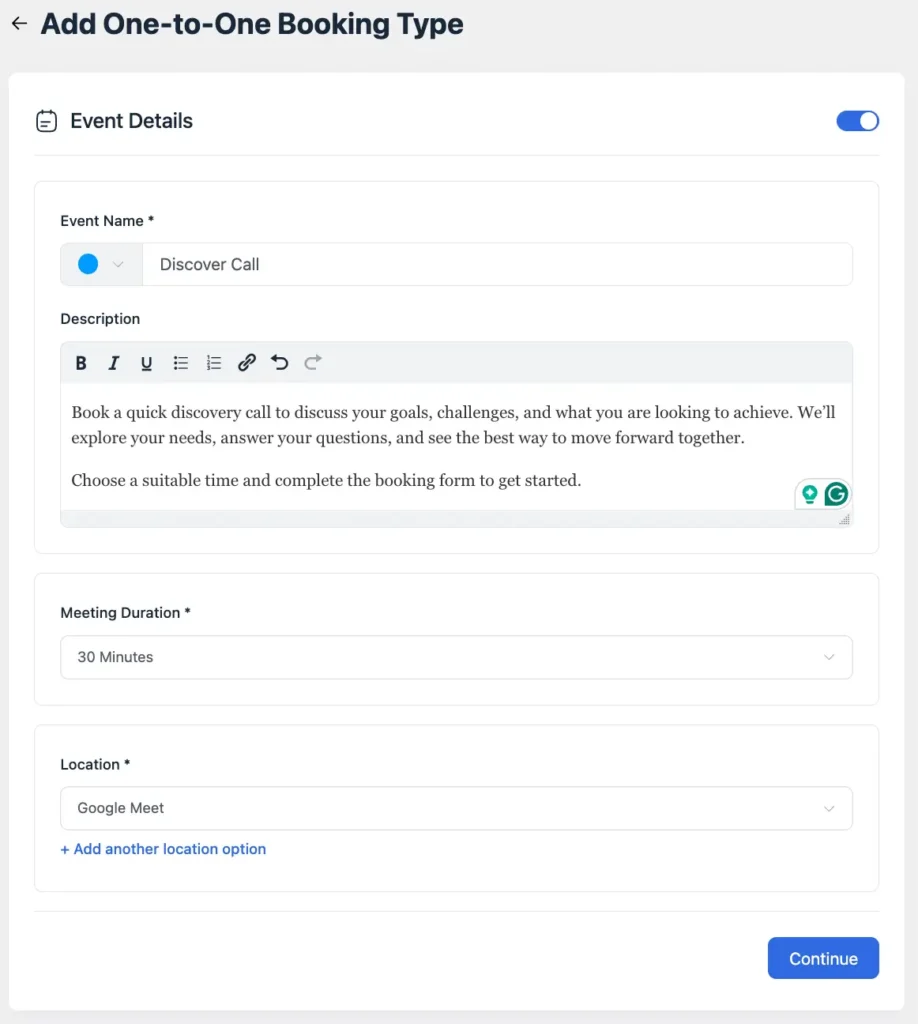
For most service businesses, discovery calls usually work best between 15 and 30 minutes. The purpose of the call is qualification and next steps, not solving the entire project during the first meeting.
Set Your Availability
Choose when people can book discovery calls.
You can define working hours, block unavailable dates, and add buffer time between meetings. This helps you avoid overloaded schedules and keeps your calendar manageable.
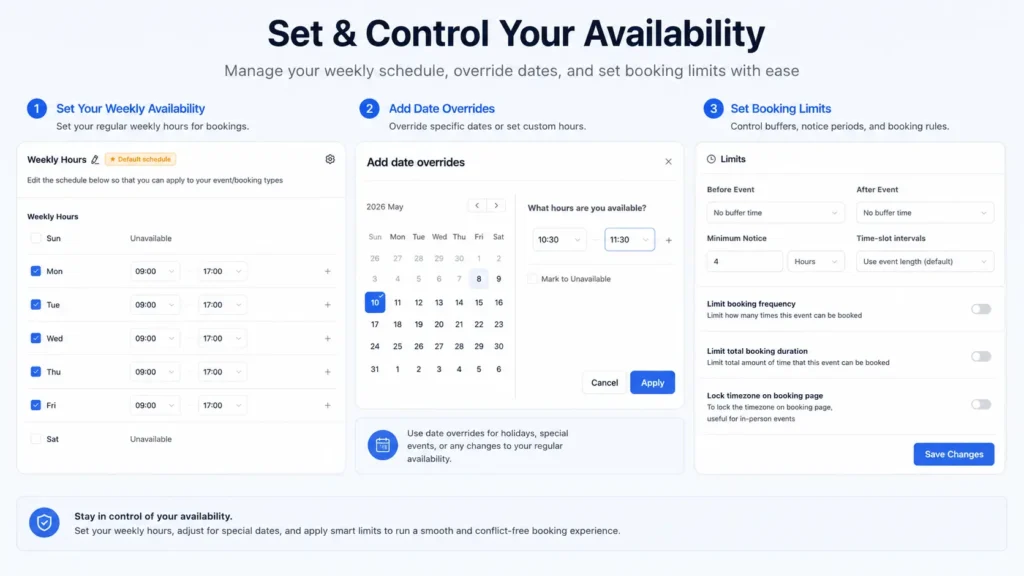
For example, many businesses reserve specific hours only for sales or onboarding calls so client work does not constantly get interrupted.
Add Booking Questions
Use booking questions to collect important details before the meeting starts.
Good discovery call questions may include:
- What service are you interested in?
- What challenge are you trying to solve?
- What is your timeline?
- What is your approximate budget?
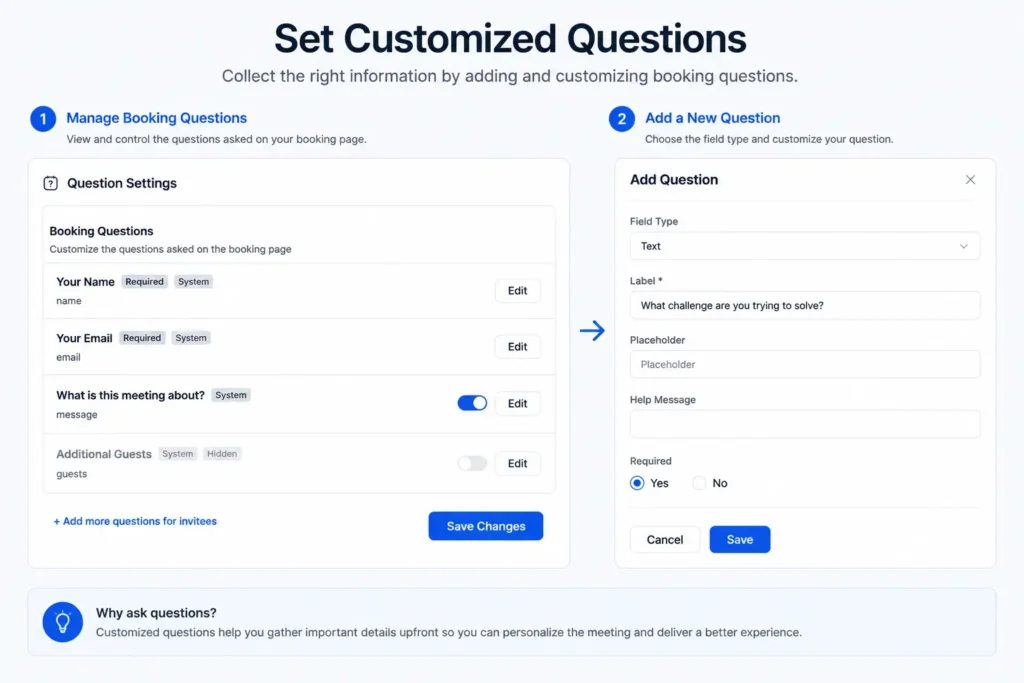
Keep the form focused and avoid asking unnecessary questions. The goal is to qualify leads without making the booking process feel exhausting.
Configure Meeting Location
Now configure where the discovery call will happen.
If you use Zoom, Google Meet, or Microsoft Teams, connect the relevant platform directly. If the call happens by phone, clearly explain how the conversation will take place.
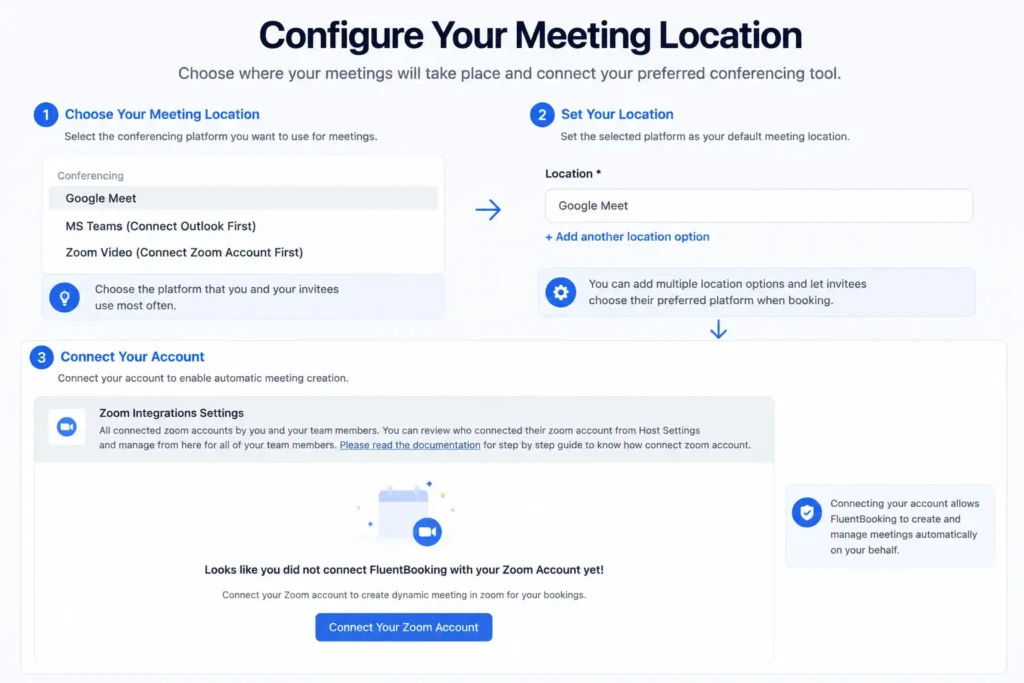
Simple instructions reduce confusion and improve attendance rates.
Set Up Automated Notifications and Reminders
This is one of the most important parts of the workflow.
Set up confirmation emails or SMS and reminder notifications so people remember the meeting and know exactly what happens next.
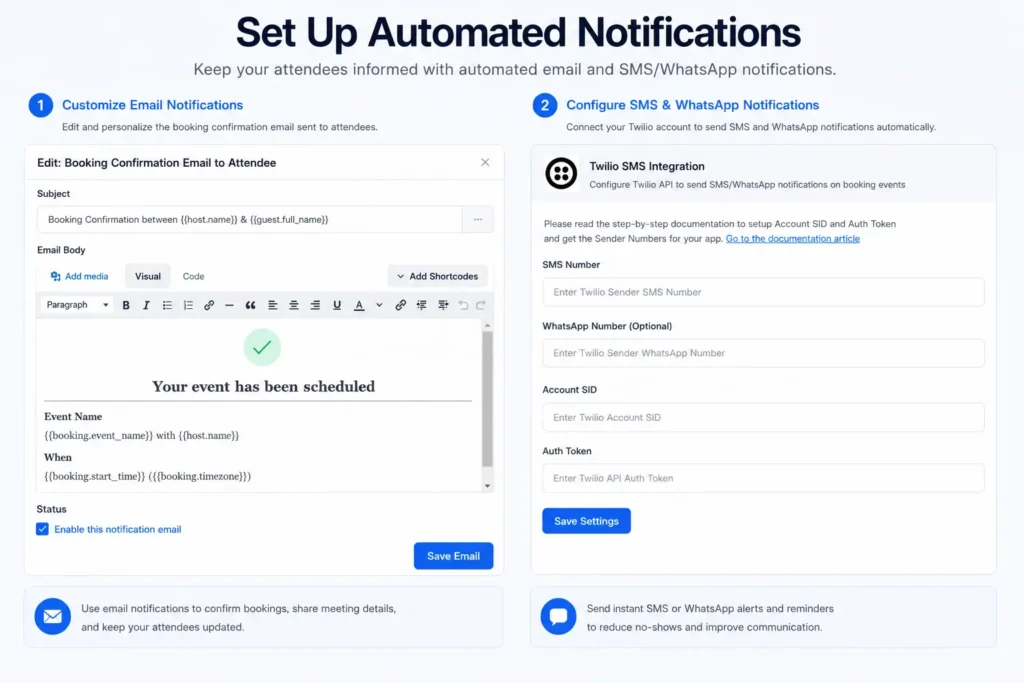
Automated reminders help reduce no-shows while also creating a smoother booking experience.
Customize Your Booking Page
Your booking page should feel like part of your business, not a generic form.
Add a short explanation about:
- who the call is for
- what will be discussed
- what visitors should expect
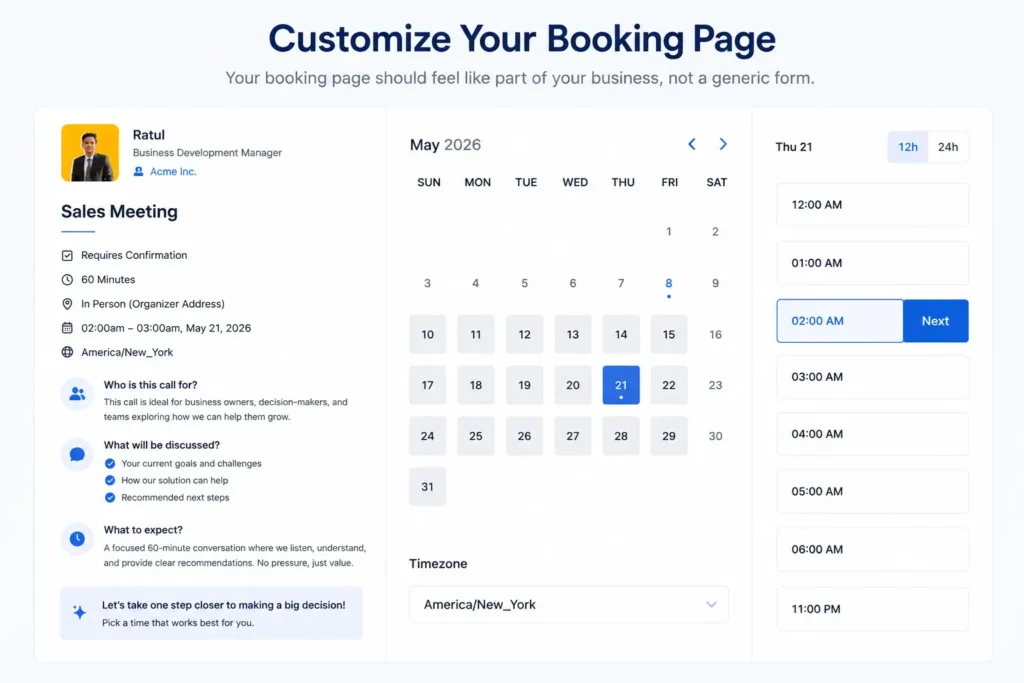
Even a few lines of clear context can improve booking quality and reduce confusion.
Embed the Booking Form on Your Website
Once the booking event is ready, place it where visitors naturally take action.
Most businesses add discovery call booking forms to:
- service pages
- contact pages
- landing pages
- homepage CTA sections
The easier it is to find the booking option, the more likely people are to use it.
Test the Booking Experience
Before going live, test the full booking process yourself.
Book a test meeting, check the calendar sync, review notification emails, and confirm that everything works properly on both desktop and mobile devices.
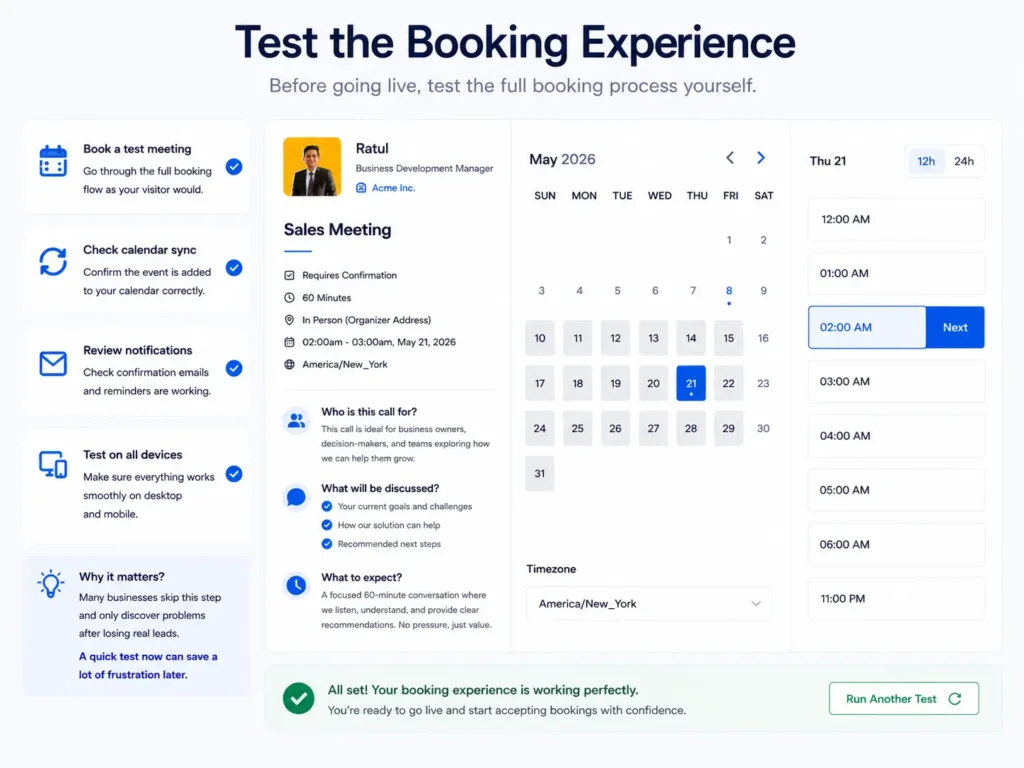
Many businesses skip this step and only discover problems after losing real leads.
A quick test now can save a lot of frustration later.
Who Can Benefit from Discovery Call Booking?
Discovery call booking works for almost any business that sells services, consultations, or customized solutions.
- Coaches and Consultants: Coaches and consultants can use discovery calls to qualify leads faster and move serious prospects into paid programs more efficiently.
- Agencies and Freelancers: Agencies and freelancers can collect project details early, filter poor-fit inquiries, and reduce time wasted on manual scheduling.
- Therapists and Counselors: A professional booking system helps clients schedule privately and conveniently without endless phone tag or delayed responses.
- Sales and Client Success Teams: Teams handling demos, onboarding calls, or consultations need a reliable scheduling system to keep meetings organized and avoid conflicts.
- Online Service Businesses: Businesses selling audits, retainers, training, or done-for-you services can use discovery calls to create a smoother path from interest to purchase.
Final Thoughts
A discovery call is not just another meeting on your calendar. It is often the beginning of a client relationship.
With FluentBooking, you can build a professional discovery call booking system directly inside WordPress without relying on complicated workflows or endless back-and-forth communication.
The result is simple: faster bookings, fewer scheduling headaches, and better conversations with qualified leads.
Set up the workflow once, optimize the experience, and let automation handle the repetitive parts of scheduling so you can focus on the conversations that actually grow your business.
Aminul Islam Tuhin
Hi! Nice to meet you. I’m a guy who loves to explore, learn, and share knowledge. I spend most of my time catching up with marketing tips & tricks. When I’m not busy with any of these, you’ll find me with a book, exploring the city, or playing my favorite games.
Table of Content
Subscribe To Get
WordPress Guides, Tips, and Tutorials
Add your first comment to this post