


What to Ask in a Client Intake Form (and Why the Booking Should Come Last)


Last Updated:
Most booking pages ask when before they ask who. A visitor picks Tuesday at 2 pm, enters their name and email, and claims a time slot. For a 15-minute introductory call, that works.
For a paid consultation, a legal inquiry, or a project kickoff, it can leave you meeting someone without knowing why they’re coming, whether you can help them, or what you need to prepare.
A client intake form helps you collect the right information before a meeting, as long as it asks the right questions in the right order. This guide covers what to ask, how the questions change by business type, and when it makes sense to put intake questions before the booking calendar.
What a Client Intake Form Helps You Decide
A client intake form is a set of questions someone answers when they inquire about your services or prepare for their first appointment. Contact details are only the beginning. The real value comes from what their answers help you decide.
- Is this a good fit? A family lawyer may not handle a commercial lease dispute. An agency with a $5,000 project minimum may not be the right choice for a $500 project.
- Which meeting do they need? A new-client assessment and a quick follow-up require different amounts of time and preparation.
- Who should handle the meeting? On a team, the answers help you decide whether the inquiry belongs with a tax specialist, a senior stylist, or a developer who knows WooCommerce.
- What should you prepare? A coach who knows the client’s goal before the session can spend less time collecting background information and more time helping them.
Here’s how intake fits into a simple idea: every booking has a next step.
Most of those steps happen after someone books, from confirmation emails and reminders to follow-ups. We covered those in our guide to what should happen once the booking is in.
Intake happens before the booking. When you collect the right information first, the booking becomes the next step. The client explains what they need, and then chooses a suitable time.
What to Ask: The Core Question Set
Most client intake forms draw from six groups of questions. You don’t need all six for every service, but most consultations benefit from four or five.
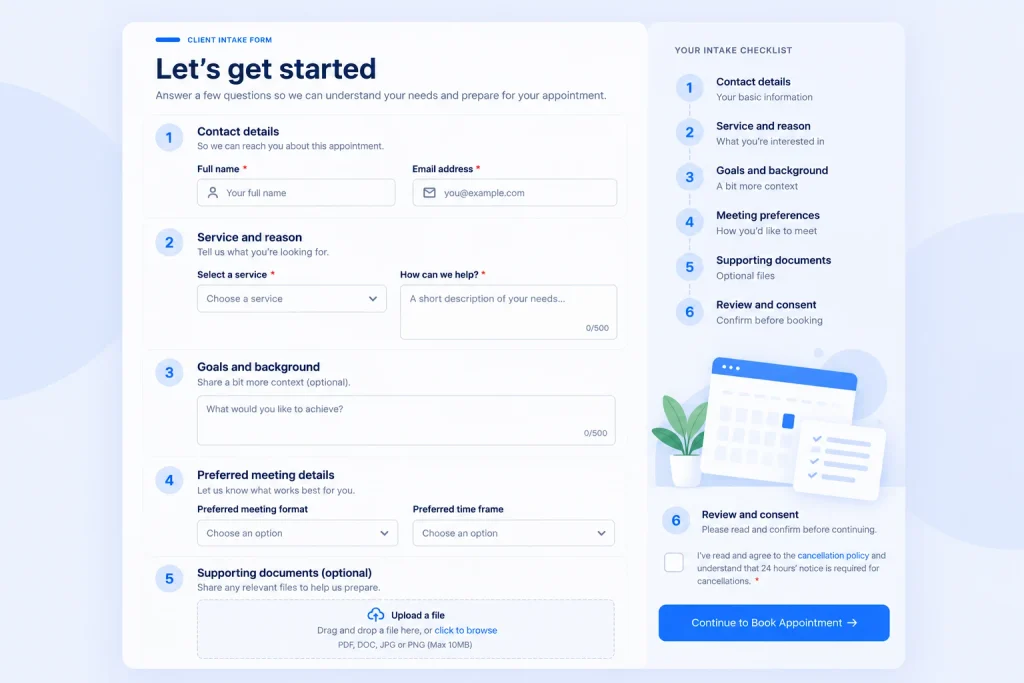
Here’s what each group covers, why it matters, and an example you can adapt.
1. Contact Details
Start with the basics: name and email address. Ask for a phone number if you’ll actually use it, and include a preferred contact method only if you’re prepared to honor that preference.
Example: “What’s the best number to reach you if we need to reschedule your appointment?”
Keep this section short. You can collect additional details later if you need them.
2. Reason for Booking
This is often the most useful part of an intake form because it tells you what the person needs.
A dropdown menu makes responses easier to sort, while an open-text field gives people room to explain their situation. Using both can help you collect structured information without losing important context.
Example:
- “Which service are you interested in?”
- “In a sentence or two, what would you like help with?”
Keep the open-text question focused. You’re looking for enough context to prepare, not a complete account of the client’s situation.
3. Context and Goals
Ask what has happened so far and what the client hopes to achieve. These answers help you prepare for the meeting instead of spending the opening minutes collecting background information.
The right question depends on your service.
Examples:
- Coach: “What would make this session worthwhile for you?”
- Accountant: “Which tax years or reporting periods does this involve?”
- Agency: “What are you hoping to improve with this project?”
You don’t need a long list of questions here. One or two focused prompts are often enough for an initial consultation.
4. Logistics and Preferences
Some details affect whether you can deliver the service and how you should prepare.
Depending on your business, you might ask about:
- Meeting format: in person, video, or phone
- Preferred location
- Project timeline or deadline
- Budget range for project-based work
When asking about budget, use ranges that match your actual packages or service options. This makes it easier for clients to respond and helps you assess whether the project fits your offering.
Example: “Which budget range best fits your project?”
5. Documents and Supporting Materials
Sometimes you need information before the meeting to make the conversation productive. That could be a project brief, a website URL, a referral letter, or an inspiration photo.
A file upload field can help you collect relevant materials through the same form instead of requesting them in a separate email.
Example: “Upload your current project brief, or share a link to your website.”
Only request documents you genuinely need at this stage. For sensitive files, consider whether a more appropriate secure collection method is necessary.
6. Consent and Terms
If your service requires clients to acknowledge a cancellation policy, agree to specific terms, or provide consent for a particular use of their information, explain that clearly.
A checkbox with a short explanation and a link to the full policy can make the requirements easier to understand.
Example: “I’ve read the cancellation policy and understand that 24 hours’ notice is required for cancellations.”
Keep policy acknowledgment separate from any consent required to process personal or sensitive information. One checkbox shouldn’t be treated as a substitute for every consent or privacy obligation that may apply to your business.
The length rule: If you won’t read an answer before the meeting or use it to make a decision, remove the question. Every extra field gives visitors another reason to abandon the form.
Client Intake Form Questions by Business Type
The six question groups provide a starting point. What changes is which questions matter most to your service.
Use these examples to build a form that collects the information you actually need.
| Business type | Fit question | Preparation question | Supporting material | Consent or terms |
|---|---|---|---|---|
| Business coach | Which stage is your business at? | What’s the main thing you want to achieve in this session? | Relevant business goals or a short brief | Session cancellation policy |
| Law firm | What type of legal matter is this, and which jurisdiction is involved? | Briefly, what has happened so far? | Relevant letters or contracts, if needed | Privacy notice and clarification that submitting an inquiry doesn’t establish an attorney-client relationship |
| Accounting firm | Is this for you personally or for a business? | Which tax years or reporting periods are involved? | Previous tax return or relevant statements, if appropriate | Consent to be contacted and applicable terms |
| Agency or freelancer | Which budget range fits your project? | What’s your deadline, and what is driving it? | Project brief or current website URL | NDA or other applicable agreement, if needed |
| Clinic, therapy, or wellness provider | Are you a new or returning client, and which service do you need? | What would you like to focus on during your first visit? | Referral letter, if required | Applicable privacy information and cancellation policy |
| Salon or beauty business | Which service do you need, and is this your first visit? | Are there any allergies or sensitivities relevant to this service? | Inspiration photo, if useful | Applicable patch-test and cancellation policies |
These are starting points, not universal requirements. Adapt the questions to your service, local regulations, and the information you need to arrange the appointment.
For clinics and other health providers, collecting health information online can create additional privacy and security obligations. Ask only for the information needed to arrange the appointment, and avoid collecting detailed clinical histories through a general booking form unless your process is designed to handle them appropriately.
If you operate in the United States, review our guide to handling health data on your booking forms before publishing a form that collects health information.
Why the Booking Should Come Last
A standard booking page usually follows a fixed order: the visitor chooses a time and then answers a few questions.
For consultations that require screening or preparation, reversing that order can make more sense. Ask the questions first, then show the calendar when the visitor’s answers meet your criteria.
Here’s what that changes.
Show the Calendar When the Answers Meet Your Criteria
When the calendar appears at the end of an intake form, you can use conditional logic to control when visitors see the booking field.
For example, an accounting firm might show its consultation calendar when someone selects a particular service. An agency might use a budget-range answer to determine whether to display a consultation option.
This helps you guide visitors toward an appropriate next step. Depending on your process, that next step might be a booking, a referral, a helpful resource, or a personal response.
The goal isn’t to reject everyone who doesn’t fit a particular category. It’s to make sure your booking process matches the services you actually offer.
Use the Answers to Guide the Booking
Not every visitor needs the same appointment.
Someone seeking a full assessment may need a longer meeting than someone asking for a quick review. Asking a few questions first helps you understand the request before presenting the relevant booking option.
For example, you might ask whether someone is a new client and what service they need before showing the appropriate booking field.
The exact setup depends on how your booking events and form conditions are configured. If you want to present different calendars based on different answers, test that workflow separately rather than assuming a single conditional field will automatically route every visitor.
Prepare Before the Meeting
When the answers are available with the booking, you can review them before the appointment.
You can read the project brief, check the client’s goals, review the information they’ve provided, and plan how to use the meeting time.
Instead of spending the first ten minutes asking questions you could have collected earlier, you can start with a clearer understanding of the client’s needs.
Help Clients Understand What They’re Booking
A visitor who has explained their needs, reviewed the relevant terms, and selected a time has more context about the appointment than someone who simply picked an available slot.
This doesn’t guarantee that they’ll attend, but it can help set expectations and make the appointment’s purpose clearer.
The trade-off: Longer forms can discourage some visitors from completing a booking. For high-value consultations that require screening or preparation, the additional effort may be worthwhile. For a short introductory call or a standard appointment, it may create unnecessary friction.
That’s why intake-first isn’t the best choice for every booking.
When Booking First is the Better Choice
If anyone can book your service, the meeting is straightforward, and you only need a few simple answers, a regular booking page is usually faster for everyone.
A 15-minute introductory call or a standard haircut probably doesn’t need a detailed qualifying form.
In FluentBooking, you can add custom booking questions to an event so visitors can provide additional information after choosing a time. Depending on your requirements, these can include text fields, dropdowns, checkboxes, date fields, file uploads, and terms acknowledgment.
Here’s how the two approaches compare.
| Booking first | Intake first | |
|---|---|---|
| Best for | Short or standard appointments | Consultations, paid sessions, and project inquiries |
| Questions | A few simple questions | More detailed questions or questions that branch |
| Booking flow | Choose a time, then answer questions | Answer questions, then see the booking field |
| Screening | Questions generally help you prepare | Answers can help determine which next step to show |
| Documents | Collected when needed | Can be requested before the meeting when appropriate |
| FluentBooking setup | Booking questions on the event | Fluent Forms with the FluentBooking Field at the end |
If your service fits the intake-first approach, you can build the workflow with Fluent Forms and FluentBooking.
How to Build an Intake-First Booking Form in WordPress
If your website uses Fluent Forms and FluentBooking, you can connect the two through the Fluent Forms integration.
This setup lets you place intake questions before a FluentBooking Field in a Fluent Forms submission. Visitors can provide their information before reaching the booking field.
Before starting, make sure you have installed the required plugins and created the FluentBooking event you want to use. The Fluent Forms integration requires FluentBooking Pro.
Step 1: Build Your Intake Questions in Fluent Forms
Create a new Fluent Form or open an existing inquiry form.
Add the questions that match your service. You might include contact details, the reason for booking, relevant context, logistical preferences, and any supporting materials you need.
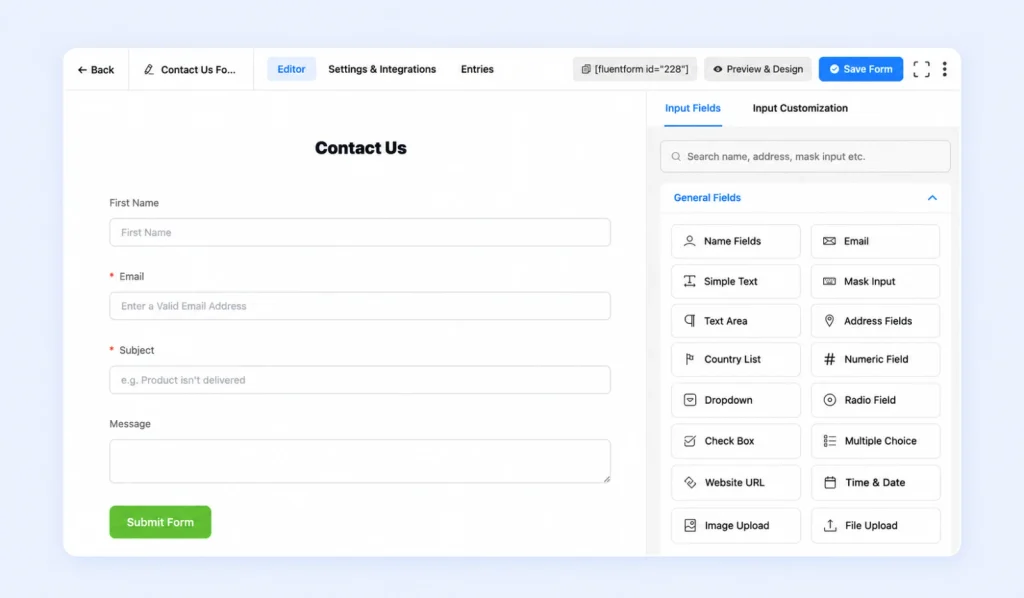
Include Name and Email fields. You’ll map these to the corresponding guest fields in the FluentBooking Field settings.
Keep the form focused. Start with the information you need to understand the request and prepare for the meeting. You can collect additional details later if necessary.
Step 2: Add the FluentBooking Field at the End
In the Fluent Forms editor, locate the FluentBooking Field under Advanced Input and add it after your intake questions.
Open its settings and select the appropriate event using Select Calendar. Then map the Select Guest Name Field and Select Guest Email Field to the Name and Email fields in your form.
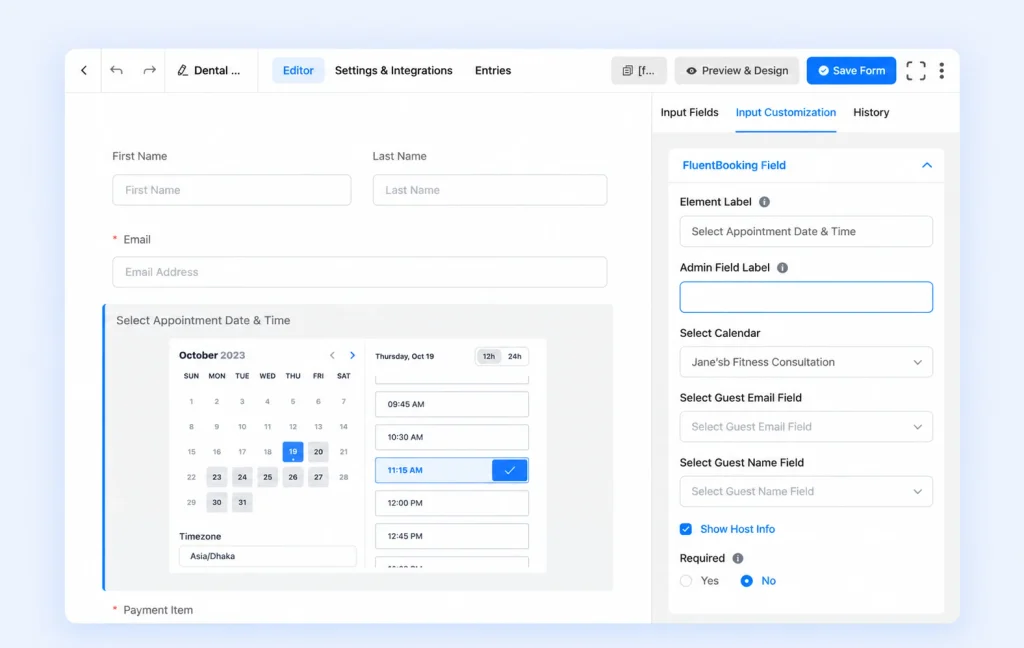
If you want visitors to see information about the person hosting the meeting, enable Show Host Info if that option is available in your installed version.
Before moving on, check that the selected event and guest-field mappings are correct.
Step 3: Control When the Booking Field Appears
If you need to show the calendar only when certain answers meet your criteria, configure the FluentBooking Field’s conditional logic in Advanced Options.
For example, an accounting firm might show its booking field when the visitor selects “Business tax return” from the Service dropdown. An agency might use a budget-range answer to determine when to display its consultation calendar.
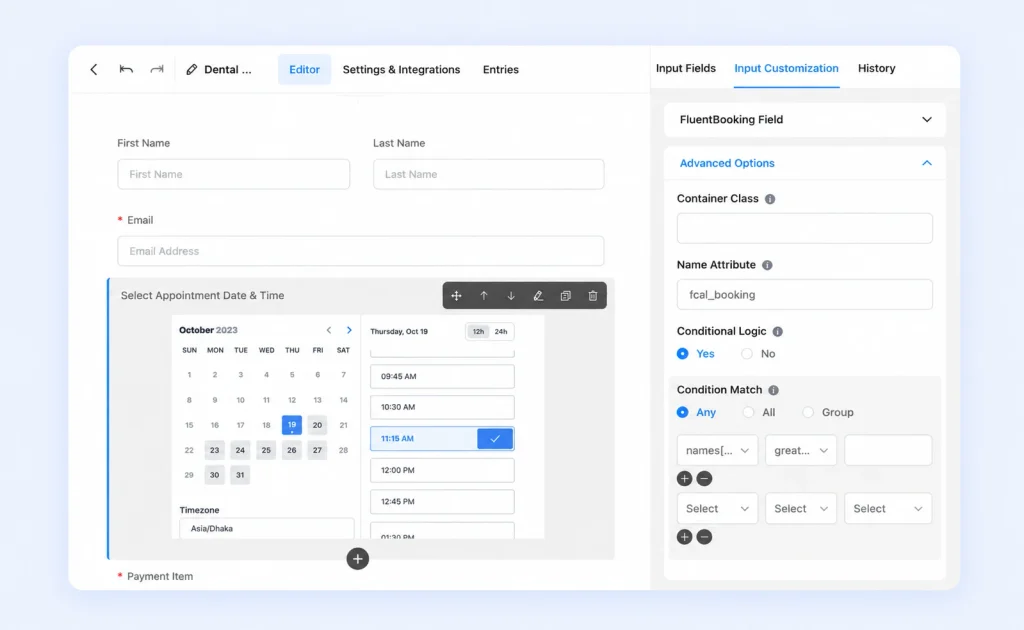
The exact conditions depend on your form and business rules.
Before publishing, test both outcomes:
- A visitor whose answers meet your criteria.
- A visitor whose answers don’t meet your criteria.
Check whether the booking field appears as expected, whether each submission completes successfully, and what happens to the submitted answers when the booking field is hidden.
Don’t assume that hiding the booking field automatically creates a booking or guarantees that every answer will be saved in the way you expect. Confirm the behavior in your actual setup.
Step 4: Check Where the Answers Are Stored
After a test submission, review the entry in Fluent Forms and the booking details in FluentBooking.
Confirm which answers are available in each place. If you want a specific intake answer to populate a FluentBooking custom booking question, configure the relevant mapping in the FluentBooking Field settings and test it.
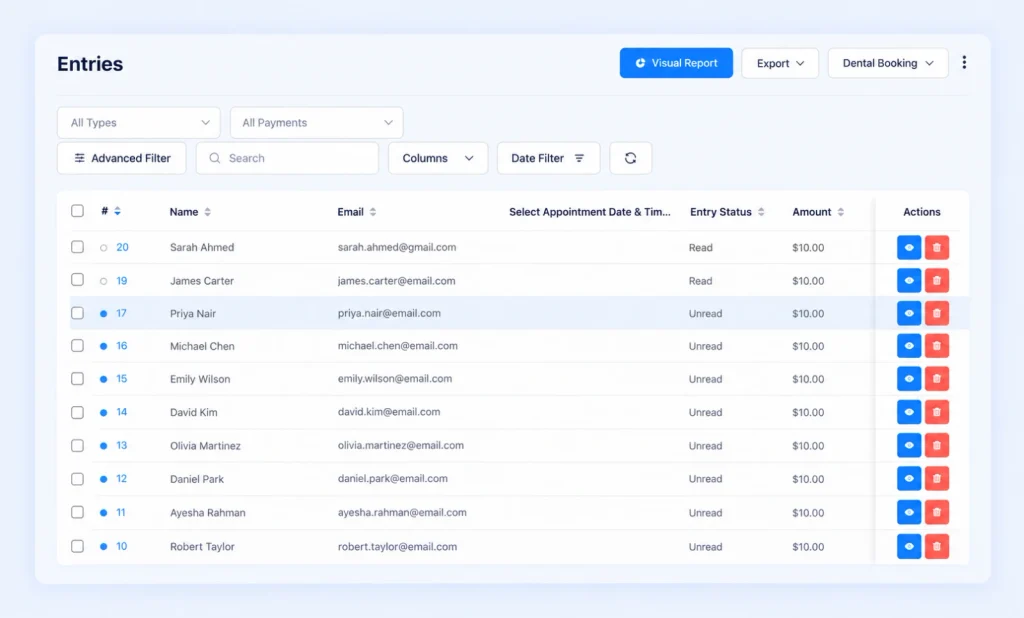
This distinction matters because collecting a general intake answer and mapping that answer to a specific booking question aren’t necessarily the same thing.
Once the workflow is working, configure the confirmation and reminder emails through the event’s Email Notifications settings. Complete a test booking to make sure the notifications and booking details behave as expected.
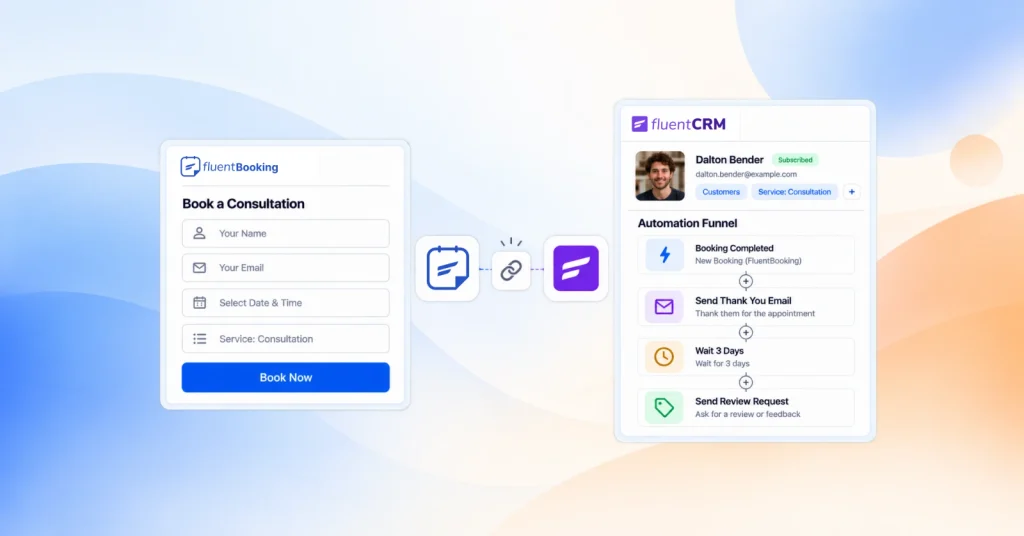
Connect Fluent Forms with FluentBooking to collect intake information before clients
choose an appointment time.
Client Intake Form Mistakes to Avoid
A well-designed intake form collects useful information without making the booking process unnecessarily difficult. Avoid these common mistakes.
- Asking questions you won’t use. Every question should help you prepare, determine whether the service is a fit, or decide what should happen next. If it doesn’t, remove it.
- Making every field required. Mark essential questions as required and leave the rest optional. If visitors can’t answer a nonessential question, they shouldn’t have to abandon the entire form.
- Collecting sensitive information too early. Avoid requesting ID numbers, full financial statements, or detailed medical histories on a first-contact form unless they’re genuinely necessary. Collect sensitive information only through a process designed to handle it appropriately.
- Using one form for every service. A tax return and a business valuation require different information. Use separate forms or conditional logic to show relevant questions when your form setup supports that workflow.
- Never review the answers. An intake form only helps if someone reads the responses. Make reviewing the information part of your preparation routine before each first appointment.
Put the Calendar Where It Belongs
A booking page that asks when first is built for speed. An intake form that asks who and why first helps you prepare for meetings that require more context.
For consultations, collect the relevant information first, use it to guide the next step, and show the booking field when the visitor meets your criteria. For simple appointments, keep the process short and let visitors book first.
The best workflow is the one that gives you the information you need without adding unnecessary steps for your clients.
No tricks, just smoother scheduling! Get up to 30% OFF FluentBooking Pro and make every booking a little less spooky.
Ratul Hasan Ripon
I enjoy making complex ideas simple and engaging through my writing and designs. With a strong knowledge on content writing and SEO, I create technical content that’s both easy to understand and interesting.
Table of Content
Subscribe To Get
WordPress Guides, Tips, and Tutorials



Add your first comment to this post