

How to Set Up a Yoga Class Booking System on WordPress: A Complete Step-by-Step Guide


Managing yoga class bookings manually can quickly become overwhelming. Between WhatsApp messages, phone calls, emails, and spreadsheets, it’s easy to miss bookings, lose track of attendees, or spend too much time handling administrative tasks.
A yoga booking system helps automate the entire process, from scheduling and reminders to payments and recurring class registrations. This not only saves time but also creates a smoother experience for your students.
In this guide, you’ll learn how to set up a complete yoga class booking system, including group classes, recurring programs, automated reminders, payments, and online bookings.
Why Yoga Studios Need an Online Booking System
Students expect a simple and convenient way to book yoga classes online. A booking system helps yoga studios stay organised, reduce administrative work, and create a better experience for both instructors and students.
- Reduce Scheduling Conflicts: Manual scheduling through calls, emails, or messaging apps can lead to missed bookings, double bookings, and class management issues.
- Allow 24/7 Online Booking: Students can view available classes and reserve their spots anytime without contacting the studio directly.
- Reduce No-Shows: Automated confirmations and reminders help students remember upcoming classes and improve attendance rates.
- Manage Class Capacity Easily: Control the number of participants in each class and prevent overbooking with attendee limits.
- Save Time on Administrative Tasks: Automating bookings, notifications, and schedule management allows instructors to focus more on teaching and supporting their students.
Bonus: If you’re still deciding whether online scheduling is worth it, explore the key benefits businesses get from automated booking systems.
What You Need Before Setting Up Your Yoga Booking System
Before creating your yoga booking system, make sure you have the following essentials in place.
- A WordPress Website: First, you’ll need a WordPress website where students can view your classes and book sessions online. If you already have a yoga studio website, you’re ready for the next step.
- Booking Plugin: There are many WordPress booking plugins available that can help you create booking pages, manage class schedules, automate notifications, and handle student registrations. For this guide, we’ll use FluentBooking, an appointment booking plugin to set up and manage your yoga class reservations online.
- Google Calendar Connection: Connecting Google Calendar helps keep your availability updated automatically and prevents scheduling conflicts between your classes and personal commitments.
- Payment Gateway: If you plan to charge for classes, workshops, or yoga programs, connect a payment gateway such as Stripe or PayPal to accept online payments during the booking process.
Not sure which booking plugin to choose? Compare some of the best yoga scheduling software before getting started.
How to Set Up a Yoga Class Booking System [Step-by-Step]
Whether you run daily yoga sessions, meditation classes, weekend workshops, or multi-week yoga programs, FluentBooking helps you manage bookings directly from your WordPress website without the hassle of manual scheduling.
Install and Activate FluentBooking
Start by installing FluentBooking on your WordPress website. After activation, complete the setup wizard by adding your business information, timezone, and booking preferences.
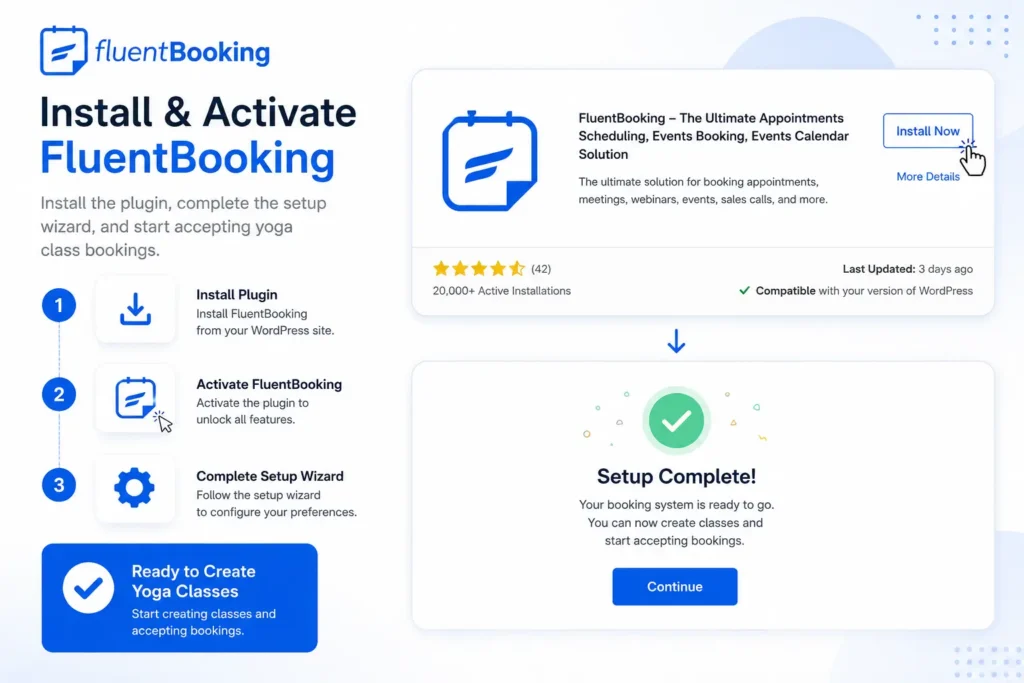
Once the setup is complete, you’re ready to create your yoga booking system.
Create Your Yoga Booking Event
In FluentBooking, events represent the yoga classes, workshops, or programs that students can book online.
To get started, navigate to the “+ New Event Type” section and choose Group or One-to-one event based on the type of yoga service you offer.
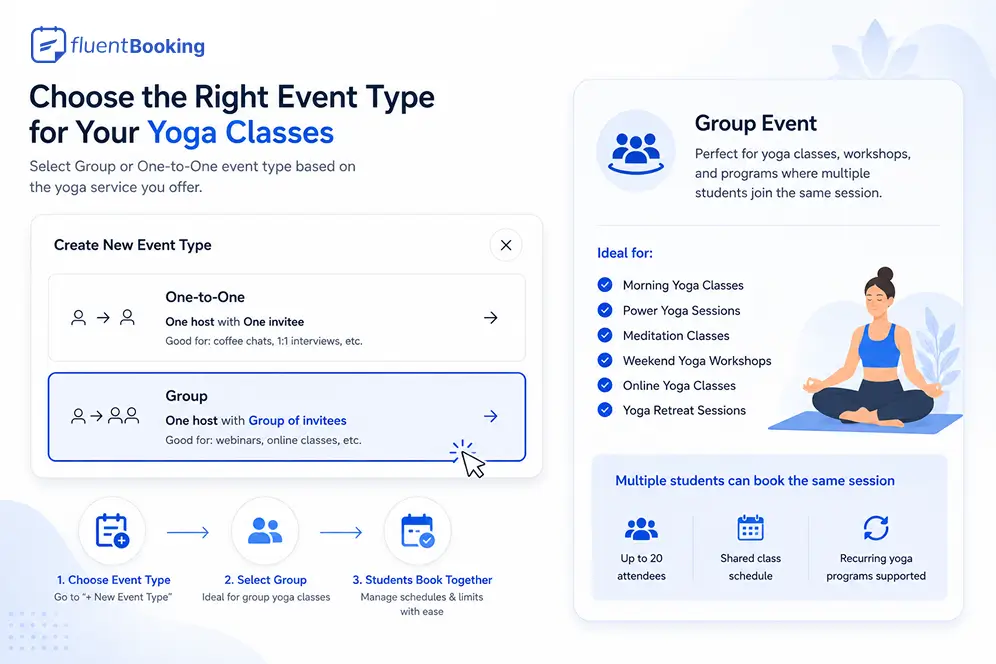
For regular yoga classes where multiple students attend the same session, choose a Group Event. This event type allows multiple participants to book the same time slot while giving you full control over attendee limits and class schedules.
Group Events are ideal for:
- Morning Yoga Classes
- Power Yoga Sessions
- Meditation Classes
- Weekend Yoga Workshops
- Online Yoga Classes
- Yoga Retreat Sessions
Add Your Class Details
Next, configure your yoga event by adding important information students need before booking. This will appear on your booking page and help students identify the session they want to join.
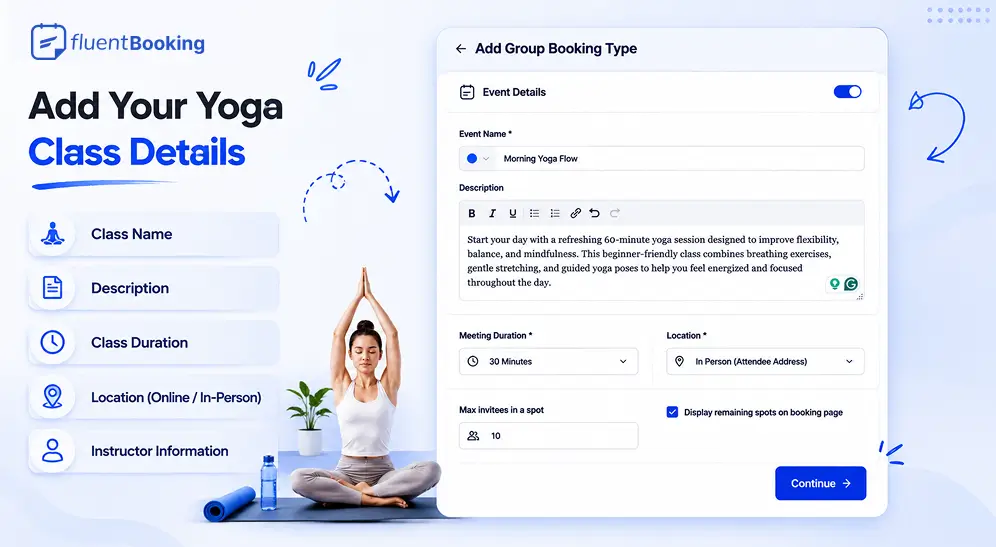
Configure your yoga event by adding:
- Class name
- Description
- Class duration
- Location (online or in-person)
- Instructor information
Providing clear and accurate class information helps students understand exactly what they’re booking and makes the registration process much smoother.
Configure Recurring Session
If you’re running a multi-session yoga program, such as an 8-Week Beginner Yoga Program or a Yoga Challenge, enable the Recurring Event option.
Recurring events allow students to book a series of classes at once instead of registering for each session individually.
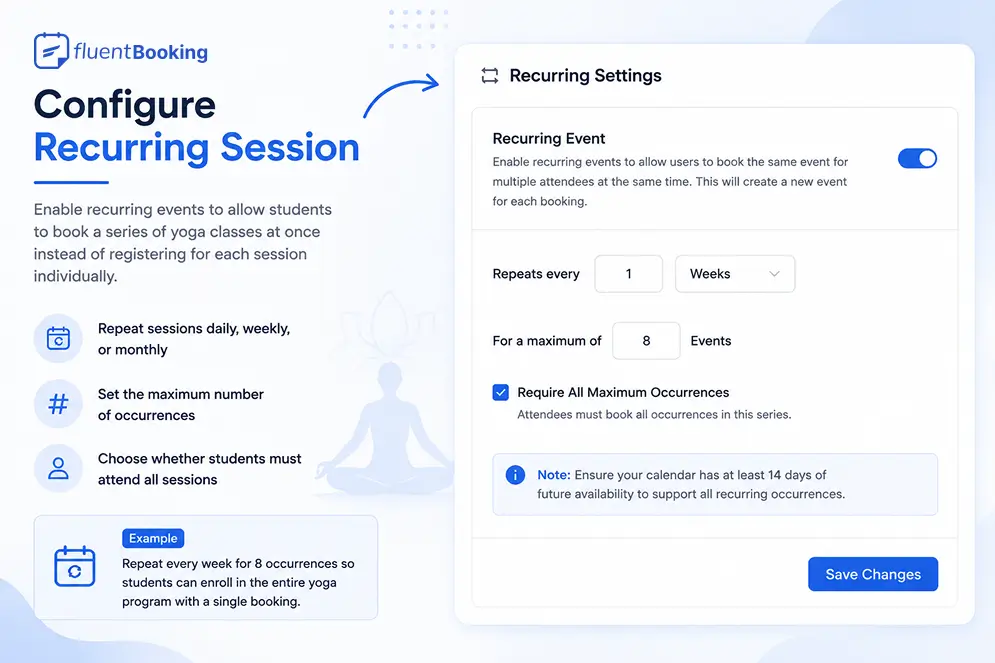
After enabling recurring events, configure:
- How often the sessions repeat (daily, weekly, or monthly)
- The maximum number of occurrences
- Whether students must attend all scheduled sessions
For example, you might set your yoga program to repeat every week for 8 occurrences, allowing students to enrol in the entire course with a single booking. Once you’ve configured the recurring schedule, click Save Changes to apply the settings.
If you’d like a deeper look at recurring bookings, read our complete guide on setting up recurring appointments in WordPress.
Configure Your Class Availability
Next, define when your yoga classes will be available for booking.
For Group Events, select the days and times students can book individual classes. For Recurring Events, configure the recurring schedule and session frequency.
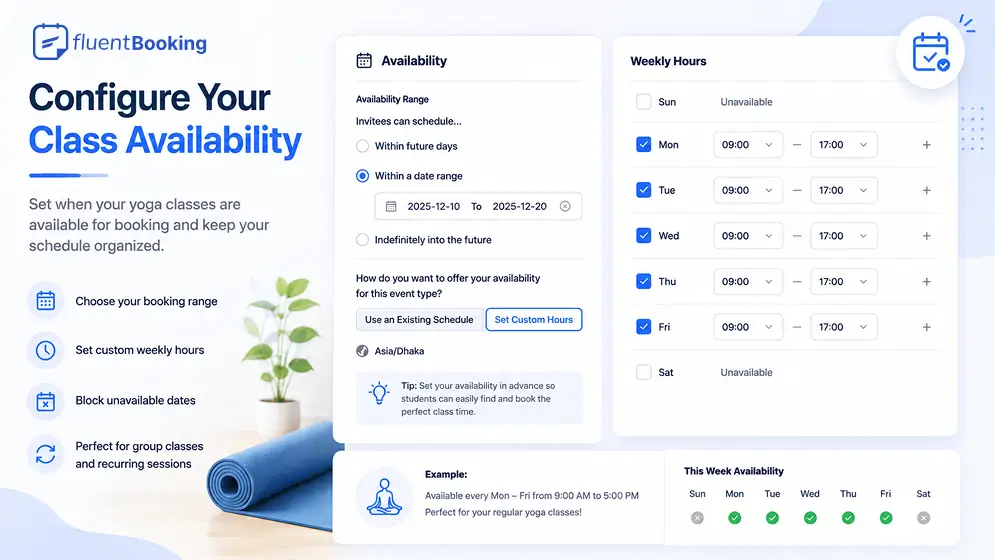
You can also block unavailable dates and add breaks between classes to keep your schedule organized and avoid booking conflicts.
Add Buffer Time Between Sessions and Booking Limits
To keep your schedule organized, you can add buffer time before or after each class. This gives you extra time for preparation, cleanup, breaks, or student consultations between sessions.
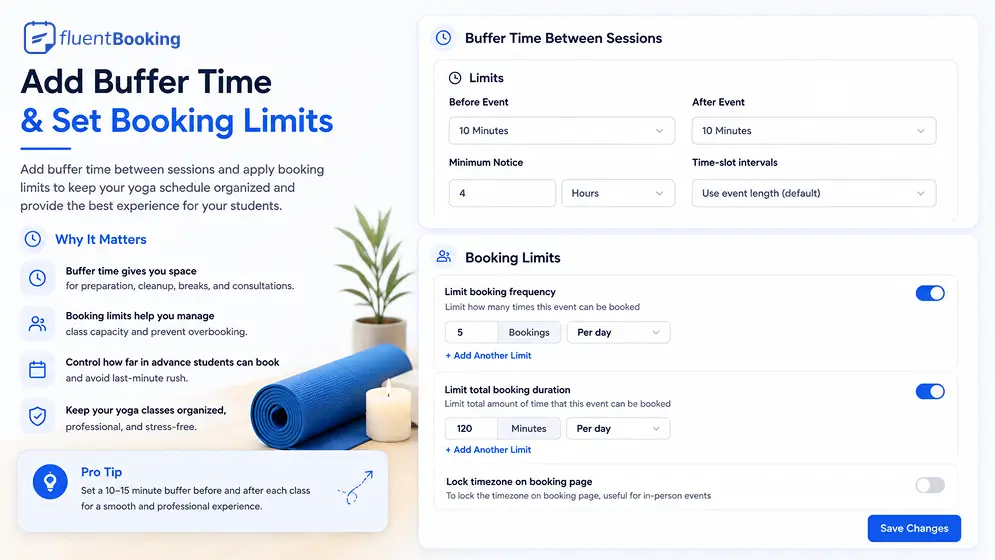
You can also limit booking frequency to control how students reserve their spots. For example, you can limit the number of attendees per class, restrict how far in advance students can book, or prevent last-minute registrations.
These settings help prevent overbooking, reduce scheduling conflicts, and create a smoother experience for both instructors and students.
Connect Your Calendar
Connecting your calendar helps keep your yoga schedule accurate and prevents booking conflicts. Once connected, the plugin can automatically sync your bookings and check your availability in real time.
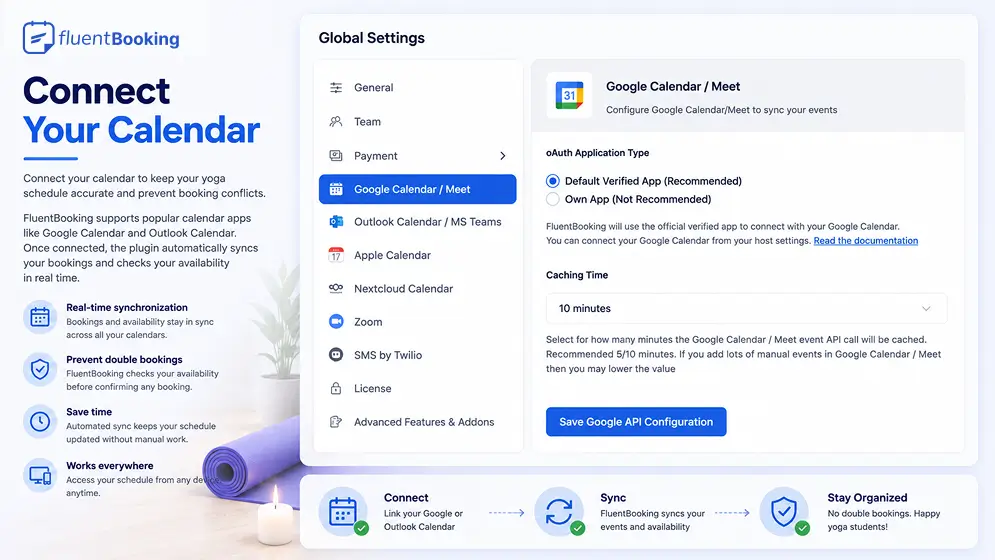
Calendar integration helps you:
- Prevent double bookings
- Keep your availability updated automatically
- Sync yoga classes with your personal calendar
- Manage all appointments from one place
This makes it easier to stay organized and ensures students only see available time slots when booking.
If you’re using Google Calendar for class management, you may also find our guide on Google Calendar tips for effective scheduling.
Set Up Automated Email and SMS Reminders
Automated notifications help students stay informed and reduce no-shows. You can customize and automate booking confirmations, reminder emails, cancellation notifications, rescheduling updates, and other event-related communications.
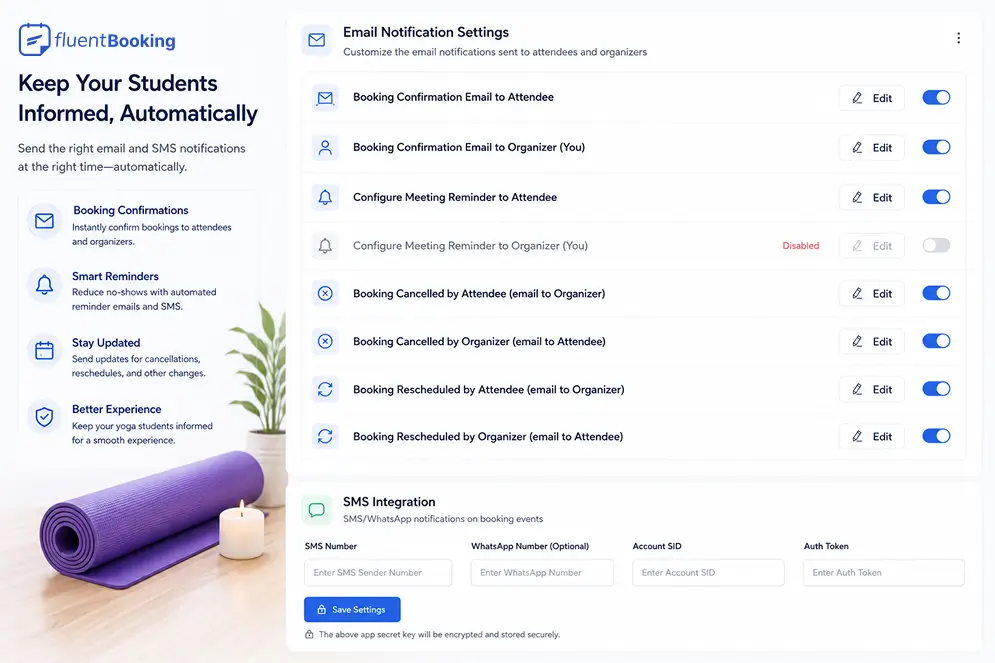
You can configure notifications for both attendees and organizers, ensuring everyone receives timely updates throughout the booking process.
These automated notifications save time, improve attendance, and help create a better experience for your yoga students.
Accept Online Payments
If you charge for yoga classes or programs, you can enable online payments during the booking process.
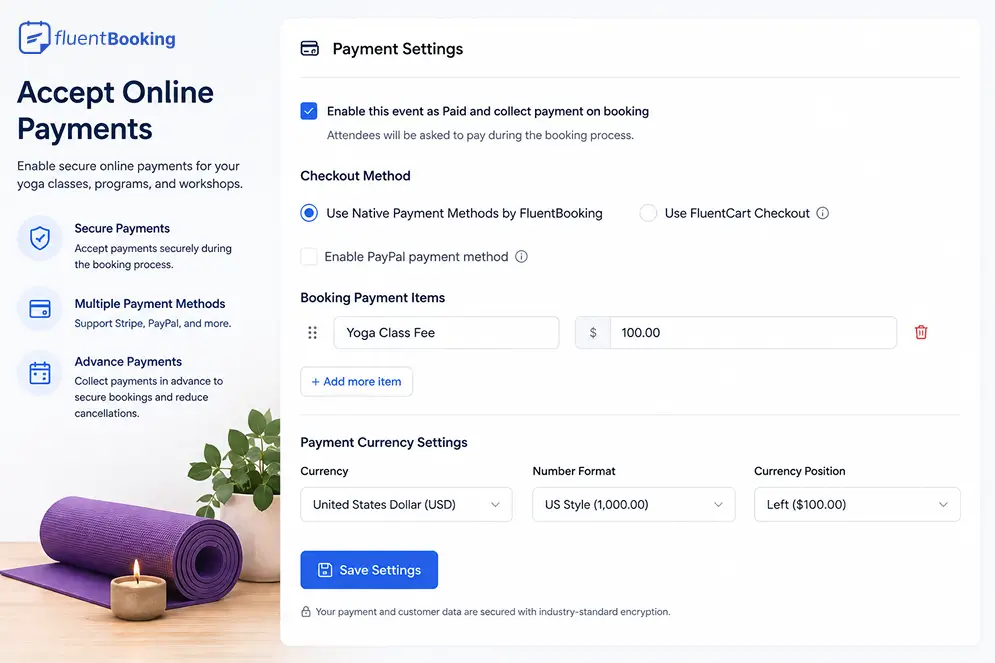
This works especially well for:
- Premium yoga classes
- Multi-week programs
- Workshops
- Private coaching sessions
Collecting payment in advance can help secure bookings and reduce cancellations.
Add the Booking Page to Your Website
After completing the setup, publish your booking page so students can start booking classes online.
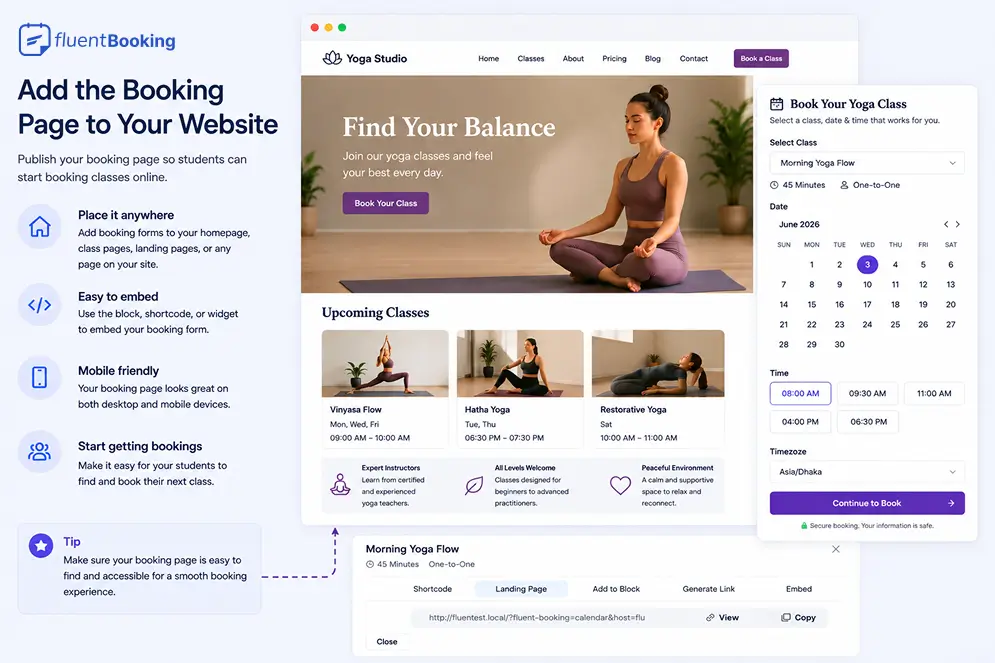
FluentBooking lets you embed booking forms anywhere on your WordPress website, including:
- Homepage sections
- Class pages
- Landing pages
- Dedicated booking pages
Make sure your booking page is easy to find and accessible on both desktop and mobile devices to provide a smooth booking experience for your students.
Test the Entire Booking Experience
Before making your booking page live, test the entire booking process to ensure everything works as expected.
Check:
- Class availability
- Capacity limits
- Confirmation emails
- Calendar synchronization
- Payment collection
- Mobile responsiveness
A smooth booking experience helps create a professional first impression and makes it easier for students to enrol in your yoga classes.
Ready to Simplify Yoga Class Bookings?
A well-organized booking system helps you manage classes more efficiently while creating a better experience for your students.
For regular drop-in classes, group bookings make it easy to manage attendance and class capacity. For structured programs, recurring sessions allow students to enroll once and attend a complete series of classes.
By automating scheduling, reminders, payments, and registrations, you can spend less time on administration and more time focusing on your students.
Frequently Asked Questions
Ratul Hasan Ripon
I enjoy making complex ideas simple and engaging through my writing and designs. With a strong knowledge on content writing and SEO, I create technical content that’s both easy to understand and interesting.
Table of Content
Subscribe To Get
WordPress Guides, Tips, and Tutorials
Add your first comment to this post