

FluentBooking 2.2.5: A Security Review, Signed Pro Updates and a New Look Coming


FluentBooking 2.2.5 is a security release first. We put both the free and Pro plugins through an external security review, fixed everything that came back, and made every Pro update prove it came from us before it can install. On top of that, your license page finally tells you what you need to know, and the settings that decide when people can book are easier to understand at a glance.
The headline changes: signed Pro updates that refuse to install if anything looks wrong, a rebuilt license screen, a new Event Types tab so you stop hunting for a calendar’s events, cancellation windows measured in days, and a first look at the redesigned interface we’re building. There are 38 changes in total, including a big round of admin speed-ups and 26 bug fixes.
A New Look Is on the Way
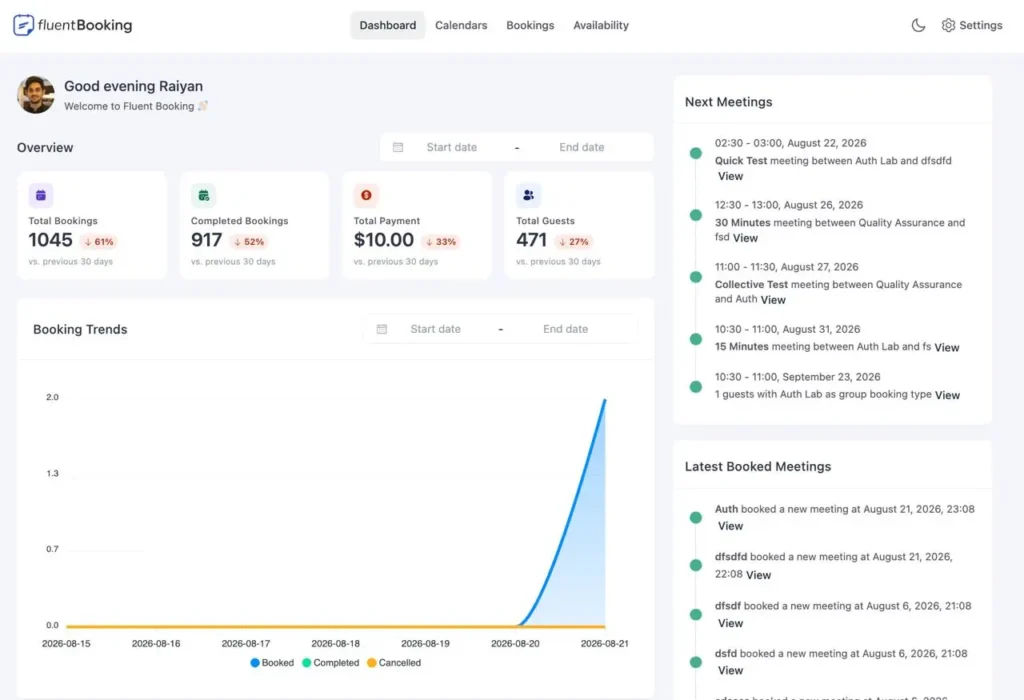
We’re rebuilding the FluentBooking interface, and the new dashboard is the first piece we can show you. It opens on the numbers you actually check: total bookings, completed bookings, payments, and guests — each compared against the previous 30 days, so you can see the direction at a glance instead of doing the math yourself.
Nothing in your setup changes today. Your calendars, event types, availability, and booking pages keep working exactly as they do now — when the redesign ships, it’s a visual refresh, not a migration. We’ll share more as it gets closer.
Security, Top to Bottom
Security is the biggest piece of work in this release, so it’s worth spelling out what changed rather than hiding it behind one changelog line.
An external review. We shared both the free and Pro plugins with Patchstack, the security team that maintains the vulnerability database used across the WordPress ecosystem. Everything they reported back has been fixed and is included in 2.2.5. Having outside researchers read the code finds the things a team stops seeing in its own work.
Who can see what. Booking, schedule, and team data is now scoped tightly to the host it belongs to, so nothing leaks between hosts on a shared site. A way of sidestepping REST permission checks by disguising the request method has been closed, and the Elementor integration’s handlers now require the right capability before they’ll answer.
Payments. PayPal notifications (pro) are now checked against the receiving merchant account and tied to the order they claim to be for, with a strict amount tolerance, and a transaction ID that’s already been used on another order is rejected outright — so a genuine notification can’t be replayed to mark a second booking paid. On the Stripe side, payment intent IDs are validated before use, and a refund webhook can no longer flip a booking back to paid.
Connecting accounts. The Stripe, Google Calendar, and Outlook connect flows are now bound to the browser session that started them, using a single-use token instead of a guessable value. That closes a path where someone could get a privileged user to load a callback and quietly attach an attacker’s account — and with it, redirect where booking payments land.
Updates and licensing. Responses from the licensing server are now sanitized and type-checked before anything is stored or used, so a malformed or hostile reply can’t take down the admin. And updates themselves are signed — which deserves its own section.
Every Pro Update Is Now Signed and Verified
FluentBooking Pro (pro) updates now carry a digital signature created with a key that never touches our servers. Before WordPress installs an update, your site checks that signature and confirms the downloaded file is byte-for-byte the package we built.
If anything doesn’t line up — a package we didn’t build, a file altered in transit, a response that doesn’t match its signature — the update stops and tells you why instead of installing. If your server can’t check signatures at all, it says so plainly rather than quietly skipping the check.
You don’t have to do anything to turn this on. It protects the moment your site is most exposed: the second it downloads and runs new code.
See Your License at a Glance
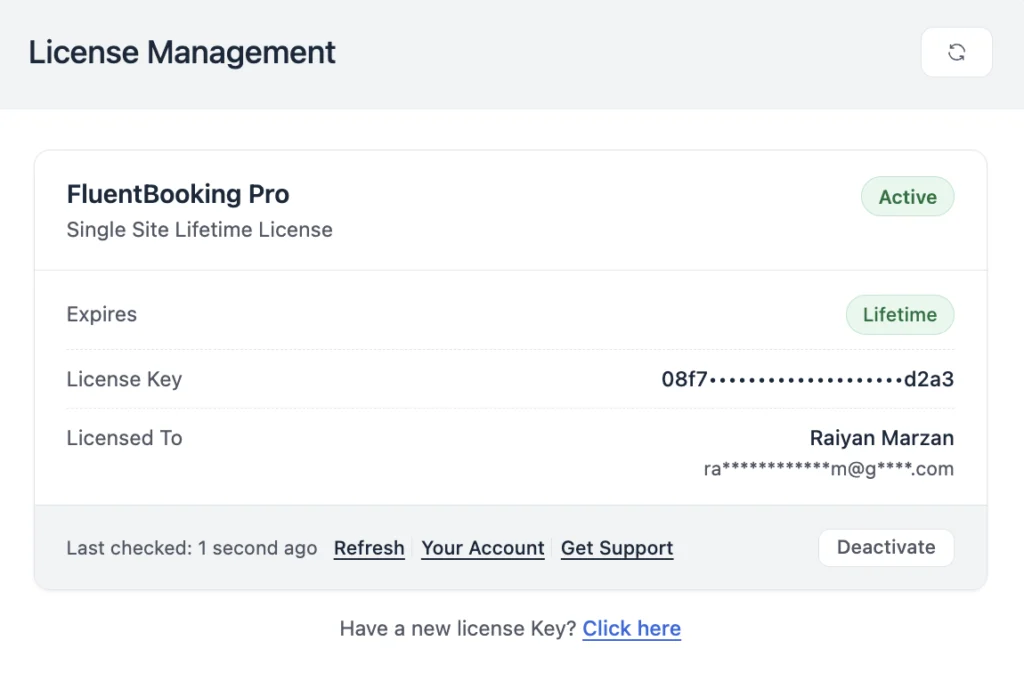
The license screen (pro) has been rebuilt around the questions you actually ask: is this active, when does it expire, and what do I do about it? You get the status, the expiry date, how many days are left, who the license belongs to, and direct links to your account and support.
If a license lapses, you’ll see the grace period clearly instead of a sudden dead end. If our licensing server can’t be reached, the page shows your stored license details and says what went wrong, rather than looking like your license failed.
Every control on the screen can now be reached by keyboard, and the license notice shows up in the frontend booking portal too — not just inside wp-admin.
Find a Calendar’s Events Without Hunting
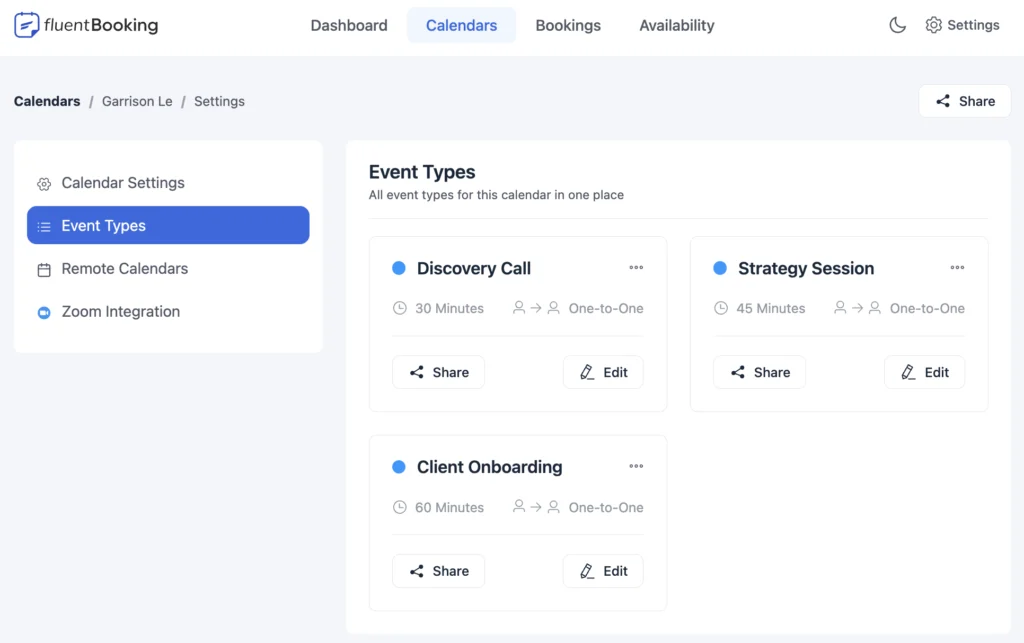
Host and team settings now have an Event Types tab, right after Calendar Settings. It lists every event on that calendar as a card, so you can jump straight to the one you want instead of going back to the Booking Types page to look for it.
The cards are the same ones you already know, so edit, share, enable or disable, clone, and delete all work right there. The settings area also stretches to full width on smaller screens, so there’s no wasted space on a laptop or tablet.
Set Cancellation Windows in Days
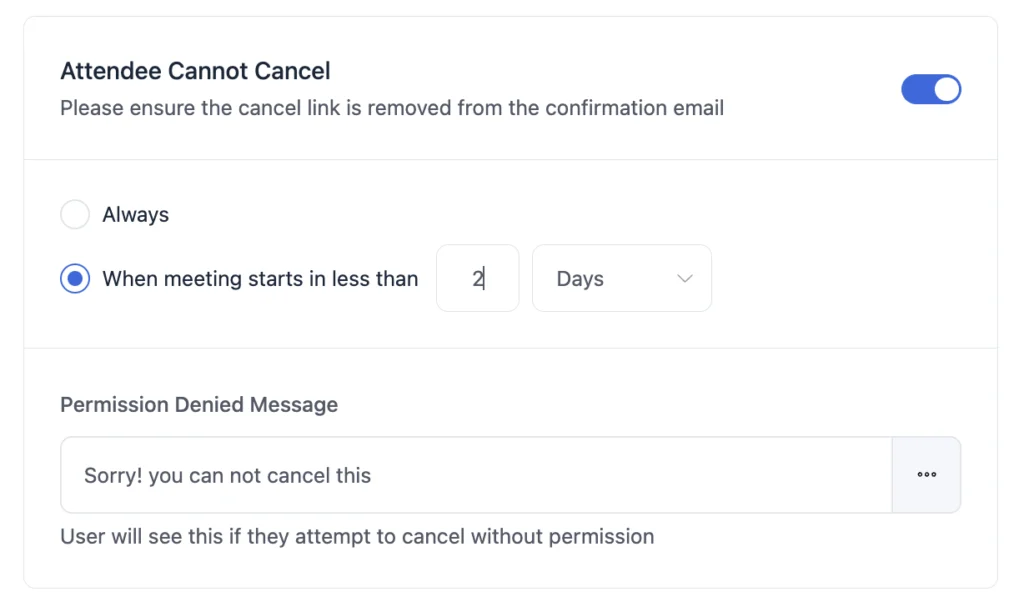
Cancellation, reschedule, and confirmation cutoffs used to offer only minutes or hours, and hours stopped at 24. That made a normal policy like “clients can’t cancel within 2 days of the appointment” impossible to set.
Days is now an option for all three, with a consistent 30-day ceiling across every unit. And if you type a value that’s out of range, you get an inline warning and the save is blocked — instead of the old behavior, where the number was silently changed behind your back.
Know What Each Limit Does
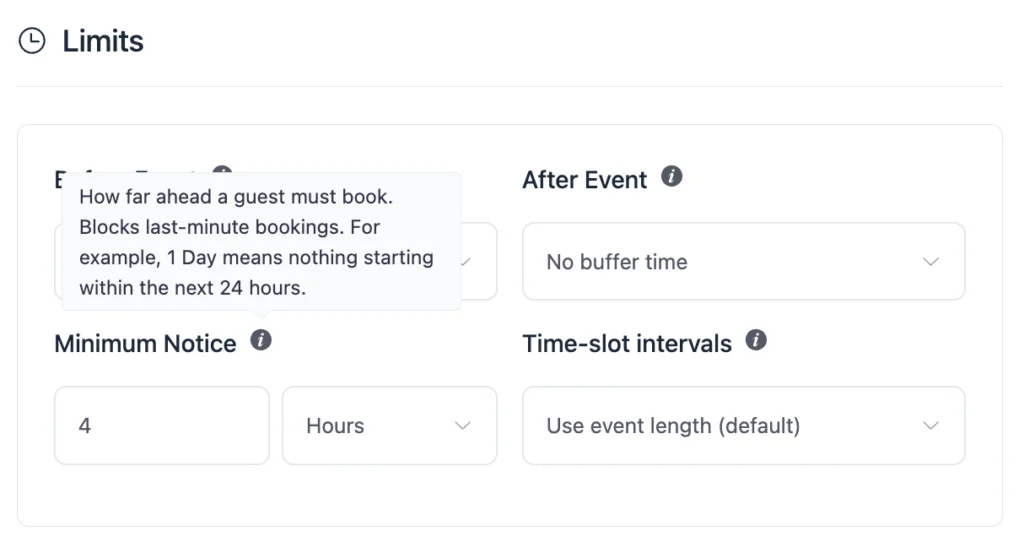
The Limits settings are powerful, but the field names alone never explained much. Before Event, After Event, Minimum Notice, and Time-slot intervals now each have a help tooltip that says what the field does in plain language.
The tooltip buttons are keyboard-reachable and properly labeled for screen readers, so everyone on your team can get to the help — not just people using a mouse.
More Client Context While You Work
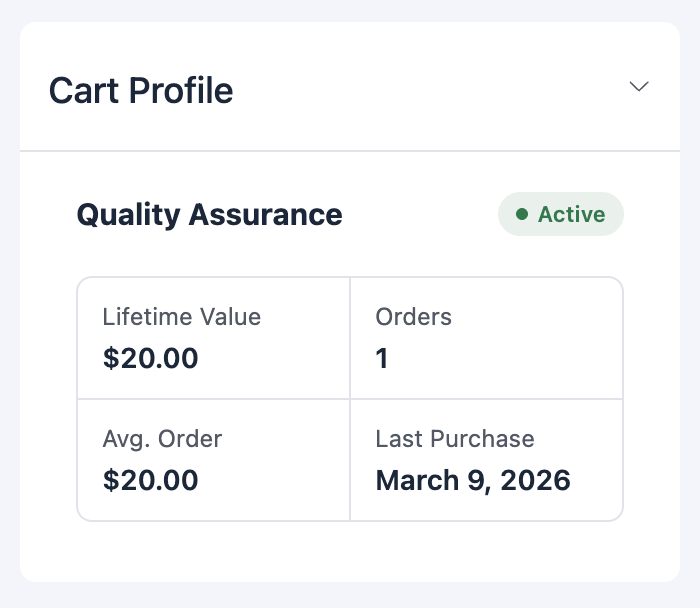
If you use FluentCart, booking details now show a cart profile in the sidebar: lifetime value, order count, average order, and last purchase. You can see whether you’re talking to a first-time enquiry or your best customer before the call starts.
The booking activity log and the sidebar widgets can now be collapsed, so a long booking record stays readable and you can hide the parts you don’t need.
In FluentCRM feeds, you can create a tag or list inline while setting the feed up, instead of leaving to FluentCRM and coming back. Blank names are rejected up front, so you can’t create an unnamed tag by accident.
A Faster, Cleaner Admin
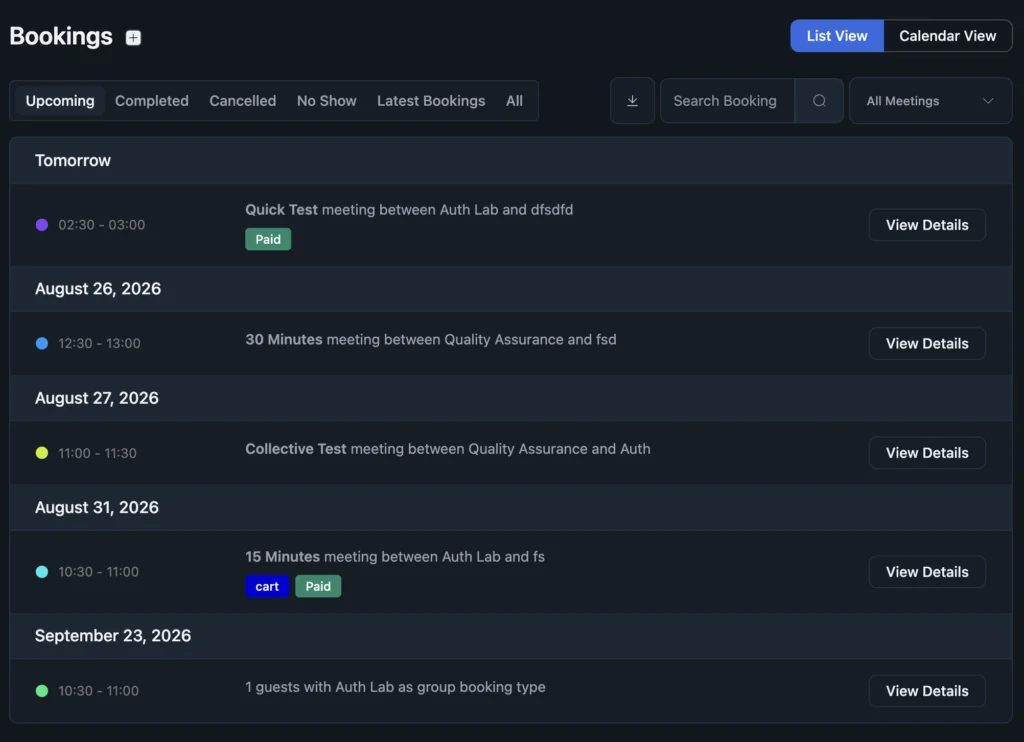
Booking and host lists used to run one extra database query per row for things like host details and avatars. Those lookups are now batched, so pages with a lot of bookings load noticeably faster — and the effect grows with the size of your calendar.
Background cleanup jobs — expiring old pending bookings and clearing abandoned slot reservations — now run in bounded batches. Busy sites get steady, predictable background work instead of occasional heavy spikes.
Dark mode and light mode both got a proper color pass, with better contrast across the admin. Booking status badges now use distinct colors, so you can tell pending from confirmed from cancelled without reading every label.
Bug Fixes and Stability
Booking pages. An event still pointing at a deleted schedule made the availability endpoint fail, so the booking calendar showed an error instead of open times — it now falls back to the event’s own schedule. A negative minimum notice could open slots in the past. Phone number validation was updated with new area codes. The booking form no longer jumps the page on load, and its fields are properly labeled and reachable by keyboard and screen reader.
Calendars and notifications. Microsoft Teams join links were missing from booking notifications (pro). Meeting URLs were being stripped out of Twilio SMS messages, and reschedule texts could go to the wrong recipient (pro). Outlook activity log entries were labeled the wrong way round (pro). Meeting times on the CRM card showed in UTC instead of your timezone.
Payments and integrations. Calendar integration feeds hit a fatal error when loaded or disconnected (pro). Turning off multiple-booking silently discarded an event’s recurring settings (pro). Webhook feeds warned on save and logged send failures without a reason (pro). A duplicate payment settings route is no longer registered when Pro is active.
Block editor. FluentBooking blocks were missing their styles inside the editor canvas, and the editor block was making the same event request twice. Switching between integration and webhook editors with browser history no longer leaves stale settings on screen.
Everyday polish. Dark mode contrast was fixed across modals, badges, and payment notices. The bookings toolbar no longer overflows on tablet widths, and the export button no longer stretches down the page on iOS. Date formats using escaped characters render correctly again. Deactivating the plugin no longer shows an error that a page refresh immediately hides, and a stray “user not found” warning is gone.
What’s Coming Next
The redesign above is the big one, and it’s where most of our design time is going right now. The dashboard is the first screen finished; the rest of the interface follows it.
Alongside it, we’re continuing the speed-up work across the busiest screens, extending the accessibility pass beyond the booking form and limit settings, and bringing dark mode to a consistent finish everywhere. The security work carries on too — external review is something we intend to keep doing, not a one-off for this release.
If there’s something you’d like to see, tell us — a lot of what shipped in 2.2.5 started as a support conversation.
Wrapping Up
FluentBooking 2.2.5 closes out an external security review, signs every Pro update, and tightens who can see what across bookings, schedules, and teams. Add a rebuilt license screen, clearer booking settings, a faster admin, and 26 bug fixes — and everyday scheduling is both safer and smoother.
Update FluentBooking whenever you’re ready — from Plugins in your WordPress dashboard, or from your account. The full list of changes is below.
FluentBooking 2.2.5
- Added: Days Unit for Booking Cutoff Limits
- Added: Cart Profile Widget in Booking Details Sidebar
- Added: Inline Tag and List Creation in CRM Feed Editor
- Added: Collapsible Booking Activity and Sidebar Widgets
- Added: Event Types Tab in Host and Team Settings
- Added: Help Tooltips for Event Limit Settings
- Improved: License Management Screen and Keyboard Access
- Improved: Dark and Light Mode Color Palette and Contrast
- Improved: Distinct Status Badge Colors in Bookings
- Improved: Booking and Host Queries Batched to Remove N+1 Lookups
- Improved: Bounded Auto-Expire and Reservation Cleanup Batches
- Security: Hardened Access Control, Payment Webhooks and Verification
- Fixed: Availability Endpoint Returning a Fatal Error
- Fixed: Negative Minimum Notice Opening Past Slots
- Fixed: Meeting Time Shown in UTC on CRM Card
- Fixed: Booking Form Auto-Focus Scroll Jump on Load
- Fixed: Keyboard Access and Screen Reader Names on Booking Form
- Fixed: FluentBooking Blocks Missing Styles in the Editor
- Fixed: Duplicate Event API Call in Editor Block
- Fixed: Dark Mode Contrast Across Modals, Badges and Notices
- Fixed: Bookings Toolbar Overflow on Tablet Widths
- Fixed: Export Button Stretching to Page Height on iOS
- Fixed: Escaped Literals in Date Format Conversion
- Fixed: Phone Number Validation and New Area Codes
- Fixed: Deactivation Error Cleared by the Refresh Behind It
- Fixed: User Not Found Warning in Availability Service
- Fixed: Stale Editor State and Provider Mismatch on History Navigation
- Fixed: Empty Slug Accepted When Creating CRM Tag or List
- Fixed: Duplicate Payment Settings Route When Pro Is Active
- Fixed: Booking Eligibility Re-Applied on Scheduler Mutations
- Fixed: Location and Extra Info Accessors on Non-Array Input
- Fixed: Microsoft Teams Join Link Missing in Booking Notifications
- Fixed: Meeting URL Stripped From Twilio SMS
- Fixed: Twilio Reschedule SMS Recipient Mapping
- Fixed: Reversed Outlook Activity Log Types
- Fixed: Integration Feed Routes Fatal Error on Load and Disconnect
- Fixed: Recurring Config Lost When Disabling Multiple-Booking
- Fixed: Webhook Feed Save Warning and Transport Error Logging
Shahjahan Jewel
Hello, this is Jewel, CEO & Head of Ideas at WPManageNinja. I am obsessed with WordPress since 2009. My aim is to be a user-centric developer first, and a serial entrepreneur second. You will find me discussing various tech issues and trying to come up with scalable solutions on different forums when I am not busy coding.
Table of Content
Subscribe To Get
WordPress Guides, Tips, and Tutorials


Add your first comment to this post